
AR Sketch & Draw: Trace
Est Gamers Art & Design Contains ads
Trace photos with AR, sketch, draw, paint and create amazing artwork.
- Downloads
- 7.2K+
- on Google Play
- Price
- Free
- No in-app purchases
- Updated
- Jul 12
- 2026 · v1.0
Screenshots


About AR Sketch & Draw: Trace
Turn your favorite photos into beautiful sketches with AR Sketch & Draw: Trace! Whether you're a beginner learning to draw or an experienced artist looking for a faster way to create amazing artwork, our powerful AR tracing technology helps you sketch with confidence.
Project images onto paper using your camera, trace outlines with precision, and transform ordinary photos into stunning hand-drawn masterpieces. Practice your drawing skills, create realistic sketches, and bring your imagination to life.
✨ Key Features
🎨 AR Image Tracing
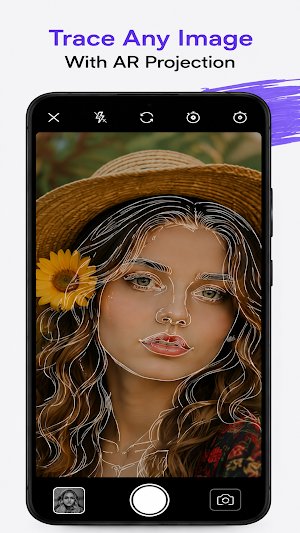
Project any image onto paper using augmented reality and trace it accurately.
🖼 Trace Any Photo
Import images from your gallery or capture a new one using your camera.
✏️ Easy Sketch Creation
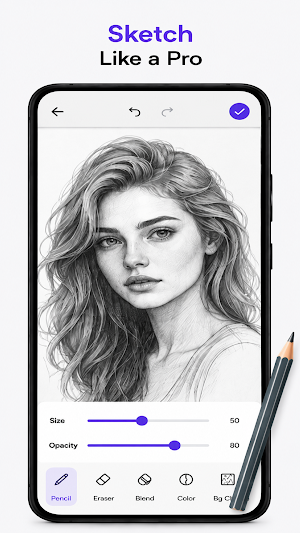
Convert photos into sketch outlines for easier tracing and drawing.
📷 Live Camera Projection
Keep your phone steady while drawing with a transparent AR overlay.
🔒 Lock Image Position
Lock the projected image to prevent accidental movement while tracing.
🎛 Adjust Opacity & Brightness
Customize transparency and brightness for the perfect tracing experience.
🖌 Multiple Sketch Categories
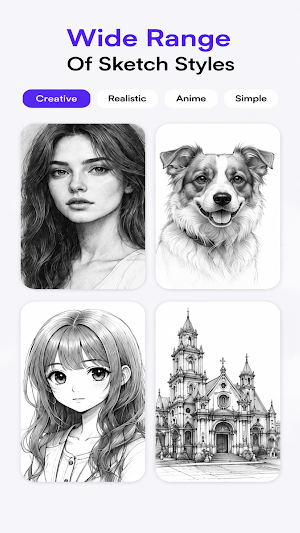
Explore a growing collection of drawings including:
• Animals
• Anime
• Nature
• Flowers
• Portraits
• Vehicles
• Architecture
• Cartoons
• Fashion
• Food
• Mandalas
• More coming soon
📱 Simple & Beautiful Interface
Designed for beginners and professionals with an intuitive user experience.
💾 Save & Share
Save your finished artwork and share it with friends and family.
________________________________________
Perfect For
✔ Beginners learning how to draw
✔ Artists improving sketch accuracy
✔ Students practicing drawing techniques
✔ Hobbyists creating unique artwork
✔ Anyone who loves sketching and painting
________________________________________
Why Choose AR Sketch & Draw?
Unlike traditional drawing apps, AR Sketch & Draw lets you project your image directly onto paper, making it easier to learn proportions, outlines, and details. Practice every day and watch your artistic skills improve faster.
Whether you're drawing portraits, pets, landscapes, anime characters, flowers, or custom photos, AR tracing makes creating beautiful artwork simple and enjoyable.
________________________________________
Main Features
• AR Drawing
• AR Sketch Projection
• Image Tracing
• Photo to Sketch
• Camera Tracing
• Sketch Drawing
• Easy Drawing Tutorials
• Adjustable Transparency
• Lock Projection
• Save Artwork
• Share Drawings
• Modern & Fast Performance
________________________________________
Download AR Sketch & Draw: Trace today and discover an easier, smarter way to create amazing sketches and artwork with augmented reality!
Start tracing. Start drawing. Start creating.
Project images onto paper using your camera, trace outlines with precision, and transform ordinary photos into stunning hand-drawn masterpieces. Practice your drawing skills, create realistic sketches, and bring your imagination to life.
✨ Key Features
🎨 AR Image Tracing
Project any image onto paper using augmented reality and trace it accurately.
🖼 Trace Any Photo
Import images from your gallery or capture a new one using your camera.
✏️ Easy Sketch Creation
Convert photos into sketch outlines for easier tracing and drawing.
📷 Live Camera Projection
Keep your phone steady while drawing with a transparent AR overlay.
🔒 Lock Image Position
Lock the projected image to prevent accidental movement while tracing.
🎛 Adjust Opacity & Brightness
Customize transparency and brightness for the perfect tracing experience.
🖌 Multiple Sketch Categories
Explore a growing collection of drawings including:
• Animals
• Anime
• Nature
• Flowers
• Portraits
• Vehicles
• Architecture
• Cartoons
• Fashion
• Food
• Mandalas
• More coming soon
📱 Simple & Beautiful Interface
Designed for beginners and professionals with an intuitive user experience.
💾 Save & Share
Save your finished artwork and share it with friends and family.
________________________________________
Perfect For
✔ Beginners learning how to draw
✔ Artists improving sketch accuracy
✔ Students practicing drawing techniques
✔ Hobbyists creating unique artwork
✔ Anyone who loves sketching and painting
________________________________________
Why Choose AR Sketch & Draw?
Unlike traditional drawing apps, AR Sketch & Draw lets you project your image directly onto paper, making it easier to learn proportions, outlines, and details. Practice every day and watch your artistic skills improve faster.
Whether you're drawing portraits, pets, landscapes, anime characters, flowers, or custom photos, AR tracing makes creating beautiful artwork simple and enjoyable.
________________________________________
Main Features
• AR Drawing
• AR Sketch Projection
• Image Tracing
• Photo to Sketch
• Camera Tracing
• Sketch Drawing
• Easy Drawing Tutorials
• Adjustable Transparency
• Lock Projection
• Save Artwork
• Share Drawings
• Modern & Fast Performance
________________________________________
Download AR Sketch & Draw: Trace today and discover an easier, smarter way to create amazing sketches and artwork with augmented reality!
Start tracing. Start drawing. Start creating.
Alternatives to AR Sketch & Draw: Trace
Looking for apps like AR Sketch & Draw: Trace? Here are 6 similar Android apps on Google Play. The highest rated is Laser Files: DXF SVG Designs (5.0/5), and all 6 are free to download.
-
Football Magic: AI Photo FX 3.6
-
Job Pictures
-
Laser Files: DXF SVG Designs 5.0
-
NoveToon
-
Solartist - AI Video Generator
-
Cute Buddha Statue
| App | Rating | Price | Installs | Last updated | Compare |
|---|---|---|---|---|---|
| AR Sketch & Draw: Trace | – | Free | 5,000+ | Jul 12, 2026 | |
| Football Magic: AI Photo FX | 3.6 / 5 | Free | 1,000+ | Jun 15, 2026 | Compare |
| Job Pictures | – | Free | 1+ | Jun 21, 2026 | Compare |
| Laser Files: DXF SVG Designs | 5.0 / 5 | Free | 1,000+ | May 31, 2026 | Compare |
| NoveToon | – | Free | 1,000+ | Jul 24, 2026 | Compare |
| Solartist - AI Video Generator | – | Free | 1,000+ | Jun 3, 2026 | Compare |
| Cute Buddha Statue | – | Free | 10+ | Mar 10, 2026 | Compare |
Similar apps on Google Play
- Football Magic: AI Photo FX
- Job Pictures
- Laser Files: DXF SVG Designs
- NoveToon
- Solartist - AI Video Generator
- Cute Buddha Statue
- Esports Gaming Logo Maker
- AR Drawing - SketchBook Maker
- VidZ : AI Video Maker
- Notepad
- Zipper Lock Screen Customizer
- Movify: AI Video Generator
- Digen: AI Video Generator
- mAI: 3D Model Generator
- Kleki
- Offline AI Image Generator
- Ar Tattoo Drawing
- Cartoonify: AI Photo Editor
- Oflep Create Poster
- Football Logo Maker : Soccer
- Roblox Clothing Hub
- Goth Stickers
- Bead Art Coloring
- AuroraVID: AI Photo & Video
- Mosaic Overlay Crochet