
Ar Draw Studio: Sketch & Trace
Art & Design In-app purchases Contains ads
Ar Draw Studio: Sketch & Trace, Unleash your creativity! Paint with AR Drawing
- Downloads
- 100+
- on Google Play
- Price
- Free
- In-app purchases
- Updated
- Feb 28
- 2024 · v1.0
Screenshots
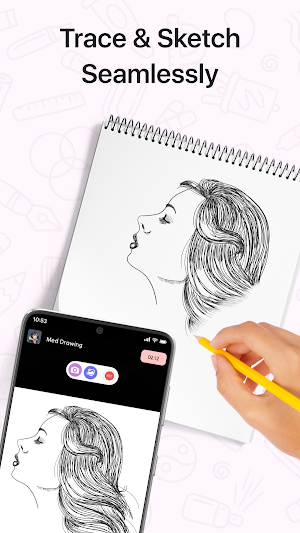
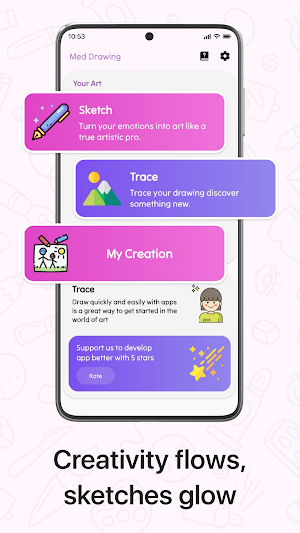
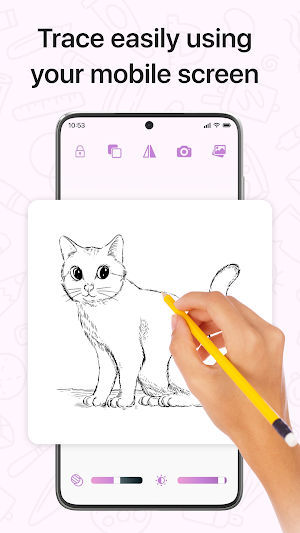


About Ar Draw Studio: Sketch & Trace
Discover the world of Ar Draw Studio: Sketch & Trace, a cutting-edge application revolutionizing digital art creation. This innovative tool combines augmented reality technology with intuitive sketching features to unleash your creativity like never before. With AR Draw Sketch, users can seamlessly paint, sketch, and trace in a virtual environment that blurs the lines between imagination and reality. Whether you're an aspiring artist or a seasoned pro, this app offers endless possibilities for artistic expression and experimentation.
Elevate your artistry to new heights with AR Studio: Draw Sketch & Trace and unlock a realm where innovation meets inspiration. Immerse yourself in a digital canvas where every stroke comes to life with unparalleled realism and precision. Unleash your imagination and bring your creative visions to fruition with this groundbreaking app.
What is AR Draw Sketch and how does it work?
AR Draw Sketch is a mobile app that utilizes augmented reality technology to allow users to draw, paint, and trace digitally. By superimposing virtual images onto the real world through the device's camera, users can create artwork in a more interactive way.
❤️🔥 Understanding AR Drawing Technology
AR drawing technology merges virtual reality with real-world surroundings, creating an immersive experience. Users can interact with digital elements while being in a physical environment. This integration enhances creativity by allowing artists to blend the virtual and real worlds seamlessly.
💡 Tips for Beginners in AR Drawing
Begin your AR draw sketch: paint & trace journey by mastering basic shapes like circles, squares, and triangles. These simple elements serve as the building blocks for more intricate drawings. For instance, a circle can be the base for drawing a face or a sun.
Progressing to Complex Subjects
Once you have mastered basic shapes, challenge yourself by progressing to more complex subjects such as animals, landscapes, or even human figures. Use the foundational knowledge of basic shapes as a guide when tackling these advanced drawings.
Is sharing artwork created on AR Draw Sketch easy on social media platforms?
Absolutely! AR Draw Sketch allows seamless sharing of your creations directly from the app to popular social media channels like Instagram or Facebook. Share your art with friends or followers effortlessly and showcase your talent online.
Features of AR Drawing: Sketch & Trace:
🎨 Edge Enhancer: Elevate your artwork with precision using the Edge Enhancer tool.
🎨 Contrast Booster: Enhance tonal range for vibrant hues and pronounced shadows and highlights.
🎨 Noise Reduction: Say goodbye to unwanted distractions with our Noise Reduction feature.
🎨 Sharpness Enhancer: Enhance clarity and crispness in your drawings.
🎨 Opacity Adjustment: Tailor the transparency of your elements with the Opacity tool. Whether blending layers or creating striking contrasts.
🎨 Bitmap Conversion: Seamlessly transition your artwork to bitmap format with the Convert To Bitmap feature. Transform vector graphics into raster images for precise editing.
🎨 Instantly trace and sketch images captured from your camera or photo gallery with ease.
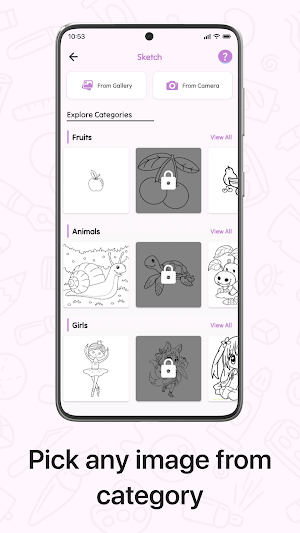
🎨 Explore a wide variety of tracing templates covering diverse subjects such as Animals, Nature, Food, Anime, and more!
🎨 Enhance your sketches with a multitude of options, allowing you to craft complete photo drawings with precision and creativity.
🎨 Create dynamic video clips illustrating the sketching and painting processes, providing an immersive glimpse into the artistry behind each stroke and color selection.
Whether you're a seasoned artist or a beginner, our app is your perfect companion for unleashing creativity and discovering new artistic realms. Don't wait any longer – dive into the world of AR Drawing: Paint & Sketch today and begin crafting your own masterpieces! Download now and let your imagination soar 🚀.
Elevate your artistry to new heights with AR Studio: Draw Sketch & Trace and unlock a realm where innovation meets inspiration. Immerse yourself in a digital canvas where every stroke comes to life with unparalleled realism and precision. Unleash your imagination and bring your creative visions to fruition with this groundbreaking app.
What is AR Draw Sketch and how does it work?
AR Draw Sketch is a mobile app that utilizes augmented reality technology to allow users to draw, paint, and trace digitally. By superimposing virtual images onto the real world through the device's camera, users can create artwork in a more interactive way.
❤️🔥 Understanding AR Drawing Technology
AR drawing technology merges virtual reality with real-world surroundings, creating an immersive experience. Users can interact with digital elements while being in a physical environment. This integration enhances creativity by allowing artists to blend the virtual and real worlds seamlessly.
💡 Tips for Beginners in AR Drawing
Begin your AR draw sketch: paint & trace journey by mastering basic shapes like circles, squares, and triangles. These simple elements serve as the building blocks for more intricate drawings. For instance, a circle can be the base for drawing a face or a sun.
Progressing to Complex Subjects
Once you have mastered basic shapes, challenge yourself by progressing to more complex subjects such as animals, landscapes, or even human figures. Use the foundational knowledge of basic shapes as a guide when tackling these advanced drawings.
Is sharing artwork created on AR Draw Sketch easy on social media platforms?
Absolutely! AR Draw Sketch allows seamless sharing of your creations directly from the app to popular social media channels like Instagram or Facebook. Share your art with friends or followers effortlessly and showcase your talent online.
Features of AR Drawing: Sketch & Trace:
🎨 Edge Enhancer: Elevate your artwork with precision using the Edge Enhancer tool.
🎨 Contrast Booster: Enhance tonal range for vibrant hues and pronounced shadows and highlights.
🎨 Noise Reduction: Say goodbye to unwanted distractions with our Noise Reduction feature.
🎨 Sharpness Enhancer: Enhance clarity and crispness in your drawings.
🎨 Opacity Adjustment: Tailor the transparency of your elements with the Opacity tool. Whether blending layers or creating striking contrasts.
🎨 Bitmap Conversion: Seamlessly transition your artwork to bitmap format with the Convert To Bitmap feature. Transform vector graphics into raster images for precise editing.
🎨 Instantly trace and sketch images captured from your camera or photo gallery with ease.
🎨 Explore a wide variety of tracing templates covering diverse subjects such as Animals, Nature, Food, Anime, and more!
🎨 Enhance your sketches with a multitude of options, allowing you to craft complete photo drawings with precision and creativity.
🎨 Create dynamic video clips illustrating the sketching and painting processes, providing an immersive glimpse into the artistry behind each stroke and color selection.
Whether you're a seasoned artist or a beginner, our app is your perfect companion for unleashing creativity and discovering new artistic realms. Don't wait any longer – dive into the world of AR Drawing: Paint & Sketch today and begin crafting your own masterpieces! Download now and let your imagination soar 🚀.
What’s new
Version 1.0 · Updated February 28, 2024
Fix Bugs
Alternatives to Ar Draw Studio: Sketch & Trace
Looking for apps like Ar Draw Studio: Sketch & Trace? Here are 6 similar Android apps on Google Play. The highest rated is Logo maker For Gym & Fitness (5.0/5), and all 6 are free to download.
-
Snooker Logo Maker : Billiard 4.6
-
Logo maker For Gym & Fitness 5.0
-
Computer Logo Maker - Creator 5.0
-
Baby Forck Ideas
-
Esports Gaming Logo Maker 5.0
-
Font Style - Lettering Design
| App | Rating | Price | Installs | Last updated | Compare |
|---|---|---|---|---|---|
| Ar Draw Studio: Sketch & Trace | – | Free | 100+ | Feb 28, 2024 | |
| Snooker Logo Maker : Billiard | 4.6 / 5 | Free | 1,000+ | Aug 7, 2025 | Compare |
| Logo maker For Gym & Fitness | 5.0 / 5 | Free | 10+ | Feb 9, 2024 | Compare |
| Computer Logo Maker - Creator | 5.0 / 5 | Free | 1,000+ | Aug 15, 2025 | Compare |
| Baby Forck Ideas | – | Free | 5+ | Feb 28, 2024 | Compare |
| Esports Gaming Logo Maker | 5.0 / 5 | Free | 100+ | Feb 28, 2024 | Compare |
| Font Style - Lettering Design | – | Free | 50,000+ | – | Compare |
Similar apps on Google Play
- Snooker Logo Maker : Billiard
- Logo maker For Gym & Fitness
- Computer Logo Maker - Creator
- Baby Forck Ideas
- Esports Gaming Logo Maker
- Font Style - Lettering Design
- Elephant Coloring Book
- Inspirational Quote Wallpapers
- JobPost: Job Post Design
- ImageFy - Image Search
- Kawaii Fox Coloring Book
- Ruby ルビーのお守り
- AR Draw to Sketch Photo
- Girls Kurti Sleeves Designs
- BrandMist:Digital Poster Maker
- My Stability AI Art
- Technology Logo Maker-Creator
- Car Logo Maker - Logo Designer
- Cats color: color by number
- Volleyball Logo Maker - Design
- ArtiFaces: ai avatar generator
- Military Tank Coloring Book
- AR Draw Easy - Trace To Sketch
- YAS
- Emoji Letter Maker & Designer