

Wi-Fi Manager for Wear OS (Android Wear)
Tools In-app purchases Contains ads
Standalone Wi-Fi manager for Wear OS (Android Wear) smartwatches
- Rating
- 3.5
- 1.3K ratings
- Downloads
- 100K+
- on Google Play
- Price
- Free
- In-app purchases
- Updated
- Mar 4
- 2021 · v1.0.210304
Screenshots


About Wi-Fi Manager for Wear OS (Android Wear)
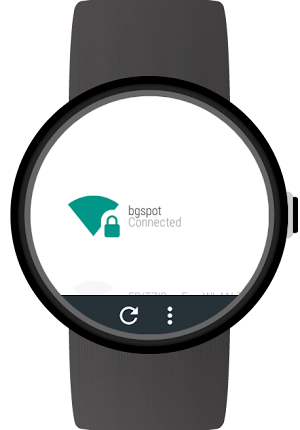
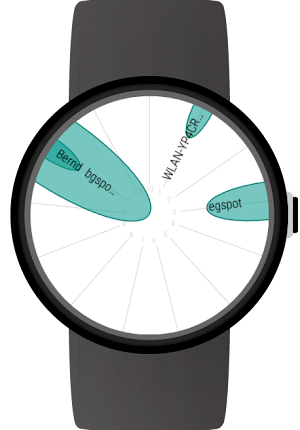
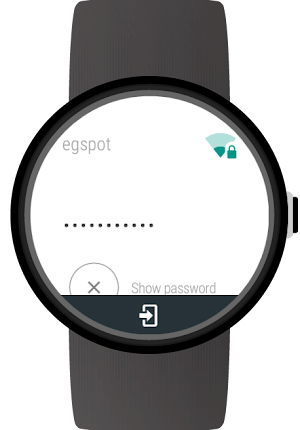
Add Wi-Fi connections and enter passwords directly on your Wear OS (Android Wear) smartwatch. View WiFi connection details. Use the Wi-Fi radar to get an overview of active networks. With the full version you can also sign in to public Wi-Fi hotspots and use static IP settings for Wi-Fi connections.
With this full featured Wi-Fi manager you will get the most out of your Android Wear smartwatch's Wi-Fi capabilities.
NOTE: All those features work without your phone. So if you left your phone at home and it is connected to the internet there, you can still connect your watch to a new Wi-Fi network allowing you to get notifications, use all apps on your watch, ...
Features:
- Scan for nearby Wi-Fi networks
- WiFi radar
- Connect to new networks
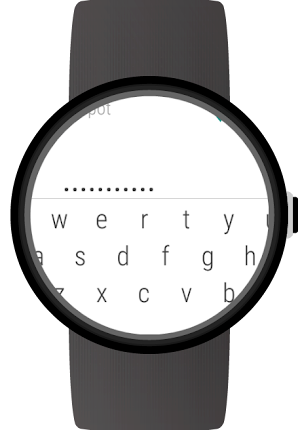
- Enter passwords directly on your Android Wear smartwatch without your phone
- Support for WPA, WEP and EAP security
- View connection details: Link speed, frequency, channel, IP address, signal level
- Forget network connections
- Connect to and disconnect networks
- Disable Wi-Fi
- Card with details for active Wi-Fi connection
- Card when sign in is required
Full version features:
- Sign in to public Wi-Fi hotspots which have a captive portal. Note: At this time this feature only works for Android Wear 1.x and you need the WIB app installed: https://play.google.com/store/apps/details?id=com.appfour.wearbrowser
- Specify static IP settings for networks
- Configurable cards and other settings
Supported smartwatches include all Wear OS (Android Wear) smartwatches with Wi-Fi support:
e.g.
- Sony SmartWatch 3
- Motorola Moto 360
- Fossil Q (Explorist, Marshal, Founder, Venture, Wander, ...)
- Ticwatch (E, S)
- Michael Kors (Bradshaw, Sophie, ...)
- Huawei Watch (2, Leo-BX9, Leo-DLXX, ...)
- LG Watch (Urbane, Sport, R, Style, …)
- ASUS ZenWatch (2, 3)
- TAG Heuer
...and many more
If your watch is not listed, please check if your Smartwatch runs Wear OS (former Android Wear).
Note: The square LG watch and Zenwatch 1 do not support WiFi and do not work with this app
With this full featured Wi-Fi manager you will get the most out of your Android Wear smartwatch's Wi-Fi capabilities.
NOTE: All those features work without your phone. So if you left your phone at home and it is connected to the internet there, you can still connect your watch to a new Wi-Fi network allowing you to get notifications, use all apps on your watch, ...
Features:
- Scan for nearby Wi-Fi networks
- WiFi radar
- Connect to new networks
- Enter passwords directly on your Android Wear smartwatch without your phone
- Support for WPA, WEP and EAP security
- View connection details: Link speed, frequency, channel, IP address, signal level
- Forget network connections
- Connect to and disconnect networks
- Disable Wi-Fi
- Card with details for active Wi-Fi connection
- Card when sign in is required
Full version features:
- Sign in to public Wi-Fi hotspots which have a captive portal. Note: At this time this feature only works for Android Wear 1.x and you need the WIB app installed: https://play.google.com/store/apps/details?id=com.appfour.wearbrowser
- Specify static IP settings for networks
- Configurable cards and other settings
Supported smartwatches include all Wear OS (Android Wear) smartwatches with Wi-Fi support:
e.g.
- Sony SmartWatch 3
- Motorola Moto 360
- Fossil Q (Explorist, Marshal, Founder, Venture, Wander, ...)
- Ticwatch (E, S)
- Michael Kors (Bradshaw, Sophie, ...)
- Huawei Watch (2, Leo-BX9, Leo-DLXX, ...)
- LG Watch (Urbane, Sport, R, Style, …)
- ASUS ZenWatch (2, 3)
- TAG Heuer
...and many more
If your watch is not listed, please check if your Smartwatch runs Wear OS (former Android Wear).
Note: The square LG watch and Zenwatch 1 do not support WiFi and do not work with this app
What’s new
Version 1.0.210304 · Updated March 4, 2021
Fix: Not able to enter IP address Older changes New: Wear OS dark theme New: Swipe down to refresh wifi list New: Settings activity on watch New: Log in to hidden networks New: Log in to EAP networks
User reviews

It works!

Bad ass

Good a apps

Worked great on my sony smartwatch 3 until latest update, does any one know if this app will work on a ZTE Quartz smartwatch.

McDonald's

Nice
Alternatives to Wi-Fi Manager for Wear OS (Android Wear)
Looking for apps like Wi-Fi Manager for Wear OS (Android Wear)? Here are 6 similar Android apps on Google Play. The highest rated is WifiLink: Share WiFi (4.9/5), and all 6 are free to download.
-
Find Wi-Fi & Connect to Wi-Fi 3.8
-
WiFi Automatic 4.3
-
WiFi QR Connect 4.2
-
WifiLink: Share WiFi 4.9
-
Linksys 3.8
-
NetSpot WiFi Site Survey Tool 3.6
| App | Rating | Price | Installs | Last updated | Compare |
|---|---|---|---|---|---|
| Wi-Fi Manager for Wear OS (Android Wear) | 3.5 / 5 | Free | 100,000+ | Mar 4, 2021 | |
| Find Wi-Fi & Connect to Wi-Fi | 3.8 / 5 | Free | 1,000,000+ | – | Compare |
| WiFi Automatic | 4.3 / 5 | Free | 1,000,000+ | Apr 17, 2021 | Compare |
| WiFi QR Connect | 4.2 / 5 | Free | 1,000,000+ | Aug 21, 2026 | Compare |
| WifiLink: Share WiFi | 4.9 / 5 | Free | 500,000+ | – | Compare |
| Linksys | 3.8 / 5 | Free | 5,000,000+ | Nov 13, 2025 | Compare |
| NetSpot WiFi Site Survey Tool | 3.6 / 5 | Free | 1,000,000+ | Aug 27, 2026 | Compare |