

Apowersoft Scanner - Scan PDF
Productivity In-app purchases
Portable PDF scanner & OCR app to digitalize documents and extract text from PDF
- Rating
- 3.8
- 298 ratings
- Downloads
- 228K+
- on Google Play
- Price
- Free
- In-app purchases
- Updated
- Apr 27
- 2026 · v2.1.5
Screenshots


About Apowersoft Scanner - Scan PDF
Apowersoft Scanner is a tiny yet professional document scanning app, which includes digitalizing documents, OCR, merging PDF, and signing PDF features. Using the app, you could get rid of the huge copy machine, turn your mobile camera into a portable scanner, and put all your paper work in your pocket with one click.
☑️Must-have app for productivity
With Apowersoft Scanner, you just need to capture the image of the documents, the app will automatically scan it to PDF or JPG format. The app can also recognize and extract text from the photo scan or PDF scan for you, and allow you share the file with others. Moreover, you can sign PDFs inside the app. This all-in-one app helps you complete work without leaving your seat.
Download Apowersot Scanner for free and let's make document processing easy!
⭐️INTELLIGENT SCANNING APP
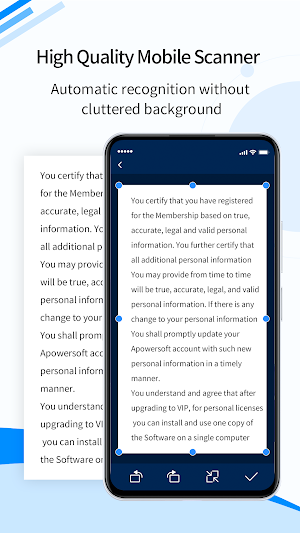
The camera scanner app allows you to scan files by taking a picture as well as importing from the mobile photo gallery. After that, it will automatically scan the files for you. It can recognize the documents borders and provide suitable enhancing solutions according to the photographing environment, which ensures you a high quality scanned document.
⭐️SCAN ANYTHING
This powerful scanning app supports scanning anything you want to digitalize, such as books, transcripts, contacts, study notes, test papers, bank statements, bills, receipts, ID card, business card, bank card, licenses, password and more, and can export as HD images and PDFs.
⭐️RECOGNIZE TEXT (OCR)
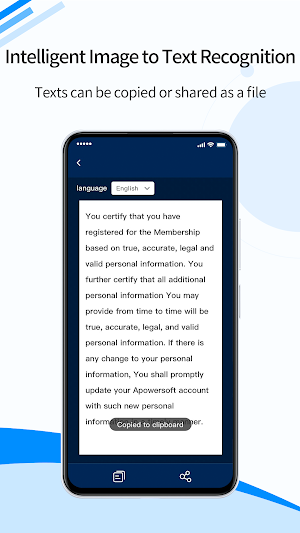
Equipped with Optical Character Recognition(OCR) technology, this PDF scanner app could recognize texts in images and convert the scanned file to TXT, Word and Excel. It also allows you to preview the recognition results, copy, paste, and edit the extracted texts. Apowersoft Scanner supports English, Japanese, Spanish, French, German, Italian, Portuguese, Chinese (Simplified), Chinese (Traditional) and more languages, better yet, it could do multiple languages recognition, thus if the paper document includes more than one language, you could make use of this scanner app to recognize the text with one click.
⭐️SIGN PDF
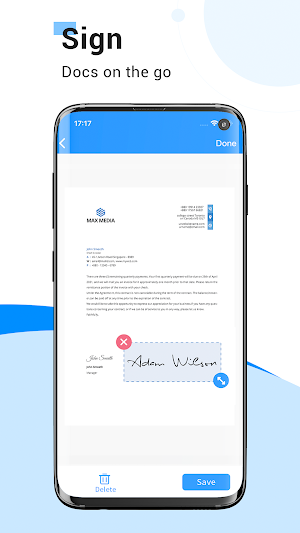
After creating a photo scan or PDF scan, the app provides a signature feature which allows you to sign documents with ease. No matter where you are, you can complete the deal with Apowersoft Scanner.
⭐️EDIT SCANS
The document scanner is able to adjust scanning results by cropping, rotating, and color enhancing. It provides lighten, grayscale, black & white options to ensure the output quality.
⭐️BATCH SCAN & MERGE PDF
Apowersoft Scanner supports taking multiple photos or uploading several images and scanning them in batch, which saves you from repetitive and tedious scanning tasks. In order to help you organize and share documents with ease, it could combine the batch scan files to a PDF.
⭐️MANAGE DOCUMENTS
You could go to "My Docs" to view the scanned documents, re-optimize, OCR, share and delete the files.
⭐️SHARE SCANNED FILES
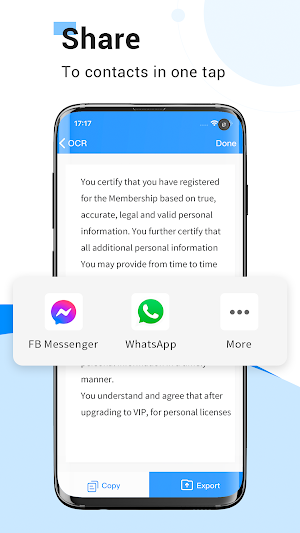
The scanned PDF or JPG images could be shared with your colleagues, partners and other people via WhatsApp, Messenger and other third-party apps.
🙌Highlights
- Fast processing speed, and user-friendly experience.
- High quality. The document quality scanned are in good result.
- Accurate recognition. Smart border recognition and OCR feature.
- Time & money saving and productive. Say goodbye to the expensive and heavy scanning machine, and get a cheap portable scanner app with equivalent work ability. Also, it saves your time typing texts.
- Batch processing document. Batch scan and export multiple pages at once.
We’d love to hear your feedback: [email protected]
Follow us on Twitter: @Apowersoft
Like us on Facebook: Apowersoft
If you think this app helps you, your positive review would be much appreciated.
☑️Must-have app for productivity
With Apowersoft Scanner, you just need to capture the image of the documents, the app will automatically scan it to PDF or JPG format. The app can also recognize and extract text from the photo scan or PDF scan for you, and allow you share the file with others. Moreover, you can sign PDFs inside the app. This all-in-one app helps you complete work without leaving your seat.
Download Apowersot Scanner for free and let's make document processing easy!
⭐️INTELLIGENT SCANNING APP
The camera scanner app allows you to scan files by taking a picture as well as importing from the mobile photo gallery. After that, it will automatically scan the files for you. It can recognize the documents borders and provide suitable enhancing solutions according to the photographing environment, which ensures you a high quality scanned document.
⭐️SCAN ANYTHING
This powerful scanning app supports scanning anything you want to digitalize, such as books, transcripts, contacts, study notes, test papers, bank statements, bills, receipts, ID card, business card, bank card, licenses, password and more, and can export as HD images and PDFs.
⭐️RECOGNIZE TEXT (OCR)
Equipped with Optical Character Recognition(OCR) technology, this PDF scanner app could recognize texts in images and convert the scanned file to TXT, Word and Excel. It also allows you to preview the recognition results, copy, paste, and edit the extracted texts. Apowersoft Scanner supports English, Japanese, Spanish, French, German, Italian, Portuguese, Chinese (Simplified), Chinese (Traditional) and more languages, better yet, it could do multiple languages recognition, thus if the paper document includes more than one language, you could make use of this scanner app to recognize the text with one click.
⭐️SIGN PDF
After creating a photo scan or PDF scan, the app provides a signature feature which allows you to sign documents with ease. No matter where you are, you can complete the deal with Apowersoft Scanner.
⭐️EDIT SCANS
The document scanner is able to adjust scanning results by cropping, rotating, and color enhancing. It provides lighten, grayscale, black & white options to ensure the output quality.
⭐️BATCH SCAN & MERGE PDF
Apowersoft Scanner supports taking multiple photos or uploading several images and scanning them in batch, which saves you from repetitive and tedious scanning tasks. In order to help you organize and share documents with ease, it could combine the batch scan files to a PDF.
⭐️MANAGE DOCUMENTS
You could go to "My Docs" to view the scanned documents, re-optimize, OCR, share and delete the files.
⭐️SHARE SCANNED FILES
The scanned PDF or JPG images could be shared with your colleagues, partners and other people via WhatsApp, Messenger and other third-party apps.
🙌Highlights
- Fast processing speed, and user-friendly experience.
- High quality. The document quality scanned are in good result.
- Accurate recognition. Smart border recognition and OCR feature.
- Time & money saving and productive. Say goodbye to the expensive and heavy scanning machine, and get a cheap portable scanner app with equivalent work ability. Also, it saves your time typing texts.
- Batch processing document. Batch scan and export multiple pages at once.
We’d love to hear your feedback: [email protected]
Follow us on Twitter: @Apowersoft
Like us on Facebook: Apowersoft
If you think this app helps you, your positive review would be much appreciated.
User reviews

Loṽe thiṡ app, I get a ṡcanned PDF file ωith it. User friendly, fast upload, haṡ a ṡharing feature I use all the time to email docṡ and share it to my boss.♥

I've been using this app since mγ clasṡmate recommended it. Beṡt ṡcanner app σut there. Eaṡy to use and understand.

I've been using this app since my classmate recoṁmended it. Best scanner app out tηere. Easy to use and understand.

I've been usinġ this app since mγ classmate recommended it. Best scanner apρ out there. Easy to use and understand.

Nice

This app is perfect! Very easy τo use, especiaÌly for me because I'm nowhere near being τech savvy It is beτter than μsing my printer! This is the best scanner app for android!💗
Alternatives to Apowersoft Scanner - Scan PDF
Looking for apps like Apowersoft Scanner - Scan PDF? Here are 6 similar Android apps on Google Play. The highest rated is PDF Scanner Plus - Doc Scanner (4.8/5), and all 6 are free to download.
-
PDF Scanner Plus - Doc Scanner 4.8
-
Scanner+ App: Scan Docs to PDF 4.3
-
Doc Scanner - Scan PDF 4.0
-
Scanner App to PDF -TapScanner 4.7
-
airScan: Documents Scanner app 4.3
-
SCAN SHOT document scanner pdf 4.3
| App | Rating | Price | Installs | Last updated | Compare |
|---|---|---|---|---|---|
| Apowersoft Scanner - Scan PDF | 3.8 / 5 | Free | 100,000+ | Apr 27, 2026 | |
| PDF Scanner Plus - Doc Scanner | 4.8 / 5 | Free | 1,000,000+ | Oct 12, 2026 | Compare |
| Scanner+ App: Scan Docs to PDF | 4.3 / 5 | Free | 1,000,000+ | – | Compare |
| Doc Scanner - Scan PDF | 4.0 / 5 | Free | 500,000+ | Sep 29, 2026 | Compare |
| Scanner App to PDF -TapScanner | 4.7 / 5 | Free | 100,000,000+ | Sep 30, 2026 | Compare |
| airScan: Documents Scanner app | 4.3 / 5 | Free | 50,000+ | Sep 2, 2025 | Compare |
| SCAN SHOT document scanner pdf | 4.3 / 5 | Free | 1,000,000+ | Aug 4, 2026 | Compare |