
Navigation Music Controller
Amphebia Music & Audio
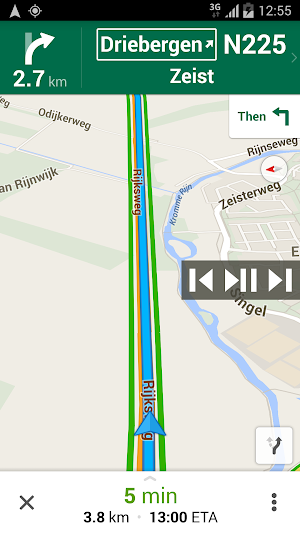
This app shows an overlay with music controls in Google Maps or any other app.
- Rating
- 4.2
- 43 ratings
- Downloads
- 1K+
- on Google Play
- Price
- $0.99
- No in-app purchases
- Updated
- Nov 20
- 2017 · v3.11
Screenshots
About Navigation Music Controller
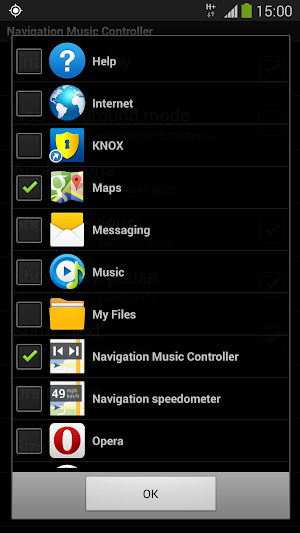
How to play, pause and skip music tracks in Google Maps or any other app (for example Navigon, TomTom, CoPilot, Skobbler, WhatsApp, Chrome) without switching to your music player app? This app automatically detects when Google Maps, Google Navigation or any other app of your choice is active and shows an overlay displaying music controls.
Features:
- No advertisements!
- No internet access necessary, no backdoors sharing your private information;
- Controls a music player app of your choice on your device;
- Compatible with many music player apps, like most stock music players, Google Play Music, Spotify, Deezer etc;
- It automatically shows and hides, depending whether Google Maps/Navigation (or any other app of your choice) is active or not;
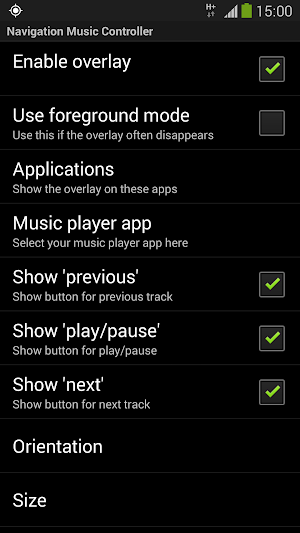
- Three music controls: play/pause, previous track and next track;
- Choose between horizontal or vertical orientation;
- Adjustable transparency;
- Adjustable size;
- Adjustable position, just drag it anywhere you like;
- Can be used with any app installed on your device.
Please contact us if this application does not work properly on your device.
We will try to fix the problem for the next release.
This app uses Accessibility services. This app will only use Accessibility services to detect the current active app, so it can show the overlay with the apps chosen by you in the configuration.
Explanation of permissions:
Display system-level alerts
This app will remain active in the background (no battery drainage) and shows an overlay on top of Google Maps/Navigation while active.
Draw over other apps
With this permission the app is able to detect if Google Maps/Navigation is active.
Features:
- No advertisements!
- No internet access necessary, no backdoors sharing your private information;
- Controls a music player app of your choice on your device;
- Compatible with many music player apps, like most stock music players, Google Play Music, Spotify, Deezer etc;
- It automatically shows and hides, depending whether Google Maps/Navigation (or any other app of your choice) is active or not;
- Three music controls: play/pause, previous track and next track;
- Choose between horizontal or vertical orientation;
- Adjustable transparency;
- Adjustable size;
- Adjustable position, just drag it anywhere you like;
- Can be used with any app installed on your device.
Please contact us if this application does not work properly on your device.
We will try to fix the problem for the next release.
This app uses Accessibility services. This app will only use Accessibility services to detect the current active app, so it can show the overlay with the apps chosen by you in the configuration.
Explanation of permissions:
Display system-level alerts
This app will remain active in the background (no battery drainage) and shows an overlay on top of Google Maps/Navigation while active.
Draw over other apps
With this permission the app is able to detect if Google Maps/Navigation is active.
What’s new
Version 3.11 · Updated November 20, 2017
The best way to control your music player from any app. Now with Android 8 support!
User reviews

It does what it says, which is not the case with so many other apps of this kind
I like how it gives you the ability to choose different music apps, as I don't use the stock app. It's a life saver, as having to pull down the bar and switch songs, or switch apps entirely isn't practical during navigation. Nice app!
Works great, first app I ever paid for - astonishing that Google maps/android operating system hasn't integrated this obvious functionality.
Really simple...worked....good setting option... Made my life easy...
Thank you!
So simple but brilliant. Makes using Tom Tom on my phone with my spotify so much easier
Alternatives to Navigation Music Controller
Looking for apps like Navigation Music Controller? Here are 6 similar Android apps on Google Play. All of them are free to download.
-
Radio Estereo Jesus El Camino
-
اغاني ليبية
-
Vida Radio
-
Rádio Manancial
-
Rádio Metrópole FM
-
MY FM Radio Malaysia FM Online
| App | Rating | Price | Installs | Last updated | Compare |
|---|---|---|---|---|---|
| Navigation Music Controller | 4.2 / 5 | $0.99 | 1,000+ | Nov 20, 2017 | |
| Radio Estereo Jesus El Camino | – | Free | 5+ | Oct 4, 2023 | Compare |
| اغاني ليبية | – | Free | 0+ | Oct 16, 2023 | Compare |
| Vida Radio | – | Free | 5+ | Sep 21, 2023 | Compare |
| Rádio Manancial | – | Free | 10+ | Sep 26, 2023 | Compare |
| Rádio Metrópole FM | – | Free | 1+ | Oct 4, 2023 | Compare |
| MY FM Radio Malaysia FM Online | – | Free | 1+ | Sep 20, 2023 | Compare |
Similar apps on Google Play
- Radio Estereo Jesus El Camino
- اغاني ليبية
- Vida Radio
- Rádio Manancial
- Rádio Metrópole FM
- MY FM Radio Malaysia FM Online
- Bob Marley Radio
- Rádio Mix Estrela de Davi
- Turkey Radio FM Online
- Odet FM
- Radio 98.5 FM Montréal Radio
- DrumTrain
- Radio Kenya: Radio FM Online
- Radio Tinamar
- اغاني بهاء سلطان كلها بدون نت
- SGPC Gurbani Kirtan
- Piano Music & Soft Rain Sounds
- Radios Perú
- CV FM Corrientes
- RM07
- Radio Paz Sija
- Rádio Prefeitura de Montividiu
- Radio Latina Digital
- RADIO CARAMELO MOVIL
- Rádio Voz do Céu