
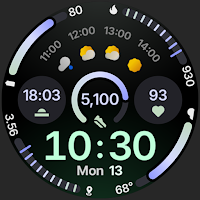
Circle Dashboard Watch Face
Personalization
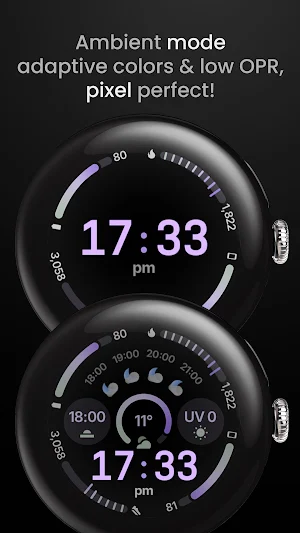
Sleek, highly customizable watch face inspired by Galaxy Watch Circle Dashboard.
- Rating
- 4.8
- 44 ratings
- Downloads
- 1.5K+
- on Google Play
- Price
- $1.99
- No in-app purchases
- Updated
- Aug 20
- 2026
Screenshots
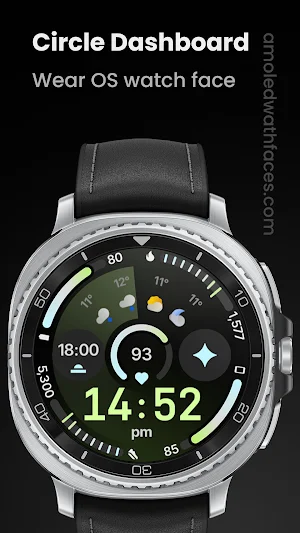
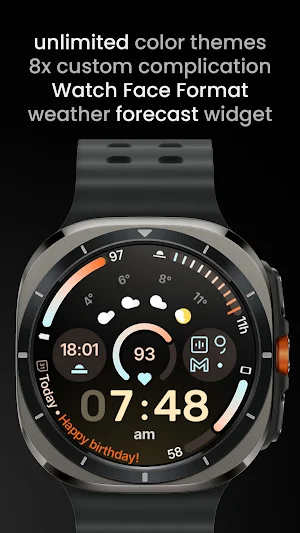


About Circle Dashboard Watch Face
Inspired by Circle Dashboard watch face from Galaxy Watch 8 series.
Powered by Watch Face Format 4
amoledwatchfaces.com
BUY ONE GET ONE OFFER
amoledwatchfaces.com/bogo
CUSTOM COMPLICATION APPS
amoledwatchfaces.com/apps
FEATURES
• Watch Face Format 4
• watch face presets (flavors) (Wear OS 5+)
• 8 custom complication slots
• supported complication types - SHORT_TEXT, LONG_TEXT, RANGED_VALUE, MONOCHROMATIC_ICON, SMALL_IMAGE
• phone notifications complication support*
• new, material 3 expressive progress bars
• optional seconds indicator
• multilanguage
• true black background
• unlimited color theme combinations
• three always-on display styles
• battery friendly
• digital clock fonts
• digital clock blinking colon effect
• weather forecast, moon phases widget (Wear OS 5+)
• created in Android Studio
• custom app shortcut (complication)
• animated AOD entering (Wear OS 6+)
• adaptive complication text size
* requires Phone Battery Complication app
https://play.google.com/store/apps/details?id=com.weartools.phonebattcomp
USER CONFIGURATIONS
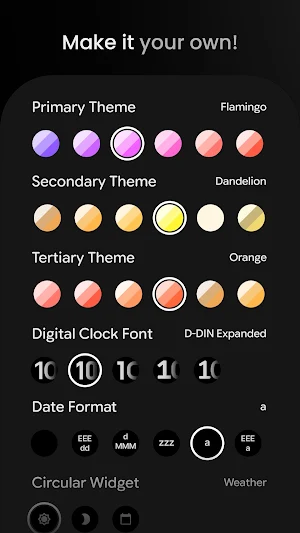
• Primary Theme (60+)
• Secondary Theme (60+)
• Tertiary Theme (60+)
• Digital Clock Font (5x)
• Date Format (6x)
• Circular Widget (Weather*, Moon Phases, Full Date)
• Weather Icon Pack* (2x)
• Weather Provider* (4x)
• AOD (3x)
• Custom Complications (8x)
• Leading Zero (Toggle)
• Seconds Indicator (Toggle)
• Complications Background (Toggle)
• Percentage Type Arcs (Toggle)
• Vivid Digital Clock** (Toggle)
* weather source type is only available on Wear OS 5+
** supported on Wear OS 6+
Installation and troubleshooting guide
amoledwatchfaces.com/guide
Please send any issues reports or help requests to our support address
[email protected]
Join our Telegram group for live support and discussion
t.me/amoledwatchfaces
Newsletter
amoledwatchfaces.com/contact#newsletter
amoledwatchfaces™ - Awf
What’s new
Updated August 20, 2026
v1.0.7 • added an option to disable blinking colon effect (wff3,wff4) v1.0.5 • 12h - no leading zero option is now not showing dimmed leading zero (wff4) • increased Date circular widget option brightness v1.0.4 • small issue fixes v1.0.3 • added steps and heart rate circular widget options • added seconds (ss) date option • xml adjustments v1.0.2 • added two more providers - old Google Weather, OnePlus Weather v1.0.1 • initial release
User reviews

My absolute favourite at the moment 🤩you always seem to get everything exactly perfect with most of your faces, this being no exception 😎keep up the excellent work 👏

Great dashboard layout with no unnecessary clutter and 8 customisable complications that are easy to tap as needed. I've tried quite a few watchfaces in a similar style but this one is definitely the best

One of the best watch faces I've seen and their BOGO offer is nice too. Took a bit of time but I received it eventually.

Gorgeously symmetrical watch face with amazing customizations and themes 👌🔥

Fantastic watch face. however it appears like with Google's own faces, circular complications that have potentially four digits (steps, calories, etc) do not scale consistently depending on the number, making for inconsistent design language. I wonder if this is a Google issue though

Unfortunately, after updating the font, they do not fit on the complication background. For example, sunrise/sunset. It is very difficult to change the parameters of the watch face.
Alternatives to Circle Dashboard Watch Face
Looking for apps like Circle Dashboard Watch Face? Here are 6 similar Android apps on Google Play. The highest rated is Sapphire Digital Watch Face (4.8/5).
-
Digital Watch face D33
-
SG-172
-
Halcyon: Digital Watch Face
-
Sapphire Digital Watch Face 4.8
-
Iris505 Digital Watch Face
-
Superior for Wear OS
| App | Rating | Price | Installs | Last updated | Compare |
|---|---|---|---|---|---|
| Circle Dashboard Watch Face | 4.8 / 5 | $1.99 | 1,000+ | Aug 20, 2026 | |
| Digital Watch face D33 | – | 1.49 USD | 100+ | Aug 10, 2026 | Compare |
| SG-172 | – | 0.99 USD | 100+ | – | Compare |
| Halcyon: Digital Watch Face | – | 1.99 USD | 100+ | Oct 31, 2025 | Compare |
| Sapphire Digital Watch Face | 4.8 / 5 | 0.99 USD | 500+ | – | Compare |
| Iris505 Digital Watch Face | – | 1.49 USD | 50+ | – | Compare |
| Superior for Wear OS | – | 1.49 USD | 100+ | Sep 12, 2024 | Compare |
Similar apps on Google Play
- Digital Watch face D33
- SG-172
- Halcyon: Digital Watch Face
- Sapphire Digital Watch Face
- Iris505 Digital Watch Face
- Superior for Wear OS
- TVV Fitness 2 Watch Face
- Dash Digital: Watch face
- MDS08 Digital Watch Face
- Athlete 2 Lite: Watch face
- Expedition Watch Face
- FSW293 Hybrid watchface
- JHW Digital Sport 2: Wear OS
- Pulse Watch Face
- SamWatch SIGN Y Weather
- ZKin WatchFace Glass Turntable
- Vibe Watch Face
- Gravity Watch Face
- Pulse 2: Watch face
- OMG 75 - Colorful Watch Face
- Arcs D5 Watch Face
- e-Sport: Watch face
- Utility Watch Face
- n-Digital 2: Watch face
- Summit Watch Face