
AstroCam: Night Sky Camera
Photography In-app purchases Contains ads
Pro Astrophotography: frame stacking, lucky imaging, night lapse & star trails
- Rating
- 4.0
- 340 ratings
- Downloads
- 24.2K+
- on Google Play
- Price
- Free
- In-app purchases
- Updated
- Aug 27
- 2026 · v4.8
Screenshots
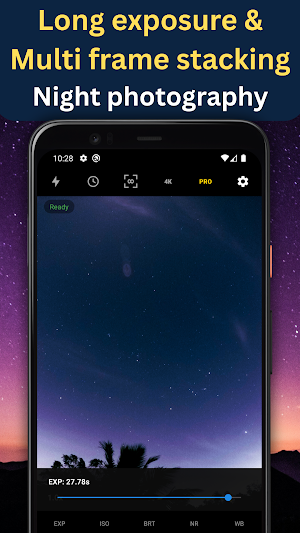


About AstroCam: Night Sky Camera
Discover the night sky like never before with AstroCam.
The astrophotography camera app built for anyone who wants to capture stunning images of stars, galaxies, and the Milky Way right from their Android phone from a beginner to a PRO.
Frame Stacking Technology
AstroCam's core feature is multi-frame stacking. Instead of taking a single noisy shot, AstroCam captures multiple long-exposure frames and mathematically combines them, reducing noise and revealing detail. Stack anywhere from 10 to 400 frames depending on how much detail you want.
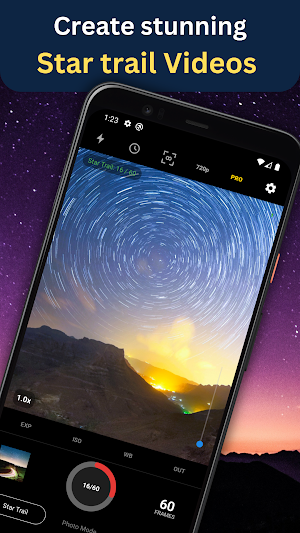
Star Trail Mode
Paint the night sky with light. AstroCam's Star Trail mode captures stunning circular star trail images and videos by blending frames over time. Choose between Max Blend for bold, vivid trails or Weighted blend for a smoother, more natural look. Fine-tune the Decay Factor to control how long trails linger, from silky smooth (0.99) to dramatic and sharp (0.10). Record at 24, 30, or 60 fps and watch the stars arc across your output video or photo.
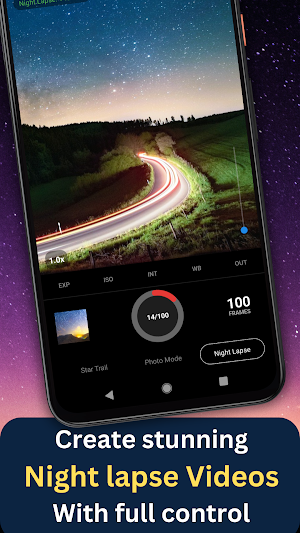
Night Lapse Mode
AstroCam automatically sequences hundreds of long-exposure frames into a breathtaking time-lapse video, showing stars rising, clouds drifting, and the Milky Way rotating across the sky, all with a single tap. Perfect for creating cinematic night sky sequences without effort and with full control.
Full Manual Control
Take complete control of your camera with manual exposure time and ISO settings. Push your phone's sensor to its true limits. AstroCam sometimes gives you access to exposures beyond standard camera apps.
Auto-Discovery
AstroCam's built-in Auto-Discovery automatically tests your camera hardware and finds the true maximum exposure your sensor supports.
Advanced Image Processing
Every stacked image goes through professional grade processing including adaptive sharpening, noise reduction, color correction, and brightness adjustment. Fine tune the results with post-brightness and white balance controls to get exactly the look you want. For Star, Moon, and Nebula captures including deep-sky and planetary images shot through a telescope unlock Advanced Stacking with Lucky Imaging: choose between Weighted Average blending or sub-pixel Drizzle for maximum detail, decide how much of your sharpest frames to keep (25% up to ALL), register and align your stack around a custom base frame, crop before processing, and export the final result as PNG, JPEG, or TIFF.
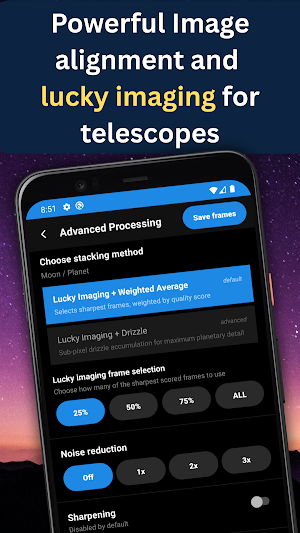
Advanced Stacking (Lucky Imaging)
Get serious about Moon and planetary photography with AstroCam's new Advanced Stacking engine. Choose between Lucky Imaging + Weighted Average, which automatically scores every frame and blends the sharpest ones together, or Lucky Imaging + Drizzle for sub-pixel accumulation and maximum planetary detail. Decide exactly how much of your data to keep with frame selection from 25% up to ALL of your sharpest frames. Pick a custom base (reference) frame, register and align your stack, crop before processing, and dial in noise reduction, sharpening, and white balance then export as PNG, JPEG, or TIFF for a fully professional planetary workflow.
Raw Frame Saving
Enable Raw Save mode to capture and save each individual frame at full resolution directly to your gallery or a custom folder for editing in Lightroom, Photoshop, or any photo editor.
Multiple Resolutions
Choose from 360p, 480p, 720p, 1080p, or 4K capture resolution depending on your needs and available storage.
Reimagine Astrophotography with AstroCam.
The astrophotography camera app built for anyone who wants to capture stunning images of stars, galaxies, and the Milky Way right from their Android phone from a beginner to a PRO.
Frame Stacking Technology
AstroCam's core feature is multi-frame stacking. Instead of taking a single noisy shot, AstroCam captures multiple long-exposure frames and mathematically combines them, reducing noise and revealing detail. Stack anywhere from 10 to 400 frames depending on how much detail you want.
Star Trail Mode
Paint the night sky with light. AstroCam's Star Trail mode captures stunning circular star trail images and videos by blending frames over time. Choose between Max Blend for bold, vivid trails or Weighted blend for a smoother, more natural look. Fine-tune the Decay Factor to control how long trails linger, from silky smooth (0.99) to dramatic and sharp (0.10). Record at 24, 30, or 60 fps and watch the stars arc across your output video or photo.
Night Lapse Mode
AstroCam automatically sequences hundreds of long-exposure frames into a breathtaking time-lapse video, showing stars rising, clouds drifting, and the Milky Way rotating across the sky, all with a single tap. Perfect for creating cinematic night sky sequences without effort and with full control.
Full Manual Control
Take complete control of your camera with manual exposure time and ISO settings. Push your phone's sensor to its true limits. AstroCam sometimes gives you access to exposures beyond standard camera apps.
Auto-Discovery
AstroCam's built-in Auto-Discovery automatically tests your camera hardware and finds the true maximum exposure your sensor supports.
Advanced Image Processing
Every stacked image goes through professional grade processing including adaptive sharpening, noise reduction, color correction, and brightness adjustment. Fine tune the results with post-brightness and white balance controls to get exactly the look you want. For Star, Moon, and Nebula captures including deep-sky and planetary images shot through a telescope unlock Advanced Stacking with Lucky Imaging: choose between Weighted Average blending or sub-pixel Drizzle for maximum detail, decide how much of your sharpest frames to keep (25% up to ALL), register and align your stack around a custom base frame, crop before processing, and export the final result as PNG, JPEG, or TIFF.
Advanced Stacking (Lucky Imaging)
Get serious about Moon and planetary photography with AstroCam's new Advanced Stacking engine. Choose between Lucky Imaging + Weighted Average, which automatically scores every frame and blends the sharpest ones together, or Lucky Imaging + Drizzle for sub-pixel accumulation and maximum planetary detail. Decide exactly how much of your data to keep with frame selection from 25% up to ALL of your sharpest frames. Pick a custom base (reference) frame, register and align your stack, crop before processing, and dial in noise reduction, sharpening, and white balance then export as PNG, JPEG, or TIFF for a fully professional planetary workflow.
Raw Frame Saving
Enable Raw Save mode to capture and save each individual frame at full resolution directly to your gallery or a custom folder for editing in Lightroom, Photoshop, or any photo editor.
Multiple Resolutions
Choose from 360p, 480p, 720p, 1080p, or 4K capture resolution depending on your needs and available storage.
Reimagine Astrophotography with AstroCam.
What’s new
Version 4.8 · Updated August 27, 2026
Version 4.8 Compatibility improvements
User reviews

Wow

me need 4 frweeeeee pweeeeezzze the ads on this app are the longest ive seen.... everyone is gettin greedy with all the ads now a days.. only gonna get worse. soon it will paid subscription and have to watch ads aswell.. u watch.

I've had a great experience with this app and have been using it for a long time for stacking and capturing night timelapses. I just need some more improvements, as the photo stacking doesn't align correctly, which prevents me from capturing nebulae and galaxies properly through my telescope.
Alternatives to AstroCam: Night Sky Camera
Looking for apps like AstroCam: Night Sky Camera? Here are 6 similar Android apps on Google Play. The highest rated is bswift Mobile (4.8/5), and all 6 are free to download.
-
Camera FV-5 Lite 4.1
-
IFSTA Instructor 9 3.9
-
Seestar 4.1
-
Ply 2.7
-
bswift Mobile 4.8
-
Loom – Screen and Cam Recorder 3.3
| App | Rating | Price | Installs | Last updated | Compare |
|---|---|---|---|---|---|
| AstroCam: Night Sky Camera | 4.0 / 5 | Free | 10,000+ | Aug 27, 2026 | |
| Camera FV-5 Lite | 4.1 / 5 | Free | 10,000,000+ | May 26, 2026 | Compare |
| IFSTA Instructor 9 | 3.9 / 5 | Free | 5,000+ | Oct 31, 2025 | Compare |
| Seestar | 4.1 / 5 | Free | 100,000+ | Sep 3, 2026 | Compare |
| Ply | 2.7 / 5 | Free | 1,000+ | Sep 28, 2026 | Compare |
| bswift Mobile | 4.8 / 5 | Free | 100,000+ | Sep 15, 2026 | Compare |
| Loom – Screen and Cam Recorder | 3.3 / 5 | Free | 1,000,000+ | Oct 13, 2026 | Compare |