

Resize Image
Alpiaco Productivity
Resize Image - Crop & resize photos, preview & custom dimension settings
- Downloads
- 230+
- on Google Play
- Price
- Free
- No in-app purchases
- Updated
- Aug 19
- 2026 · v0.4.1
Screenshots


About Resize Image
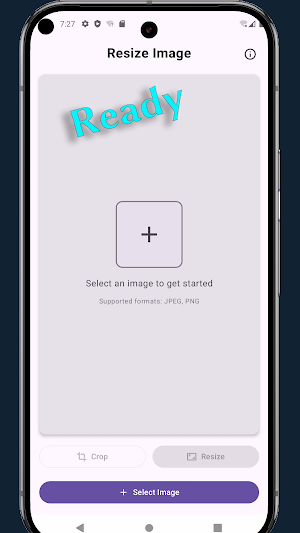
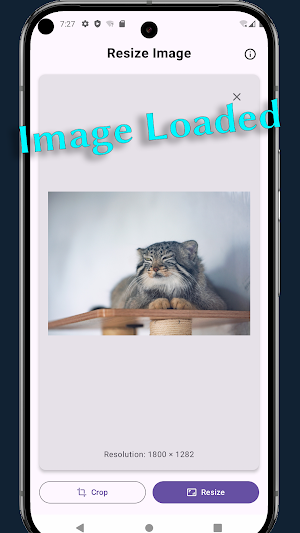
Resize Image is a straightforward Android utility for quickly cropping and resizing your JPEG or PNG photos. With a clean, modern interface and intuitive icons, you can turn any image into the perfect size in just a few taps—no extra features, no clutter.
Key Features
• Image Selection: browse and pick JPEG/PNG files from your device storage.
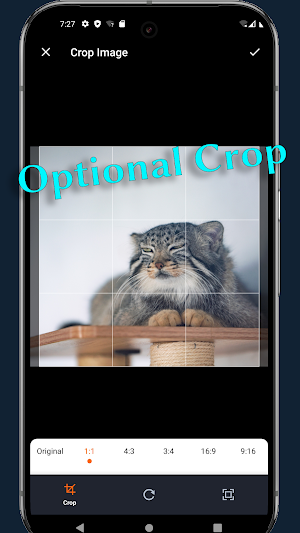
• Optional Crop: choose common aspect ratios (1:1, 4:3, 16:9) or freely adjust the crop box by dragging corners and edges.
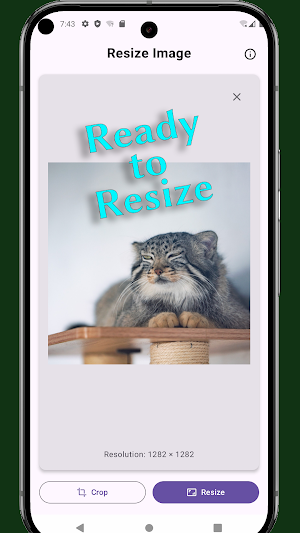
• Flexible Resize: select from smart presets that match your image’s aspect ratio or enter custom width and height. By default, aspect ratio is maintained, but you can override it when needed.
• Instant Preview: compare original and processed images side by side before saving.
• Easy Save Options: store your result in the default “Pictures/Resize Image” folder or pick a custom location with “Save As.”
• Original Format Retained: saved files keep the same format (JPEG or PNG) as the source.
• JPEG Quality Control: adjust output quality on a 0–100% slider in Settings.
• Settings Page: view and change your default save folder and default JPEG quality.
• Responsive UI: adapts to all screen sizes and orientations, with clear labels and loading indicators during processing.
Use Resize Image to prepare photos for social media, email attachments, web uploads, or any scenario where precise image dimensions matter. Its minimal design focuses purely on crop and resize tasks, so you spend less time fumbling through menus and more time getting the perfect shot ready.
Key Features
• Image Selection: browse and pick JPEG/PNG files from your device storage.
• Optional Crop: choose common aspect ratios (1:1, 4:3, 16:9) or freely adjust the crop box by dragging corners and edges.
• Flexible Resize: select from smart presets that match your image’s aspect ratio or enter custom width and height. By default, aspect ratio is maintained, but you can override it when needed.
• Instant Preview: compare original and processed images side by side before saving.
• Easy Save Options: store your result in the default “Pictures/Resize Image” folder or pick a custom location with “Save As.”
• Original Format Retained: saved files keep the same format (JPEG or PNG) as the source.
• JPEG Quality Control: adjust output quality on a 0–100% slider in Settings.
• Settings Page: view and change your default save folder and default JPEG quality.
• Responsive UI: adapts to all screen sizes and orientations, with clear labels and loading indicators during processing.
Use Resize Image to prepare photos for social media, email attachments, web uploads, or any scenario where precise image dimensions matter. Its minimal design focuses purely on crop and resize tasks, so you spend less time fumbling through menus and more time getting the perfect shot ready.
What’s new
Version 0.4.1 · Updated August 19, 2026
updatesdk
Alternatives to Resize Image
Looking for apps like Resize Image? Here are 6 similar Android apps on Google Play. All of them are free to download.
-
Big Text
-
Convert Markdown to PDF
-
View Large Image: Resize, Crop
-
Sun/Moon Calc, Locate & Track
-
Breathing Light
-
Simple Multi-Year Calendar
| App | Rating | Price | Installs | Last updated | Compare |
|---|---|---|---|---|---|
| Resize Image | – | Free | 100+ | Aug 19, 2026 | |
| Big Text | – | Free | 5,000+ | – | Compare |
| Convert Markdown to PDF | – | Free | 1,000+ | – | Compare |
| View Large Image: Resize, Crop | – | Free | 1,000+ | – | Compare |
| Sun/Moon Calc, Locate & Track | – | Free | 500+ | Apr 17, 2026 | Compare |
| Breathing Light | – | Free | 1,000+ | – | Compare |
| Simple Multi-Year Calendar | – | Free | 100+ | – | Compare |
Compare Resize Image with the top alternatives: ratings, updates, ASO score and keyword gaps →