
ClariText: Text Reader
Almobairik Devs Productivity
Read shared text comfortably with adjustable fonts, spacing and colors.
- Downloads
- 36+
- on Google Play
- Price
- Free
- No in-app purchases
- Updated
- Sep 14
- 2026 · v1.2.0
Screenshots


About ClariText: Text Reader
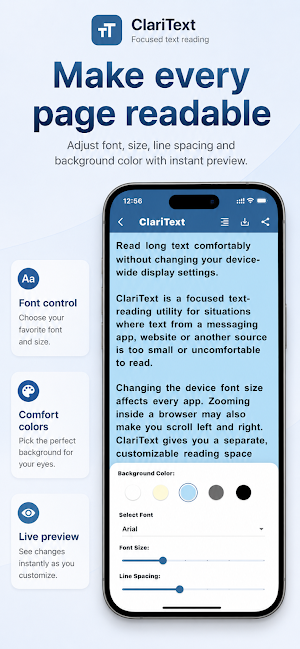
Read long text comfortably without changing your device-wide display settings.
ClariText is a focused text-reading utility for situations where text from a messaging app, website or another source is too small or uncomfortable to read.
Changing the device font size affects every app. Zooming inside a browser may also make you scroll left and right. ClariText gives you a separate, customizable reading space without changing the rest of your device.
HOW IT WORKS
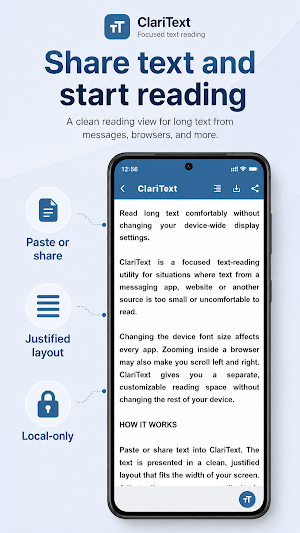
Paste or share text into ClariText. The text is presented in a clean, justified layout that fits the width of your screen. Adjust the appearance until it is comfortable to read.
READ TEXT YOUR WAY
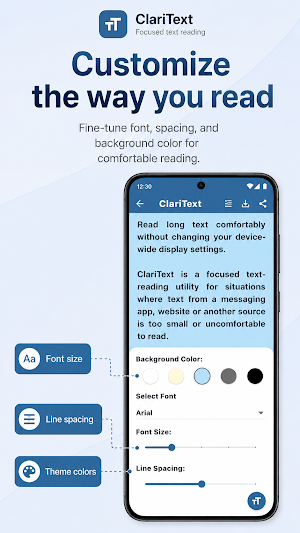
• Change the font size
• Choose a different font style
• Adjust the line spacing
• Select a background color
• Read text in a justified, screen-width layout
SHARE OR SAVE THE RESULT
After reading, you can share the text again or save the formatted reading view as an image.
FOCUSED BY DESIGN
ClariText is not intended to be another general-purpose note-taking app. It does not add unnecessary folders, reminders, collaboration tools or cloud workspaces.
It was designed for one specific task: making copied or shared text easier and more comfortable to read.
PRIVATE AND LOCAL
Saved texts are stored locally on your device.
ClariText is a focused text-reading utility for situations where text from a messaging app, website or another source is too small or uncomfortable to read.
Changing the device font size affects every app. Zooming inside a browser may also make you scroll left and right. ClariText gives you a separate, customizable reading space without changing the rest of your device.
HOW IT WORKS
Paste or share text into ClariText. The text is presented in a clean, justified layout that fits the width of your screen. Adjust the appearance until it is comfortable to read.
READ TEXT YOUR WAY
• Change the font size
• Choose a different font style
• Adjust the line spacing
• Select a background color
• Read text in a justified, screen-width layout
SHARE OR SAVE THE RESULT
After reading, you can share the text again or save the formatted reading view as an image.
FOCUSED BY DESIGN
ClariText is not intended to be another general-purpose note-taking app. It does not add unnecessary folders, reminders, collaboration tools or cloud workspaces.
It was designed for one specific task: making copied or shared text easier and more comfortable to read.
PRIVATE AND LOCAL
Saved texts are stored locally on your device.
What’s new
Version 1.2.0 · Updated September 14, 2026
Fixing issues in dark mode. adding new background colors and ability to upload background image.
Alternatives to ClariText: Text Reader
Looking for apps like ClariText: Text Reader? Here are 3 similar Android apps on Google Play. All of them are free to download.


| App | Rating | Price | Installs | Last updated | Compare |
|---|---|---|---|---|---|
| ClariText: Text Reader | – | Free | 10+ | Sep 14, 2026 | |
| Shia Guide | – | Free | 100+ | Sep 15, 2026 | Compare |
| حاسبة زكاة الفطرة | – | Free | 5+ | – | Compare |
| منبر الشيعة | – | Free | 100+ | Sep 5, 2026 | Compare |