
Alarm Clock: Wake Up Challenge
Hong Kong Lux Limo Service Limited Productivity In-app purchases Contains ads
Set custom alarms with fun challenges, sounds, and wallpapers.
- Rating
- 4.7
- 298 ratings
- Downloads
- 64.5K+
- on Google Play
- Price
- Free
- In-app purchases
- Updated
- Sep 15
- 2026 · v1.0.2
Screenshots

About Alarm Clock: Wake Up Challenge
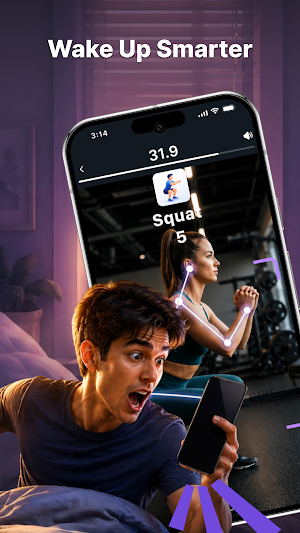
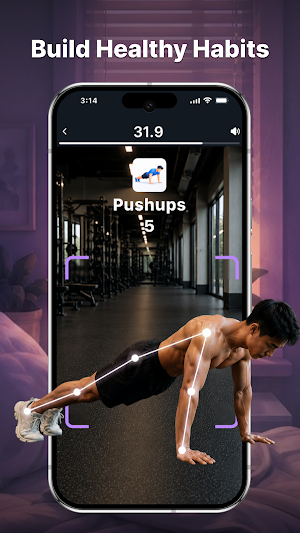
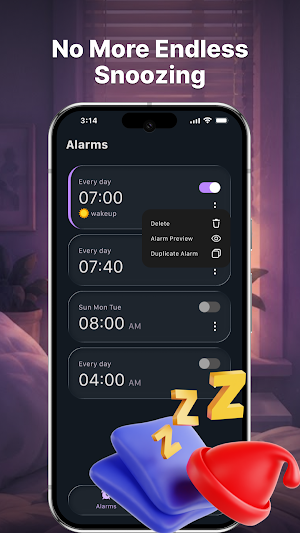
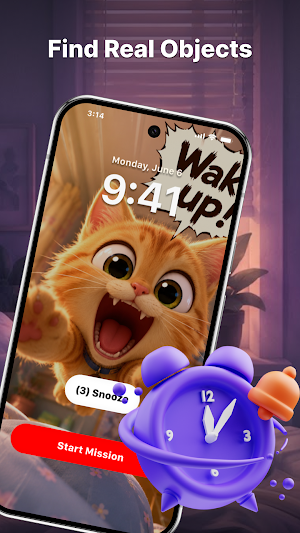
Turn every alarm into an interactive experience. Set your alarm, choose a challenge, customize your ringtone, wallpaper, and snooze settings. To dismiss the alarm, simply complete the challenge you've selected.
Main Features:
- Workout Challenges: Choose a physical challenge before setting your alarm: Push Ups, Squats, Jumping Jacks. Set the number of repetitions you want to complete. The alarm will stop only after you finish the selected goal.
- Household Item Challenge: Select a household item in advance. When the alarm rings, find and scan the chosen object to dismiss the alarm.
- Custom Alarm: Create alarms for any schedule by choosing the time and challenge that best fits your routine.
- Alarm Sounds: Browse the built-in ringtone collection and choose the alarm sound you prefer.
- Wallpaper: Personalize the app with wallpapers from the library or use your own photos.
Why You'll Love It:
- Simple and easy to use
- Interactive challenge based alarms
- Workout and object finding missions
- Multiple alarm sounds
Download Alarm Clock: Wake Up Challenge today to create personalized alarms with fun challenges, customizable settings, and a unique alarm experience.
Disclaimer:
Alarm Clock: Wake Up Challenge is designed to provide an interactive alarm experience. Please complete physical challenges safely and within your own comfort level.
Main Features:
- Workout Challenges: Choose a physical challenge before setting your alarm: Push Ups, Squats, Jumping Jacks. Set the number of repetitions you want to complete. The alarm will stop only after you finish the selected goal.
- Household Item Challenge: Select a household item in advance. When the alarm rings, find and scan the chosen object to dismiss the alarm.
- Custom Alarm: Create alarms for any schedule by choosing the time and challenge that best fits your routine.
- Alarm Sounds: Browse the built-in ringtone collection and choose the alarm sound you prefer.
- Wallpaper: Personalize the app with wallpapers from the library or use your own photos.
Why You'll Love It:
- Simple and easy to use
- Interactive challenge based alarms
- Workout and object finding missions
- Multiple alarm sounds
Download Alarm Clock: Wake Up Challenge today to create personalized alarms with fun challenges, customizable settings, and a unique alarm experience.
Disclaimer:
Alarm Clock: Wake Up Challenge is designed to provide an interactive alarm experience. Please complete physical challenges safely and within your own comfort level.
What’s new
Version 1.0.2 · Updated September 15, 2026
A new update is available! We’ve improved performance and stability. Update now to enjoy a better experience.
User reviews

super
Alternatives to Alarm Clock: Wake Up Challenge
Looking for apps like Alarm Clock: Wake Up Challenge? Here are 4 similar Android apps on Google Play. The highest rated is Bully Bunches US (4.8/5), and all 4 are free to download.




| App | Rating | Price | Installs | Last updated | Compare |
|---|---|---|---|---|---|
| Alarm Clock: Wake Up Challenge | 4.7 / 5 | Free | 50,000+ | Sep 15, 2026 | |
| Sleep Number | 4.3 / 5 | Free | 1,000,000+ | Sep 15, 2026 | Compare |
| KCTCS | 4.7 / 5 | Free | 50,000+ | Aug 19, 2026 | Compare |
| SuppCo: Supplement Scanner | 4.7 / 5 | Free | 100,000+ | Jun 1, 2026 | Compare |
| Bully Bunches US | 4.8 / 5 | Free | 1,000+ | Oct 29, 2026 | Compare |