
Computer Proficiency Book
Joseph Ajireloja Education
An excellent mobile app for the book titled "Computer Proficiency for Everyone”
- Downloads
- 171+
- on Google Play
- Price
- Free
- No in-app purchases
- Updated
- Sep 30
- 2023 · v4.0
Screenshots


About Computer Proficiency Book
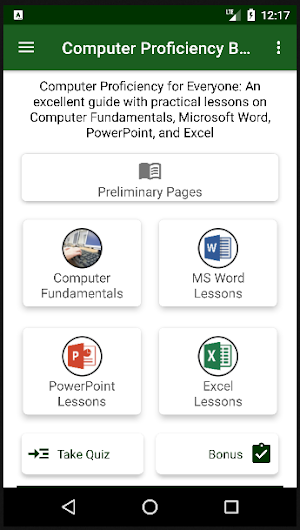
Computer Book App is an android mobile application that contains the book titled: "Computer Proficiency for Everyone: An excellent guide with practical lessons on Computer Fundamentals, Microsoft Word, PowerPoint, and Excel".
The app also contains an extra book titled: "Good Practices in Preparing your Microsoft Word Document", which has been added as a bonus for users.
In addition, the app features Quiz functionality which users can use to test their Computer proficiency knowledge.
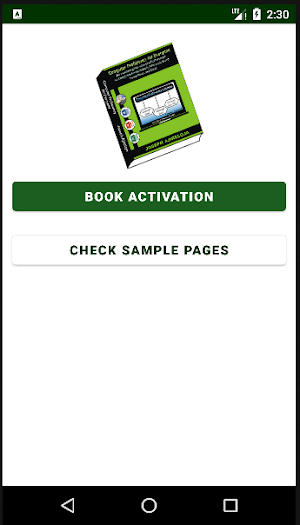
The app requires one-time book activation to gain access to all the pages in the book.
Happy learning, and have an awesome user experience!
About the "Computer Proficiency for Everyone" Book
In this mobile app, the book is organized into four key parts, which are:
- Computer Fundamentals
- Microsoft Word
- Microsoft PowerPoint
- Microsoft Excel
Computer Fundamentals (lesson 1): This first lesson helps to build a solid foundation in Computer usage by providing the general knowledge you need to have about the computer system, its hardware and software components, its key operations, its maintenance, among others.
Microsoft Word (Lessons 2 to 5): This introduces you to Microsoft Word document, and practically demonstrates how to add and format texts, tables, charts, pictures, among others. In the lessons, you will also learn how to make good use of the Review tool in Microsoft Word, how to insert automatic Table of Content, and how to print your documents.
Microsoft PowerPoint (Lessons 6 to 7): In the lessons, you will be introduced to Microsoft PowerPoint presentation; and you will practically learn how to add and format texts, tables, charts, pictures, among others on slides. You will also learn how to run slideshow, design simple graphics, add transitions and animations to your slides and their contents respectively; and how to make nice simple video with PowerPoint.
Microsoft Excel (Lessons 8 to 13): In the parts, you will understand the main Excel features and commands, and how to enter, format, filter and analyze data; how to create, format and design charts of different kinds in Excel; how to use Excel formula and functions to perform calculations, and do some data analysis. You will also learn about Auto Fill, Flash Fill, PivotTable, PivotChart, document printing, and some keyboard shortcut keys in Microsoft Excel.
The app also contains an extra book titled: "Good Practices in Preparing your Microsoft Word Document", which has been added as a bonus for users.
In addition, the app features Quiz functionality which users can use to test their Computer proficiency knowledge.
The app requires one-time book activation to gain access to all the pages in the book.
Happy learning, and have an awesome user experience!
About the "Computer Proficiency for Everyone" Book
In this mobile app, the book is organized into four key parts, which are:
- Computer Fundamentals
- Microsoft Word
- Microsoft PowerPoint
- Microsoft Excel
Computer Fundamentals (lesson 1): This first lesson helps to build a solid foundation in Computer usage by providing the general knowledge you need to have about the computer system, its hardware and software components, its key operations, its maintenance, among others.
Microsoft Word (Lessons 2 to 5): This introduces you to Microsoft Word document, and practically demonstrates how to add and format texts, tables, charts, pictures, among others. In the lessons, you will also learn how to make good use of the Review tool in Microsoft Word, how to insert automatic Table of Content, and how to print your documents.
Microsoft PowerPoint (Lessons 6 to 7): In the lessons, you will be introduced to Microsoft PowerPoint presentation; and you will practically learn how to add and format texts, tables, charts, pictures, among others on slides. You will also learn how to run slideshow, design simple graphics, add transitions and animations to your slides and their contents respectively; and how to make nice simple video with PowerPoint.
Microsoft Excel (Lessons 8 to 13): In the parts, you will understand the main Excel features and commands, and how to enter, format, filter and analyze data; how to create, format and design charts of different kinds in Excel; how to use Excel formula and functions to perform calculations, and do some data analysis. You will also learn about Auto Fill, Flash Fill, PivotTable, PivotChart, document printing, and some keyboard shortcut keys in Microsoft Excel.
What’s new
Version 4.0 · Updated September 30, 2023
Updated release with freely accessible book bonus, and improved user interface for dark theme display mode.
User reviews

A very efficient application for accurate learning with explanatory illustrations and diagrams, I strongly recommend!

The app is great with an ideal design and interactive enough

Highly educating and easy to operate

Awesome! Easy Computer proficiency learning app with pictorial representation of every steps. I recommend this awesome and easy to navigate app to everyone around the globe.
Alternatives to Computer Proficiency Book
Looking for apps like Computer Proficiency Book? Here are 6 similar Android apps on Google Play. All of them are free to download.


| App | Rating | Price | Installs | Last updated | Compare |
|---|---|---|---|---|---|
| Computer Proficiency Book | – | Free | 100+ | Sep 30, 2023 | |
| PBR Cowpea App | – | Free | 100+ | Mar 25, 2024 | Compare |
| Maize Farm Assistant | – | Free | 1,000+ | – | Compare |
| Task Alert | – | Free | 100+ | – | Compare |
| Digital Note | – | Free | 50+ | Oct 29, 2023 | Compare |
| Farm Record Store | – | Free | 100+ | Oct 29, 2023 | Compare |
| Get Sample Size | – | Free | 5,000+ | Jun 28, 2021 | Compare |