
LiveStream Player Pro - M3U
Ishanka IT Video Players & Editors Contains ads
Professional M3U8/HLS player with playlist management and Chromecast support.
- Downloads
- 543+
- on Google Play
- Price
- Free
- No in-app purchases
- Updated
- Oct 16
- 2025 · v1.1
Screenshots
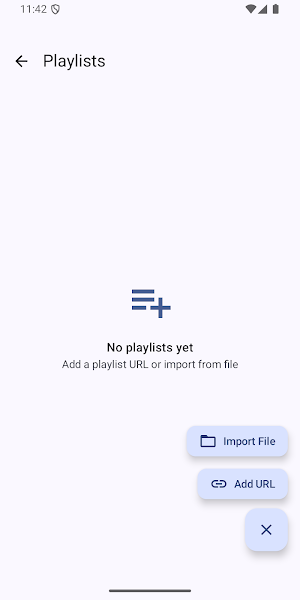
About LiveStream Player Pro - M3U
LiveStream Player Pro - Advanced M3U8/HLS Streaming Player
LiveStream Player Pro is a powerful and user-friendly media player designed for streaming M3U8 and HLS content. Whether you're watching live TV, IPTV channels, or online video streams, our app provides a seamless playback experience with professional-grade features.
KEY FEATURES
Advanced Media Playback
- Full support for M3U8 and HLS streaming protocols
- Adaptive bitrate streaming for optimal quality
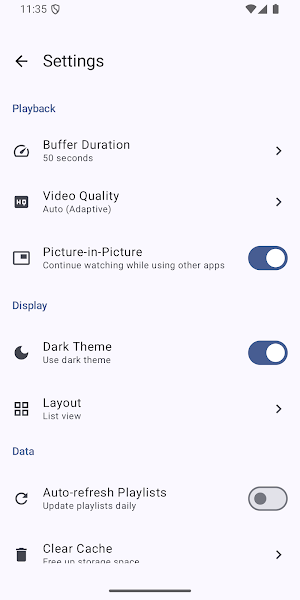
- Multiple video quality options (Auto, 1080p, 720p, 480p, 360p, 240p)
- Customizable buffer duration for smooth playback
- Hardware acceleration for efficient performance
Playlist Management
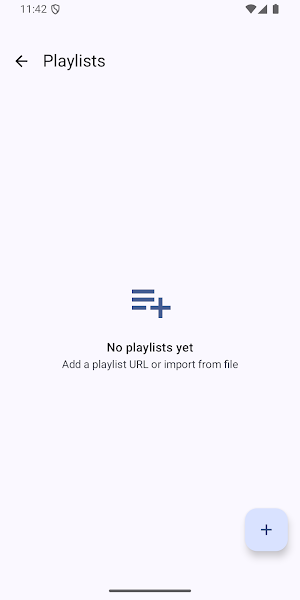
- Import M3U8 playlist files directly
- Manually add individual stream URLs
- Organize channels with custom names and logos
- Create and manage multiple playlists
- Group channels by categories
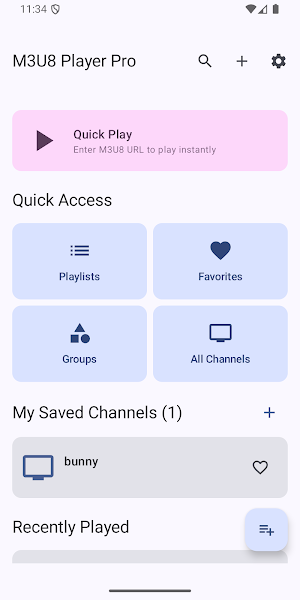
- Search functionality to quickly find channels
Smart Features
- Recently watched channels for quick access
- Favorite channels for easy bookmarking
- Viewing history tracking
- Auto-refresh playlists at custom intervals
- Clear cache option for managing storage
Flexible Display Options
- Three layout modes: List, Grid, and Compact views
- Dark mode support for comfortable viewing
- Intuitive and modern Material Design interface
- Responsive design optimized for all screen sizes
Chromecast Integration
- Cast streams to your TV with Chromecast
- Full playback controls from your phone
- Seamless switching between devices
- High-quality streaming to big screens
Picture-in-Picture Mode
- Watch videos while using other apps
- Multitask without interrupting playback
- Floating video window (Android 8.0+)
- Adjustable window size and position
Professional Player Controls
- Play, pause, and seek controls
- Volume and brightness adjustment
- Screen orientation lock
- Fullscreen mode
- Background audio playback
Privacy and Security
- All data stored locally on your device
- No account registration required
- No cloud sync or data upload
- Your playlists stay private
- Complete control over your content
Performance Optimized
- Lightweight and fast
- Low battery consumption
- Efficient memory usage
- Smooth playback even on older devices
- Minimal data usage with smart caching
HOW TO USE
1. Add Streams: Import M3U8 playlist files or manually enter stream URLs
2. Organize: Create playlists, add channel names and logos
3. Watch: Select any channel to start streaming instantly
4. Cast: Tap the Cast button to stream to your TV
5. Customize: Adjust video quality, buffer, and display settings
SUPPORTED FORMATS
- M3U8 (HTTP Live Streaming)
- HLS (Apple HTTP Live Streaming)
- M3U playlist files
- Direct stream URLs
PERFECT FOR
- IPTV subscribers
- Live TV streaming
- Sports events
- News channels
- Educational content
- Entertainment streams
- Video podcasts
- Online broadcasts
REQUIREMENTS
- Android 7.0 or higher
- Internet connection for streaming
- Chromecast device (optional, for TV casting)
IMPORTANT NOTICE
LiveStream Player Pro is a media player application only. We do not provide, host, or distribute any streaming content. Users are responsible for ensuring they have legal rights to access the streams they add to the app. Please respect copyright laws and content provider terms of service.
SUPPORT
Having issues or suggestions? Contact us at [email protected]
We're committed to improving your streaming experience.
Download LiveStream Player Pro today and enjoy professional-quality streaming on your Android device!
LiveStream Player Pro is a powerful and user-friendly media player designed for streaming M3U8 and HLS content. Whether you're watching live TV, IPTV channels, or online video streams, our app provides a seamless playback experience with professional-grade features.
KEY FEATURES
Advanced Media Playback
- Full support for M3U8 and HLS streaming protocols
- Adaptive bitrate streaming for optimal quality
- Multiple video quality options (Auto, 1080p, 720p, 480p, 360p, 240p)
- Customizable buffer duration for smooth playback
- Hardware acceleration for efficient performance
Playlist Management
- Import M3U8 playlist files directly
- Manually add individual stream URLs
- Organize channels with custom names and logos
- Create and manage multiple playlists
- Group channels by categories
- Search functionality to quickly find channels
Smart Features
- Recently watched channels for quick access
- Favorite channels for easy bookmarking
- Viewing history tracking
- Auto-refresh playlists at custom intervals
- Clear cache option for managing storage
Flexible Display Options
- Three layout modes: List, Grid, and Compact views
- Dark mode support for comfortable viewing
- Intuitive and modern Material Design interface
- Responsive design optimized for all screen sizes
Chromecast Integration
- Cast streams to your TV with Chromecast
- Full playback controls from your phone
- Seamless switching between devices
- High-quality streaming to big screens
Picture-in-Picture Mode
- Watch videos while using other apps
- Multitask without interrupting playback
- Floating video window (Android 8.0+)
- Adjustable window size and position
Professional Player Controls
- Play, pause, and seek controls
- Volume and brightness adjustment
- Screen orientation lock
- Fullscreen mode
- Background audio playback
Privacy and Security
- All data stored locally on your device
- No account registration required
- No cloud sync or data upload
- Your playlists stay private
- Complete control over your content
Performance Optimized
- Lightweight and fast
- Low battery consumption
- Efficient memory usage
- Smooth playback even on older devices
- Minimal data usage with smart caching
HOW TO USE
1. Add Streams: Import M3U8 playlist files or manually enter stream URLs
2. Organize: Create playlists, add channel names and logos
3. Watch: Select any channel to start streaming instantly
4. Cast: Tap the Cast button to stream to your TV
5. Customize: Adjust video quality, buffer, and display settings
SUPPORTED FORMATS
- M3U8 (HTTP Live Streaming)
- HLS (Apple HTTP Live Streaming)
- M3U playlist files
- Direct stream URLs
PERFECT FOR
- IPTV subscribers
- Live TV streaming
- Sports events
- News channels
- Educational content
- Entertainment streams
- Video podcasts
- Online broadcasts
REQUIREMENTS
- Android 7.0 or higher
- Internet connection for streaming
- Chromecast device (optional, for TV casting)
IMPORTANT NOTICE
LiveStream Player Pro is a media player application only. We do not provide, host, or distribute any streaming content. Users are responsible for ensuring they have legal rights to access the streams they add to the app. Please respect copyright laws and content provider terms of service.
SUPPORT
Having issues or suggestions? Contact us at [email protected]
We're committed to improving your streaming experience.
Download LiveStream Player Pro today and enjoy professional-quality streaming on your Android device!
Alternatives to LiveStream Player Pro - M3U
Looking for apps like LiveStream Player Pro - M3U? Here are 6 similar Android apps on Google Play. All of them are free to download.
-
Word Explainer
-
Bulk Barcode Generator
-
Links to QR
-
Own Dictionary
-
QR Feedback Collector
-
QR Survey Generator
| App | Rating | Price | Installs | Last updated | Compare |
|---|---|---|---|---|---|
| LiveStream Player Pro - M3U | – | Free | 500+ | Oct 16, 2025 | |
| Word Explainer | – | Free | 1,000+ | – | Compare |
| Bulk Barcode Generator | – | Free | 1,000+ | Nov 25, 2025 | Compare |
| Links to QR | – | Free | 10+ | Jan 29, 2026 | Compare |
| Own Dictionary | – | Free | 100+ | – | Compare |
| QR Feedback Collector | – | Free | 10+ | Jan 14, 2026 | Compare |
| QR Survey Generator | – | Free | 50+ | – | Compare |
Similar apps on Google Play
- Word Explainer
- Bulk Barcode Generator
- Links to QR
- Own Dictionary
- QR Feedback Collector
- QR Survey Generator
- Sri Lanka 2026 Calendar
- WiFi QR Generator
- QR Price List Generator
- BulkQR -Bulk QR Code Generator
- Homeplug Pro
- PDF Unlocker Pro
- PDF Signer - Sign Documents
- Video To Audio Converter Pro
- Bukedde 1
- newgenclz
- ePal - Shape up your English
- Video Tags Generator
- Japanese English Translator
- JLPT N5 Kanji Sinhala