
TurboX: 120 FPS Game Booster
SmartPocket Apps Tools Contains ads
TurboX boosts FPS, smooth gameplay and stable performance for mobile games.
- Downloads
- 127K+
- on Google Play
- Price
- Free
- No in-app purchases
- Updated
- Sep 9
- 2026 · v1.0.9
Screenshots
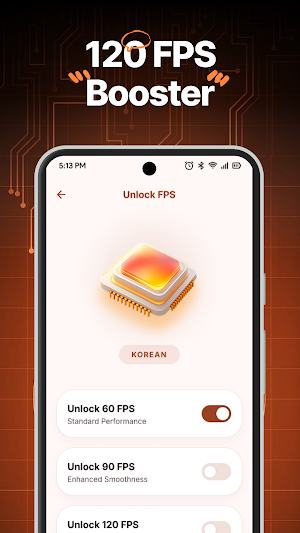
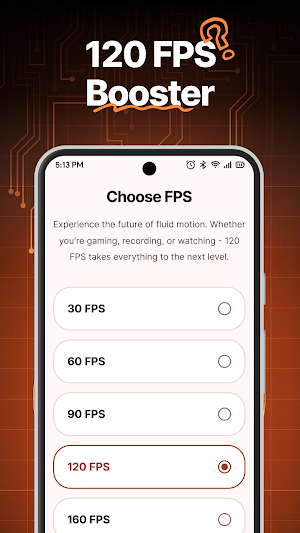
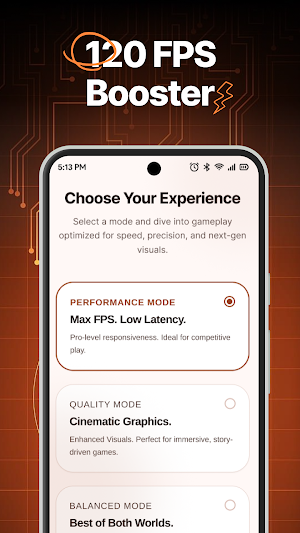

About TurboX: 120 FPS Game Booster
🚀 TurboX is built for players who want smoother action, quicker response, and easier FPS control without wasting time on complicated setup.
If low FPS, frame drops, and uneven motion keep ruining your matches, TurboX gives you a cleaner way to improve gaming performance on supported devices. TurboX works as a practical FPS Booster and FPS Tool for players who want better control before they launch a game.
✨ Why choose TurboX?
• 120 FPS Booster support on compatible devices
• Smooth gameplay for fast-paced matches
• Stable FPS with more consistent motion
• Supported FPS settings that are easy to apply
• Simple interface for quick setup
• Helpful options for different game versions
🎮 TurboX is made for real gaming needs
Some players want a faster response in shooters. Others want cleaner visuals in racing, sports, or action games. TurboX is designed around that real insight. TurboX helps reduce frame drops, improve touch-to-action feel, and support a more consistent frame rate during gameplay.
Instead of confusing menus, TurboX keeps the process simple. TurboX lets you explore supported settings in a way that feels fast, clear, and beginner-friendly.
⚙️ How TurboX works
TurboX helps you apply supported FPS options and useful performance settings based on your device and game version. TurboX is not just about chasing bigger numbers. TurboX is focused on smooth gameplay, stable FPS, and a better overall game feel when every second matters.
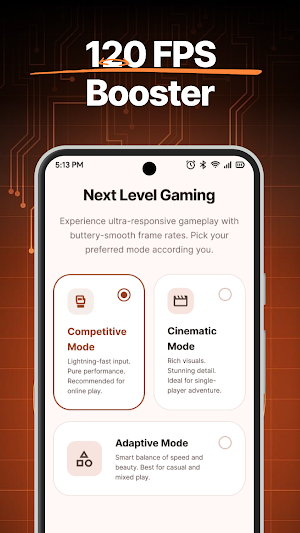
📈 Choose the FPS style that fits you
• 60 FPS for steady everyday gaming
• 90 FPS for more fluid motion
• 120 FPS Turbo for supported high-refresh play
With TurboX, you can test what feels best for your device. TurboX helps supported games run with cleaner motion, better pacing, and less distracting instability in intense moments.
🕹️ Simple steps with TurboX
• Select your game
• Choose an available method
• Apply supported FPS settings
• Launch and test your results
🌍 Why players keep TurboX on their phone
TurboX is useful for popular games, quick match sessions, ranked play, and daily gaming when you want performance tools in one place. TurboX combines easy setup, simple interface, and maximum compatibility thinking so you can spend less time adjusting and more time playing.
Whether you call it a 120 FPS Booster, an FPS Booster, or an FPS Tool, TurboX is built to help supported games feel smoother and more responsive.
🔥 Better for everyday play
Use it before long sessions, competitive matches, or quick games when you want stable FPS, smoother camera motion, and less visual distraction. It is especially helpful when you want cleaner control, supported FPS settings, and a more comfortable gaming experience.
🛡 Important note
Results depend on device hardware, operating system version, game support, and available methods. TurboX does not guarantee the same outcome for every phone.
⬇️ Download TurboX now and enjoy smoother gameplay, stable FPS, and better control in supported games.
If low FPS, frame drops, and uneven motion keep ruining your matches, TurboX gives you a cleaner way to improve gaming performance on supported devices. TurboX works as a practical FPS Booster and FPS Tool for players who want better control before they launch a game.
✨ Why choose TurboX?
• 120 FPS Booster support on compatible devices
• Smooth gameplay for fast-paced matches
• Stable FPS with more consistent motion
• Supported FPS settings that are easy to apply
• Simple interface for quick setup
• Helpful options for different game versions
🎮 TurboX is made for real gaming needs
Some players want a faster response in shooters. Others want cleaner visuals in racing, sports, or action games. TurboX is designed around that real insight. TurboX helps reduce frame drops, improve touch-to-action feel, and support a more consistent frame rate during gameplay.
Instead of confusing menus, TurboX keeps the process simple. TurboX lets you explore supported settings in a way that feels fast, clear, and beginner-friendly.
⚙️ How TurboX works
TurboX helps you apply supported FPS options and useful performance settings based on your device and game version. TurboX is not just about chasing bigger numbers. TurboX is focused on smooth gameplay, stable FPS, and a better overall game feel when every second matters.
📈 Choose the FPS style that fits you
• 60 FPS for steady everyday gaming
• 90 FPS for more fluid motion
• 120 FPS Turbo for supported high-refresh play
With TurboX, you can test what feels best for your device. TurboX helps supported games run with cleaner motion, better pacing, and less distracting instability in intense moments.
🕹️ Simple steps with TurboX
• Select your game
• Choose an available method
• Apply supported FPS settings
• Launch and test your results
🌍 Why players keep TurboX on their phone
TurboX is useful for popular games, quick match sessions, ranked play, and daily gaming when you want performance tools in one place. TurboX combines easy setup, simple interface, and maximum compatibility thinking so you can spend less time adjusting and more time playing.
Whether you call it a 120 FPS Booster, an FPS Booster, or an FPS Tool, TurboX is built to help supported games feel smoother and more responsive.
🔥 Better for everyday play
Use it before long sessions, competitive matches, or quick games when you want stable FPS, smoother camera motion, and less visual distraction. It is especially helpful when you want cleaner control, supported FPS settings, and a more comfortable gaming experience.
🛡 Important note
Results depend on device hardware, operating system version, game support, and available methods. TurboX does not guarantee the same outcome for every phone.
⬇️ Download TurboX now and enjoy smoother gameplay, stable FPS, and better control in supported games.
What’s new
Version 1.0.9 · Updated September 9, 2026
We're always working to make TurboX faster and smoother. • Performance and stability improvements • UI refinements for a smoother experience • Bug fixes based on your feedback Thanks for playing with TurboX!
Alternatives to TurboX: 120 FPS Game Booster
Looking for apps like TurboX: 120 FPS Game Booster? Here are 6 similar Android apps on Google Play. The highest rated is AR Drawing Anime: Sketch Anime (4.7/5), and all 6 are free to download.
-
Color SMS: Custom Messenger WA 2.3
-
AR Drawing Anime: Sketch Anime 4.7
-
WiDIY DIY Wallpaper Widget Mix
-
Football Score – Live Match
-
Icon Changer: Themes & Widget
-
Wallpaper 3D: Live 4K HD
| App | Rating | Price | Installs | Last updated | Compare |
|---|---|---|---|---|---|
| TurboX: 120 FPS Game Booster | – | Free | 100,000+ | Sep 9, 2026 | |
| Color SMS: Custom Messenger WA | 2.3 / 5 | Free | 1,000,000+ | – | Compare |
| AR Drawing Anime: Sketch Anime | 4.7 / 5 | Free | 500,000+ | Mar 14, 2026 | Compare |
| WiDIY DIY Wallpaper Widget Mix | – | Free | 10,000+ | Jul 1, 2026 | Compare |
| Football Score – Live Match | – | Free | 10,000+ | – | Compare |
| Icon Changer: Themes & Widget | – | Free | 10,000+ | Jul 4, 2026 | Compare |
| Wallpaper 3D: Live 4K HD | – | Free | 100,000+ | Aug 28, 2026 | Compare |
Similar apps on Google Play
- Color SMS: Custom Messenger WA
- AR Drawing Anime: Sketch Anime
- WiDIY DIY Wallpaper Widget Mix
- Football Score – Live Match
- Icon Changer: Themes & Widget
- Wallpaper 3D: Live 4K HD
- MamaNest – Pregnancy Tracker
- Themepack: Widgets & Icons
- WiFi Scanner Wifi Location Map
- Silly Smile Live Wallpaper 4K
- Camera HD: Ultra Zoom Photos
- Watch Live TV: IPTV Player
- Palmistry: Palm & Tarot Reader
- Emix: Emoji Battery Status Bar
- AR Easy Trace - Draw & Sketch
- AI Gen-AI Photo Video Maker
- English Pal
- Speakerly: Cleaner Eject Water
- Wamoji: WA Love Sticker Maker
- Veily: Unseen, Deleted Message
- All Recovery - Recover Photo
- Assistive Touch: Easy Control
- Authify: 2FA Authenticator
- Dreame: Sleep Tracker Monitor
- Petlix: Shimeji Pet on Screen
- Reptica: Repeat Text & Style
- AreaCal Area GPS Measure Field
- Zipper Lock Screen - Wallpaper