

AI Translator: Voice & Camera
Frame Sixty Labs LLC Tools In-app purchases
Translate signs, menus and text with your camera — offline, in 59 languages.
- Downloads
- 26+
- on Google Play
- Price
- Free
- In-app purchases
- Updated
- Sep 6
- 2026 · v1.3.0
Screenshots


About AI Translator: Voice & Camera
Point your camera at a street sign, a restaurant menu, or a product label and see it in your language right away. AI Translator reads printed text through the camera and lays the translation over the sign itself, so you can keep walking, keep ordering, and keep reading. Everything runs on your phone, which means the camera translator keeps working on the plane, on the metro, and anywhere with no signal or roaming plan.
TRANSLATE WITH YOUR CAMERA
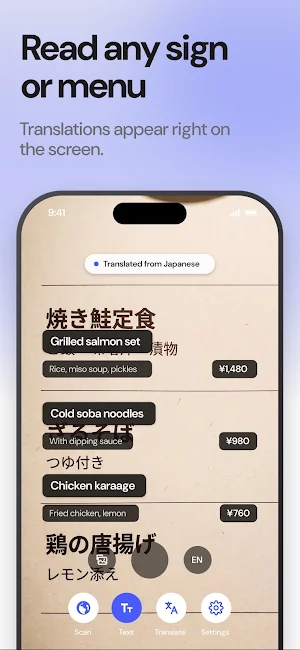
Hold your phone over signs, menus, labels, or a page of text and watch the translation appear live on screen. Tap to pause and read at your own pace. Already took the photo? Import any picture from your library and translate the text inside it.
SCAN OBJECTS AND LEARN THE WORD
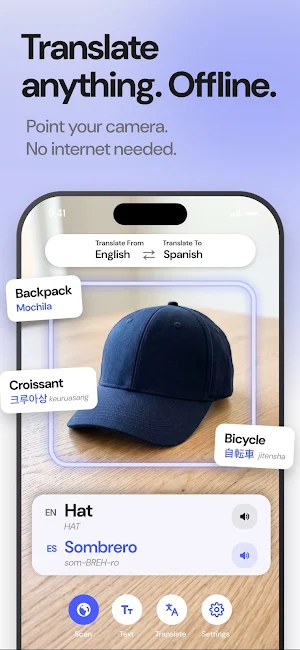
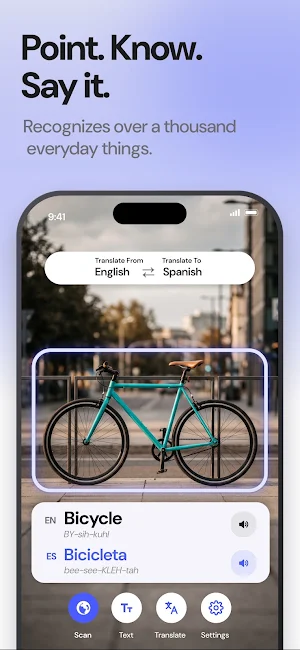
Aim at anything around you and the app names it in both languages, with the translation right underneath. It recognizes over a thousand everyday objects and adds pronunciation hints for Korean, Chinese, Japanese, Cyrillic and Greek.
TYPE OR SPEAK
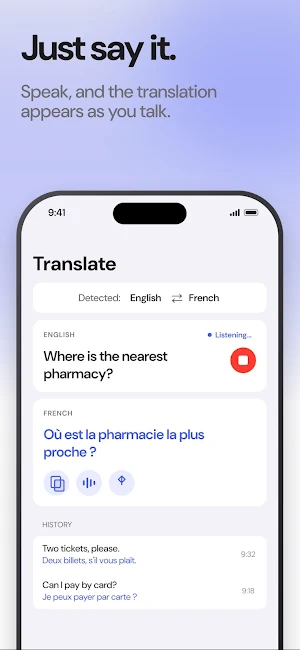
Type a sentence or tap the microphone and speak — the translation appears as you talk. The source language is detected automatically, and every result can be copied, shared, or read aloud in a natural voice.
WORKS OFFLINE IN 59 LANGUAGES
Download a language pack once and everything runs on your device: text recognition, object recognition, and translation. No internet connection, no waiting on a server. It is also why your text, photos, and camera images never leave your phone.
MADE FOR TRAVEL AND LEARNING
Read a menu in Tokyo, a train sign in Athens, or a label in a Seoul supermarket. Look up a word mid-conversation. Save the words you want to remember and come back to them later. Because every translation can be spoken aloud, the app also works as a practical reading aid for anyone with low vision.
NO ADS, NO ACCOUNT
There are no ads anywhere in the app, and you never have to create an account or sign in. Open it and translate.
HOW IT WORKS
1. Pick the language to translate from and the language to translate to.
2. Choose Scan, Text, or Translate.
3. Point, type, or speak — the translation appears instantly.
FEATURES
• Live camera translation for signs, menus, and labels
• Translate text in photos from your library
• Object recognition named in both languages
• Voice and text translation with automatic language detection
• Pronunciation and read-aloud for every word
• 59 languages, all available offline
• Saved words and recent translations, stored on your device
• Available in 11 interface languages
Without Premium, the app includes 15 translations per day plus the language packs for your language pair. Premium removes the daily limit and unlocks all 59 offline languages.
Terms of Use: https://framesixty.com/translate/terms
Privacy Policy: https://framesixty.com/translate/privacy
TRANSLATE WITH YOUR CAMERA
Hold your phone over signs, menus, labels, or a page of text and watch the translation appear live on screen. Tap to pause and read at your own pace. Already took the photo? Import any picture from your library and translate the text inside it.
SCAN OBJECTS AND LEARN THE WORD
Aim at anything around you and the app names it in both languages, with the translation right underneath. It recognizes over a thousand everyday objects and adds pronunciation hints for Korean, Chinese, Japanese, Cyrillic and Greek.
TYPE OR SPEAK
Type a sentence or tap the microphone and speak — the translation appears as you talk. The source language is detected automatically, and every result can be copied, shared, or read aloud in a natural voice.
WORKS OFFLINE IN 59 LANGUAGES
Download a language pack once and everything runs on your device: text recognition, object recognition, and translation. No internet connection, no waiting on a server. It is also why your text, photos, and camera images never leave your phone.
MADE FOR TRAVEL AND LEARNING
Read a menu in Tokyo, a train sign in Athens, or a label in a Seoul supermarket. Look up a word mid-conversation. Save the words you want to remember and come back to them later. Because every translation can be spoken aloud, the app also works as a practical reading aid for anyone with low vision.
NO ADS, NO ACCOUNT
There are no ads anywhere in the app, and you never have to create an account or sign in. Open it and translate.
HOW IT WORKS
1. Pick the language to translate from and the language to translate to.
2. Choose Scan, Text, or Translate.
3. Point, type, or speak — the translation appears instantly.
FEATURES
• Live camera translation for signs, menus, and labels
• Translate text in photos from your library
• Object recognition named in both languages
• Voice and text translation with automatic language detection
• Pronunciation and read-aloud for every word
• 59 languages, all available offline
• Saved words and recent translations, stored on your device
• Available in 11 interface languages
Without Premium, the app includes 15 translations per day plus the language packs for your language pair. Premium removes the daily limit and unlocks all 59 offline languages.
Terms of Use: https://framesixty.com/translate/terms
Privacy Policy: https://framesixty.com/translate/privacy
What’s new
Version 1.3.0 · Updated September 6, 2026
Translate anything with your camera. Point at a sign or menu and read it in your language, or point at an object to learn its name in both languages with audio and pronunciation. Type or speak to translate, and download language packs so everything keeps working offline.
Alternatives to AI Translator: Voice & Camera
Looking for apps like AI Translator: Voice & Camera? Here are 6 similar Android apps on Google Play. 5 of the 6 are free to download.
-
Wear OS Watch Faces: Animated
-
Goldpan Klondike Solitaire
-
Bilingual English Dictionary
-
Nebula Glide: Space Arcade
-
Hours and Minutes Calculator
-
Offline Games: Puzzle & Cards
| App | Rating | Price | Installs | Last updated | Compare |
|---|---|---|---|---|---|
| AI Translator: Voice & Camera | – | Free | 10+ | Sep 6, 2026 | |
| Wear OS Watch Faces: Animated | – | Free | 10+ | Sep 29, 2026 | Compare |
| Goldpan Klondike Solitaire | – | Free | 10+ | – | Compare |
| Bilingual English Dictionary | – | Free | 100+ | – | Compare |
| Nebula Glide: Space Arcade | – | Free | 10+ | – | Compare |
| Hours and Minutes Calculator | – | 0.99 USD | 5+ | Jul 9, 2026 | Compare |
| Offline Games: Puzzle & Cards | – | Free | 100+ | – | Compare |