
AI Draw Sketch - AR Draw
Score Apps Lab Art & Design Contains ads
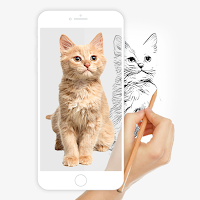
Just trace a projected picture on paper and color it.
- Downloads
- 1K+
- on Google Play
- Price
- Free
- No in-app purchases
- Updated
- Jul 25
- 2023 · v1.0
Screenshots


About AI Draw Sketch - AR Draw
AI Drawing is an innovative mobile app that helps you learn to draw and allows to create stunning drawings and paintings using augmented reality technology. You can draw anything you want on any surface.
Whether you are an experienced artist or just starting out, AR Drawing app is the perfect tool for unleashing your creativity and exploring new possibilities in art. So why wait? Download "AI Draw Sketch - AR Draw" today and start creating your own masterpiece! Sketch, paint, create!
The image will appear on screen with camera open. Place phone about 1feet above and look into the phone and draw on paper.
Features For AI Draw Sketch :-
1) Best way to learn the sketch using your smart device
2) Trace any image using the camera
3) Allow choosing a picture from the gallery or taking one directly from the camera
4) Open the camera, select any image, and begin tracing it
5) Set your gadget on a glass or tripod and begin drawing lines across it
6) various tracing templates, including those with animals, cars, nature, food, anime, etc
7) When you're drawing using AR Draw Sketch, you can lock the screen
8) You may easily adjust the brightness to your preference
9) Flashlight supported
10) Easily rotate and flip the image
11) A simple way to start learning drawing using your phone camera to draw
12) Save your drawing in the gallery
13) Best way to Make a perfect sketch and paint it
14) Share the result on social media.
Whether you are an experienced artist or just starting out, AR Drawing app is the perfect tool for unleashing your creativity and exploring new possibilities in art. So why wait? Download "AI Draw Sketch - AR Draw" today and start creating your own masterpiece! Sketch, paint, create!
The image will appear on screen with camera open. Place phone about 1feet above and look into the phone and draw on paper.
Features For AI Draw Sketch :-
1) Best way to learn the sketch using your smart device
2) Trace any image using the camera
3) Allow choosing a picture from the gallery or taking one directly from the camera
4) Open the camera, select any image, and begin tracing it
5) Set your gadget on a glass or tripod and begin drawing lines across it
6) various tracing templates, including those with animals, cars, nature, food, anime, etc
7) When you're drawing using AR Draw Sketch, you can lock the screen
8) You may easily adjust the brightness to your preference
9) Flashlight supported
10) Easily rotate and flip the image
11) A simple way to start learning drawing using your phone camera to draw
12) Save your drawing in the gallery
13) Best way to Make a perfect sketch and paint it
14) Share the result on social media.
Alternatives to AI Draw Sketch - AR Draw
Looking for apps like AI Draw Sketch - AR Draw? Here are 3 similar Android apps on Google Play. All of them are free to download.


| App | Rating | Price | Installs | Last updated | Compare |
|---|---|---|---|---|---|
| AI Draw Sketch - AR Draw | – | Free | 1,000+ | Jul 25, 2023 | |
| Find My Phone by Clap, Whistle | – | Free | 0+ | Oct 6, 2023 | Compare |
| Unicorn Ai Mix Generate Game | – | Free | 10+ | Aug 24, 2023 | Compare |
| Ai Mix Mech Robot Game | – | Free | 1,000+ | Aug 19, 2023 | Compare |