

AirportGo: CLE Airport Map
Airportgo Technologies Maps & Navigation
Offline CLE airport map, gates, TSA, & walking directions
- Downloads
- 50+
- on Google Play
- Price
- Free
- No in-app purchases
- Updated
- Sep 1
- 2026 · v1.1.5
Screenshots


About AirportGo: CLE Airport Map
Navigate Cleveland Hopkins Airport Faster
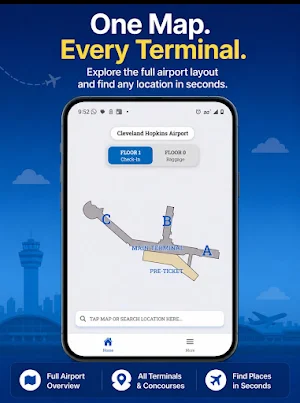
AirportGo is an offline indoor navigation app for Cleveland Hopkins International Airport (CLE). Find gates, terminals, TSA checkpoints, baggage claim, restaurants, restrooms, elevators, and other airport services with simple walking directions.
Whether you're catching a flight, meeting arriving passengers, or exploring the airport for the first time, AirportGo helps you navigate Cleveland Hopkins with confidence—even without an internet connection.
Why Choose AirportGo?
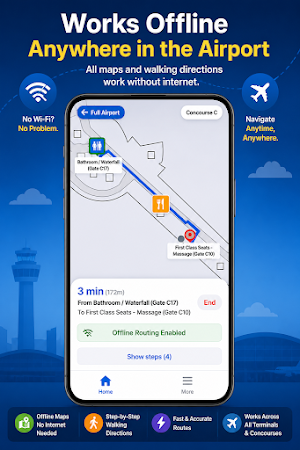
✔ Works completely offline
✔ Indoor airport map designed specifically for CLE
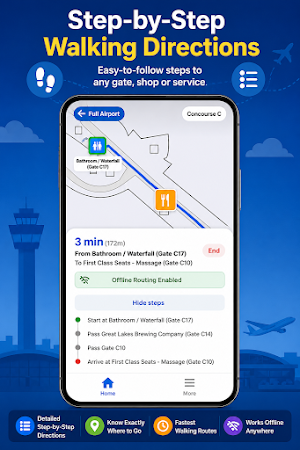
✔ Fast walking directions between locations
✔ Simple and easy-to-use interface
✔ No account required
Features
• Cleveland Hopkins Airport (CLE) map
• Walking directions between airport locations
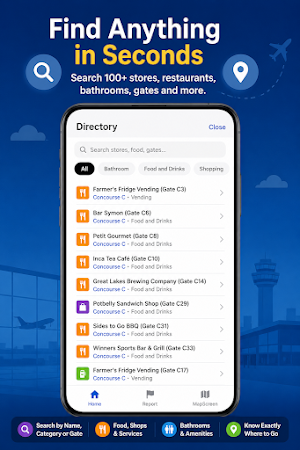
• Find gates quickly
• Locate TSA security checkpoints
• Navigate terminals and concourses
• Find baggage claim
• Locate restaurants and food options
• Find restrooms, elevators, escalators, and stairs
• Find airport services and amenities
• Estimated walking times
• Offline airport navigation
Great For
• First-time visitors
• Tight layovers
• Connecting flights
• Business travelers
• Families
• Picking up arriving passengers
• Travelers with heavy luggage
• Anyone who wants to save time at Cleveland Hopkins Airport
Why AirportGo?
AirportGo is designed specifically for indoor airport navigation. Instead of searching through airport websites or trying to understand unfamiliar terminal maps, AirportGo helps you quickly find where you need to go.
Whether you're looking for your gate, TSA security, baggage claim, food, or airport services, AirportGo provides a simple map with walking directions designed for travelers.
Current Airport
Currently includes:
• Cleveland Hopkins International Airport (CLE)
Coming Soon
AirportGo is expanding.
Future updates will include:
• Additional U.S. airports
• More airport maps
• Expanded traveler features
• More airport services and points of interest
Download AirportGo Today
Navigate Cleveland Hopkins Airport with confidence.
Find gates faster.
Locate TSA checkpoints.
Explore terminals.
Walk the shortest route.
AirportGo makes airport navigation simple.
AirportGo is an offline indoor navigation app for Cleveland Hopkins International Airport (CLE). Find gates, terminals, TSA checkpoints, baggage claim, restaurants, restrooms, elevators, and other airport services with simple walking directions.
Whether you're catching a flight, meeting arriving passengers, or exploring the airport for the first time, AirportGo helps you navigate Cleveland Hopkins with confidence—even without an internet connection.
Why Choose AirportGo?
✔ Works completely offline
✔ Indoor airport map designed specifically for CLE
✔ Fast walking directions between locations
✔ Simple and easy-to-use interface
✔ No account required
Features
• Cleveland Hopkins Airport (CLE) map
• Walking directions between airport locations
• Find gates quickly
• Locate TSA security checkpoints
• Navigate terminals and concourses
• Find baggage claim
• Locate restaurants and food options
• Find restrooms, elevators, escalators, and stairs
• Find airport services and amenities
• Estimated walking times
• Offline airport navigation
Great For
• First-time visitors
• Tight layovers
• Connecting flights
• Business travelers
• Families
• Picking up arriving passengers
• Travelers with heavy luggage
• Anyone who wants to save time at Cleveland Hopkins Airport
Why AirportGo?
AirportGo is designed specifically for indoor airport navigation. Instead of searching through airport websites or trying to understand unfamiliar terminal maps, AirportGo helps you quickly find where you need to go.
Whether you're looking for your gate, TSA security, baggage claim, food, or airport services, AirportGo provides a simple map with walking directions designed for travelers.
Current Airport
Currently includes:
• Cleveland Hopkins International Airport (CLE)
Coming Soon
AirportGo is expanding.
Future updates will include:
• Additional U.S. airports
• More airport maps
• Expanded traveler features
• More airport services and points of interest
Download AirportGo Today
Navigate Cleveland Hopkins Airport with confidence.
Find gates faster.
Locate TSA checkpoints.
Explore terminals.
Walk the shortest route.
AirportGo makes airport navigation simple.
What’s new
Version 1.1.5 · Updated September 1, 2026
-added pop up screen on home page leading to checklist
User reviews

As someone who loves traveling,this app keeps me prepared. Thank you to the developer for making our journeys easier.🙏

It was helpful and easy to use when going through the airport!.

This will help me when I come to visit Ohio.
Alternatives to AirportGo: CLE Airport Map
Looking for apps like AirportGo: CLE Airport Map? Here are 6 similar Android apps on Google Play. All of them are free to download.






| App | Rating | Price | Installs | Last updated | Compare |
|---|---|---|---|---|---|
| AirportGo: CLE Airport Map | – | Free | 50+ | Sep 1, 2026 | |
| YourSpace | – | Free | 50+ | May 6, 2026 | Compare |
| Andeshandbook | – | Free | 1,000+ | – | Compare |
| FleetHub Driver | – | Free | 10+ | – | Compare |
| Louisville Transit - Bus Times | – | Free | 500+ | – | Compare |
| CargoBike | – | Free | 50+ | – | Compare |
| Ch7al | – | Free | 10+ | May 21, 2026 | Compare |
Similar apps on Google Play
- YourSpace
- Andeshandbook
- FleetHub Driver
- Louisville Transit - Bus Times
- CargoBike
- Ch7al
- DropSync: Delivery app Zambia
- bizi places
- GPS Poznan
- Pilupay
- Orlando Florida - Bus Transit
- Chicago App
- Mapstead: Property Mapper
- NeptuneCore
- E-Tap
- DriveNC
- Oolel Maps
- Refuge For All
- Checkin Explorer
- COAST Shuttles
- PWWA
- Atomz
- MIMI Conductoras
- LeafTech Ag
- SpectreNav