
AI Question Maker Practice App
ANDREW BETTS Education
Generate AI questions, practice & track progress offline.
- Downloads
- 10+
- on Google Play
- Price
- Free
- No in-app purchases
- Updated
- Apr 19
- 2026 · v1.0
Screenshots


About AI Question Maker Practice App
AI Question Maker Practice App helps learners create custom questions for any topic and practice interactively.
Key features:
Question Generation
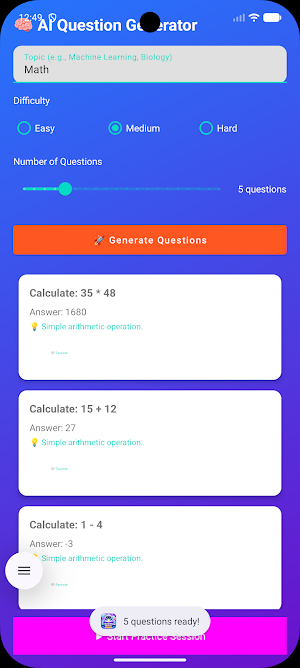
Enter any topic (e.g., Math, Science, English). Select difficulty (Easy, Medium, Hard). The application generates multiple‑choice and short‑answer questions using rule‑based logic.
Practice Mode
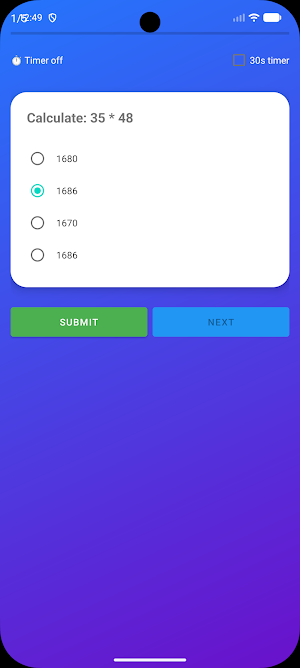
Answer one question at a time. Optional 30‑second timer. Immediate feedback shows correct answer and explanation. Score is calculated automatically.
Progress Tracking
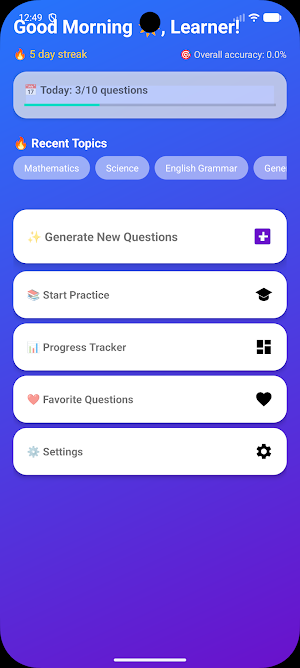
The app records total questions answered, correct answers, and accuracy percentage. A simple chart visualizes your progress over time.
Favorites
Mark useful questions as favorites. Review them later in a separate list.
Offline Functionality
All features work without an internet connection. No account required.
Customization
Switch between light and dark themes. Enable or disable sound effects and animations. Reset progress data at any time.
Settings
Adjust app behavior to your preference. All settings are saved locally.
How it works
Open the app and go to “Generate Questions”.
Type a topic, choose difficulty, and select how many questions to create (1–20).
The app instantly builds a set of questions based on built‑in knowledge templates.
Start a practice session to answer the questions.
Review your score and see correct answers with explanations.
Track your overall performance in the Progress section.
Data storage
All user data (settings, progress, favorites) stays on the device using SharedPreferences. No personal information is collected or transmitted.
Requirements
Android 6.0 (API level 23) or higher. Internet permission is optional and only used if future online AI features are enabled.
Use cases
Self‑study for exams or quizzes
Quick knowledge checks on any subject
Teachers preparing sample questions for students
Anyone who wants to practice and measure learning progress
The application provides a straightforward, ad‑free learning tool without misleading claims or unnecessary permissions.
Key features:
Question Generation
Enter any topic (e.g., Math, Science, English). Select difficulty (Easy, Medium, Hard). The application generates multiple‑choice and short‑answer questions using rule‑based logic.
Practice Mode
Answer one question at a time. Optional 30‑second timer. Immediate feedback shows correct answer and explanation. Score is calculated automatically.
Progress Tracking
The app records total questions answered, correct answers, and accuracy percentage. A simple chart visualizes your progress over time.
Favorites
Mark useful questions as favorites. Review them later in a separate list.
Offline Functionality
All features work without an internet connection. No account required.
Customization
Switch between light and dark themes. Enable or disable sound effects and animations. Reset progress data at any time.
Settings
Adjust app behavior to your preference. All settings are saved locally.
How it works
Open the app and go to “Generate Questions”.
Type a topic, choose difficulty, and select how many questions to create (1–20).
The app instantly builds a set of questions based on built‑in knowledge templates.
Start a practice session to answer the questions.
Review your score and see correct answers with explanations.
Track your overall performance in the Progress section.
Data storage
All user data (settings, progress, favorites) stays on the device using SharedPreferences. No personal information is collected or transmitted.
Requirements
Android 6.0 (API level 23) or higher. Internet permission is optional and only used if future online AI features are enabled.
Use cases
Self‑study for exams or quizzes
Quick knowledge checks on any subject
Teachers preparing sample questions for students
Anyone who wants to practice and measure learning progress
The application provides a straightforward, ad‑free learning tool without misleading claims or unnecessary permissions.
Alternatives to AI Question Maker Practice App
Looking for apps like AI Question Maker Practice App? Here are 6 similar Android apps on Google Play. The highest rated is Answer.AI - Your AI tutor (4.7/5), and all 6 are free to download.
-
Pocket Prep Fitness 2026 4.7
-
Answer.AI - Your AI tutor 4.7
-
SHRM Exam Prep 2026 4.7
-
MPI Educational
-
SIE Exam Prep 2026 4.5
-
LCSW Test Prep 2026 4.7
| App | Rating | Price | Installs | Last updated | Compare |
|---|---|---|---|---|---|
| AI Question Maker Practice App | – | Free | 10+ | Apr 19, 2026 | |
| Pocket Prep Fitness 2026 | 4.7 / 5 | Free | 10,000+ | Aug 25, 2026 | Compare |
| Answer.AI - Your AI tutor | 4.7 / 5 | Free | 1,000,000+ | Apr 1, 2026 | Compare |
| SHRM Exam Prep 2026 | 4.7 / 5 | Free | 10,000+ | – | Compare |
| MPI Educational | – | Free | 10,000+ | Sep 24, 2025 | Compare |
| SIE Exam Prep 2026 | 4.5 / 5 | Free | 10,000+ | – | Compare |
| LCSW Test Prep 2026 | 4.7 / 5 | Free | 10,000+ | – | Compare |