
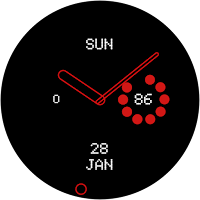
Nothing Minimal Watchface
Attified Designs Personalization
Watchface based on Nothing OS UI
- Downloads
- 1+
- on Google Play
- Price
- $0.49
- No in-app purchases
- Updated
- Jan 23
- 2024 · v1.0.1
Screenshots
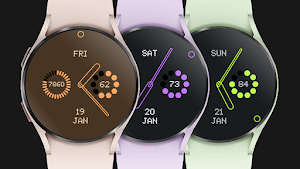
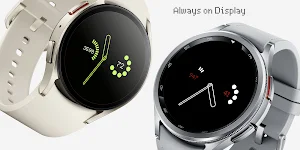
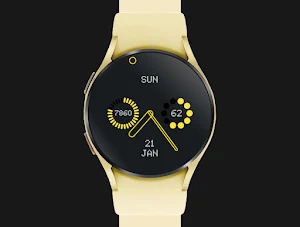
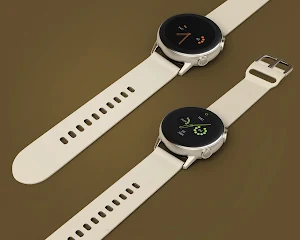


About Nothing Minimal Watchface
Add nothing to your watchface to sync with your minimal nothing OS style.
Installation:
1. Keep your watch connected to your phone.
2. Install in the phone. After installation, immediately check your watch face list in your watch by pressing and hold display then swipe to the very end and click Add watch face. There you can see the newly installed watch face and just activate it.
3. After installation, you can also check the following:
A. For Samsung watches, check your Galaxy Wearable app in your phone (install it if not yet installed). Under Watch faces > Downloaded, there you can see the newly installed watch face and then just apply it to connected watch.
B. For other smartwatch brands, for other Wear OS devices, please check the watch app installed in your phone that comes with your smartwatch brand and find the newly installed watch face in the watch face gallery or list.
FEATURES:
- Battery percent
- Steps percent subdial
- Date, Month & day of week
- 10+ Theme colors
Customisation:
1. Press and hold display then hit "Customize".
2. Swipe left and right to choose what to customize.
3. Swipe up and down to choose options available.
4. Hit "OK".
Preset App Shortcuts:
1.Battery Status
2. Calendar
3. Heart rate
The Measuring Heart Rate shortcut takes independent measurement of heart rate and doesn't update the Wear OS heart rate app. This watch face displays the heart rate at the time of measurement and it may have different reading from the Wear OS app. To measure heart rate: Please make sure to wear your watch properly, screen turned on and stay still while measuring. Then single tap the shortcut to measure heart rate. Icon appears when measuring heart rate. Wait for a few seconds. Heart rate icon disappears once done. Heart rate will automatically measure every 10 minutes.
Compatible devices are: Samsung Galaxy Watch5 Pro, Samsung Watch4 Classic, Samsung Galaxy Watch5, Samsung Galaxy Watch4, Mobvoi TicWatch Pro 4 GPS, TicWatch Pro 4 Ultra GPS, Fossil Gen 6, Fossile Wear OS, Google Pixel Watch, Suunto 7, Mobvoi TicWatch Pro, Fossil Wear, Mobvoi TicWatch Pro, Fossil Gen 5e, (g-shock) Casio GSW-H1000, Mobvoi TicWatch E3, Mobvoi Ticwatch Pro 4G, Mobvoi TicWatch Pro 3, TAG Heuer Connected 2020, Fossil Gen 5 LTE, Movado, Connect 2.0, Mobvoi TicWatch E2/S2, Montblanc Summit 2+, Montblanc Summit, Motorola Moto 360, Fossil Sport, Hublot Big Bang e Gen 3, TAG Heuer Connected Calibre E4 42mm, Montblanc Summit Lite, Casio WSD-F21HR, Mobvoi TicWatch C2, Montblanc SUMMIT, Oppo OPPO Watch, Fossil Wear, Oppo OPPO Watch, TAG Heuer Connected Calibre E4 45mm
Installation:
1. Keep your watch connected to your phone.
2. Install in the phone. After installation, immediately check your watch face list in your watch by pressing and hold display then swipe to the very end and click Add watch face. There you can see the newly installed watch face and just activate it.
3. After installation, you can also check the following:
A. For Samsung watches, check your Galaxy Wearable app in your phone (install it if not yet installed). Under Watch faces > Downloaded, there you can see the newly installed watch face and then just apply it to connected watch.
B. For other smartwatch brands, for other Wear OS devices, please check the watch app installed in your phone that comes with your smartwatch brand and find the newly installed watch face in the watch face gallery or list.
FEATURES:
- Battery percent
- Steps percent subdial
- Date, Month & day of week
- 10+ Theme colors
Customisation:
1. Press and hold display then hit "Customize".
2. Swipe left and right to choose what to customize.
3. Swipe up and down to choose options available.
4. Hit "OK".
Preset App Shortcuts:
1.Battery Status
2. Calendar
3. Heart rate
The Measuring Heart Rate shortcut takes independent measurement of heart rate and doesn't update the Wear OS heart rate app. This watch face displays the heart rate at the time of measurement and it may have different reading from the Wear OS app. To measure heart rate: Please make sure to wear your watch properly, screen turned on and stay still while measuring. Then single tap the shortcut to measure heart rate. Icon appears when measuring heart rate. Wait for a few seconds. Heart rate icon disappears once done. Heart rate will automatically measure every 10 minutes.
Compatible devices are: Samsung Galaxy Watch5 Pro, Samsung Watch4 Classic, Samsung Galaxy Watch5, Samsung Galaxy Watch4, Mobvoi TicWatch Pro 4 GPS, TicWatch Pro 4 Ultra GPS, Fossil Gen 6, Fossile Wear OS, Google Pixel Watch, Suunto 7, Mobvoi TicWatch Pro, Fossil Wear, Mobvoi TicWatch Pro, Fossil Gen 5e, (g-shock) Casio GSW-H1000, Mobvoi TicWatch E3, Mobvoi Ticwatch Pro 4G, Mobvoi TicWatch Pro 3, TAG Heuer Connected 2020, Fossil Gen 5 LTE, Movado, Connect 2.0, Mobvoi TicWatch E2/S2, Montblanc Summit 2+, Montblanc Summit, Motorola Moto 360, Fossil Sport, Hublot Big Bang e Gen 3, TAG Heuer Connected Calibre E4 42mm, Montblanc Summit Lite, Casio WSD-F21HR, Mobvoi TicWatch C2, Montblanc SUMMIT, Oppo OPPO Watch, Fossil Wear, Oppo OPPO Watch, TAG Heuer Connected Calibre E4 45mm
Alternatives to Nothing Minimal Watchface
Looking for apps like Nothing Minimal Watchface? Here are 6 similar Android apps on Google Play. The highest rated is Piptek KWGT Clock Widget (2.6/5), and 3 of the 6 are free to download.
-
Vision Pro KWGT
-
Cyberpunk KWGT Widget 2.4
-
KWGT Hack Widget
-
Fall KWGT
-
Piptek KWGT Clock Widget 2.6
-
Attified Minimal Widget
| App | Rating | Price | Installs | Last updated | Compare |
|---|---|---|---|---|---|
| Nothing Minimal Watchface | – | $0.49 | 1+ | Jan 23, 2024 | |
| Vision Pro KWGT | – | 0.99 USD | 100+ | Oct 20, 2026 | Compare |
| Cyberpunk KWGT Widget | 2.4 / 5 | 0.99 USD | 5,000+ | Aug 8, 2026 | Compare |
| KWGT Hack Widget | – | 0.99 USD | 500+ | Apr 16, 2026 | Compare |
| Fall KWGT | – | Free | 1,000+ | Jul 19, 2022 | Compare |
| Piptek KWGT Clock Widget | 2.6 / 5 | Free | 10,000+ | Jan 18, 2017 | Compare |
| Attified Minimal Widget | – | Free | 100+ | Jun 2, 2016 | Compare |