
Refresh Rate Display Pro
Ahmed Nagy Tools
Screen refresh rate with a customizable floating display for all applications.
- Downloads
- 49+
- on Google Play
- Price
- $4.99
- No in-app purchases
- Updated
- Sep 26
- 2026 · v3.0
Screenshots
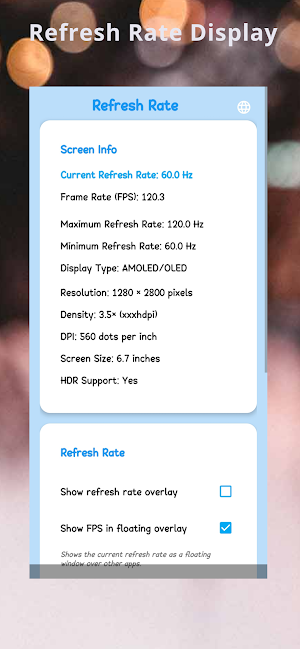
About Refresh Rate Display Pro
"Refresh Rate Display" is a professional tool that allows you to monitor and display your device's screen refresh rate in real-time with high accuracy. The app provides detailed information about your device's screen including:
• Current screen refresh rate in Hertz (Hz)
• Maximum refresh rate available on your device
• Minimum screen refresh rate
• Screen type and specifications
• Actual frames per second (FPS) during use
App Features:
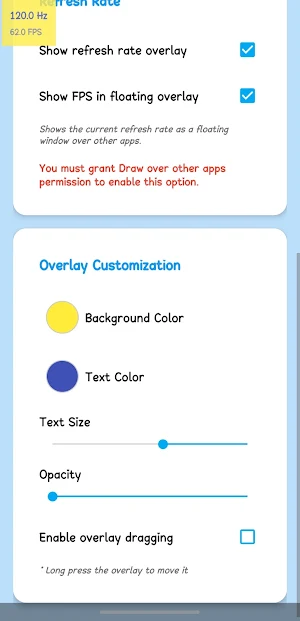
✓ Movable floating window that works on top of all applications
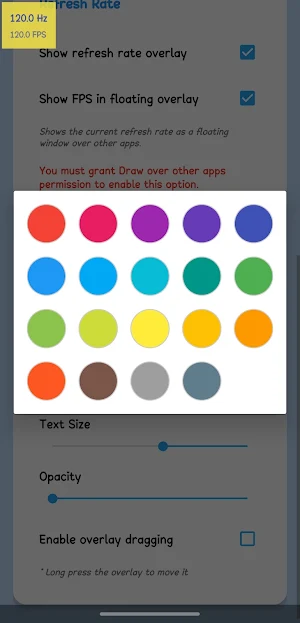
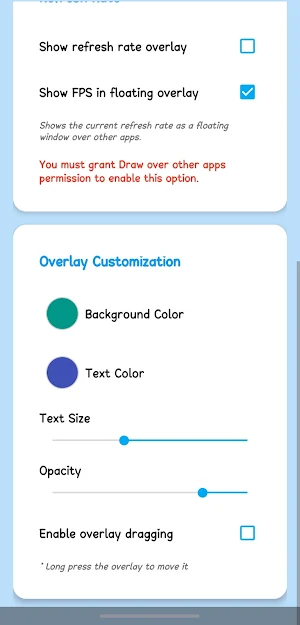
✓ Ability to customize colors, size, and transparency of the floating window
✓ Support for multiple languages
✓ High-precision FPS measurement
✓ Simple and easy-to-use interface
✓ Runs in the background with low battery consumption
✓ Specially designed for devices with high refresh rates (90Hz, 120Hz, 144Hz)
✓ Regular updates to ensure compatibility with the latest Android versions
Use Cases:
• For gamers: Check refresh rate stability during gameplay
• For developers: Test application performance at different refresh rates
• For regular users: Ensure you're benefiting from your phone's high refresh rate
• For tech enthusiasts: Understand how refresh rate changes during different application usage
The app requires “Display over other apps” permission to continuously show the refresh rate, and notification permission to work as a background service.
Download "Refresh Rate Monitor" now and enjoy professionally monitoring your phone screen's performance!
• Current screen refresh rate in Hertz (Hz)
• Maximum refresh rate available on your device
• Minimum screen refresh rate
• Screen type and specifications
• Actual frames per second (FPS) during use
App Features:
✓ Movable floating window that works on top of all applications
✓ Ability to customize colors, size, and transparency of the floating window
✓ Support for multiple languages
✓ High-precision FPS measurement
✓ Simple and easy-to-use interface
✓ Runs in the background with low battery consumption
✓ Specially designed for devices with high refresh rates (90Hz, 120Hz, 144Hz)
✓ Regular updates to ensure compatibility with the latest Android versions
Use Cases:
• For gamers: Check refresh rate stability during gameplay
• For developers: Test application performance at different refresh rates
• For regular users: Ensure you're benefiting from your phone's high refresh rate
• For tech enthusiasts: Understand how refresh rate changes during different application usage
The app requires “Display over other apps” permission to continuously show the refresh rate, and notification permission to work as a background service.
Download "Refresh Rate Monitor" now and enjoy professionally monitoring your phone screen's performance!
Alternatives to Refresh Rate Display Pro
Looking for apps like Refresh Rate Display Pro? Here are 6 similar Android apps on Google Play. The highest rated is NetCut – Internet Blocker (1.2/5), and 4 of the 6 are free to download.
-
NetCut – Internet Blocker 1.2
-
PDF Easy Pro
-
SVG Viewer
-
image converter pro
-
Charging Power Pro
-
Image Converter PDF JPG PNG

| App | Rating | Price | Installs | Last updated | Compare |
|---|---|---|---|---|---|
| Refresh Rate Display Pro | – | $4.99 | 10+ | Sep 26, 2026 | |
| NetCut – Internet Blocker | 1.2 / 5 | Free | 100,000+ | – | Compare |
| PDF Easy Pro | – | Free | 100+ | – | Compare |
| SVG Viewer | – | Free | 500+ | Sep 18, 2026 | Compare |
| image converter pro | – | 0.49 USD | 10+ | Sep 26, 2025 | Compare |
| Charging Power Pro | – | 3.2 USD | 100+ | Aug 1, 2026 | Compare |
| Image Converter PDF JPG PNG | – | Free | 500+ | Apr 24, 2026 | Compare |

