Kore Launcher: Home & Themes
Customize your Android home screen: themes, widgets, icon packs & app drawer.
About Kore Launcher: Home & Themes
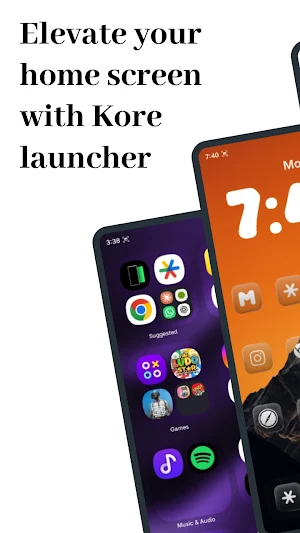
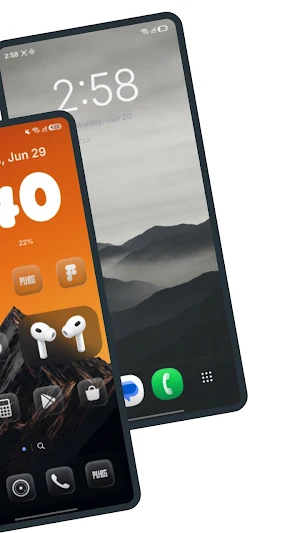
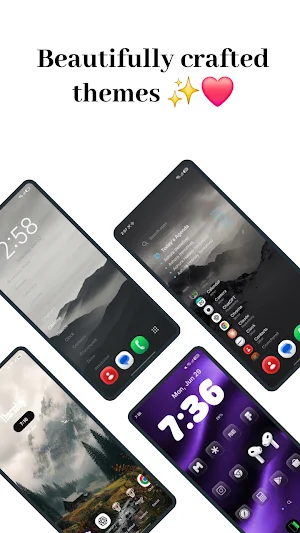
Kore Launcher is a fast, clean and highly customizable home screen launcher for Android. Personalize everything — themes, icon packs, widgets, fonts, wallpapers, grid and gestures — then enjoy a smooth, private home screen that runs at up to 120fps. Set Kore as your default launcher and make your phone yours.
One-time purchase. No ads. No subscriptions. No trackers.
★ MADE TO CUSTOMIZE
- Themes and one-tap style presets
- Icon packs and adaptive icon backdrops
- Custom fonts, wallpapers and live wallpaper blur
- Adjustable grid size, icon size, labels, folders and dock
- Multiple home screen layouts: classic pages, minimal text home, Agenda home, or a personal dashboard
★ POWERFUL APP DRAWER & UNIVERSAL SEARCH
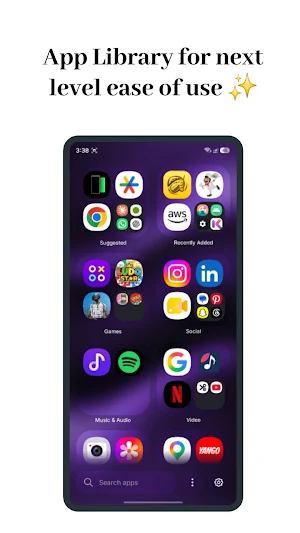
A clean, alphabetical app drawer with instant search across apps, contacts, settings and files — plus a built-in calculator. Choose grid or list, paged or continuous scrolling, and place the search bar on top or bottom.
★ WIDGETS & WIDGET STUDIO
Add any Android widget, resize it with Samsung-style corner handles, or design your own custom widgets in Widget Studio — clock, weather, steps and more.
★ SMART FOLDERS & CORE INTELLIGENCE
On-device intelligence learns the apps you use by time of day and surfaces them when you need them. Tap "Organize into folders" and Kore neatly sorts every app into categories — Games, Social, Productivity, Finance and more — while keeping your calls and messaging apps on the dock.
★ Kore Pill
A floating island shows charging, ringer changes, unlock and now-playing music. Drag it anywhere on screen — even over the status or navigation bar — with smooth, elastic, fluid and bouncy animations.
★ PREMIUM LIQUID GLASS LOOK
Optional Apple-style liquid glass with real backdrop refraction, adjustable reflection, tint and blur — apply it to the dock, search bar and folders, or turn it off for a flat look. Your launcher, your style.
★ APP LOCK & PRIVACY
Lock sensitive apps behind your fingerprint, face or PIN. Kore collects no personal data, shows no ads, and keeps your layout, usage and settings on your device.
★ ACCESSIBILITY SERVICE (OPTIONAL, OFF BY DEFAULT)
Kore has one optional feature, Kore Launcher gestures, that uses Android's accessibility service
It lets the gestures you set up yourself open your notifications, open Quick Settings, show recent apps, open the power menu, take a screenshot or lock your phone. Android gives a launcher no other way to do these things.
Kore only ever performs the action you asked for. It cannot see what you type, what you tap or what is on your screen, and it never records, stores or shares anything.
It stays off until you switch it on. Kore explains it in full first, and you can turn it off any time in Android Settings > Accessibility. Every gesture that uses it is optional, and Kore works perfectly without it.
★ FAST & SMOOTH
Built with Jetpack Compose for buttery scrolling and quick app launches. Lightweight and battery-friendly.
WHY CHOOSE KORE LAUNCHER?
- One-time price — buy once, yours forever
- Privacy-first — nothing leaves your phone
- No ads, no subscriptions, no tracking
- Endlessly customizable home screen
- Designed and built by Aeroloom Studio
Whether you want a minimal, clean home screen or a fully themed, widget-packed setup, Kore Launcher gives you a beautiful, fast and private Android home screen.
Questions or feedback? [email protected]
Kore Launcher: Home & Themes details
Kore Launcher: Home & Themes is a paid Personalization app for Android with 100+ installs on Google Play and a 4.8/5 average rating from 104 ratings. It was released on July 5, 2026 and last updated on September 3, 2026. It requires Android 7.0 or later.
- Category
- Personalization
- Rating
- 4.8 / 5 (104 ratings)
- Installs
- 100+
- Price
- $9.99
- In-app purchases
- No
- Ads
- No ads
- Current version
- 4.2
- Requires Android
- 7.0
- Content rating
- Everyone
- Released
- July 5, 2026
- Last updated
- September 3, 2026
What’s new in Kore Launcher: Home & Themes
✨ New: Category drawer can now be placed on the top, bottom, left, or right. Added new themes and more customization options. Fixed lag and performance issues, dock animation flickering, crashes, and several UI issues for a smoother and more reliable experience.
Version 4.2 · Updated September 3, 2026
Similar Apps

Hermit — Lite Apps Browser
Advanced Web Browser for Power Users, optimized for Lite Apps & Privacy

Be Soul: Legacy Planner
Create a Digital Legacy for future generations

Ares Light: Pastel Icon Pack
Light, squircle-shaped icons for your homescreen and app drawer. Pastel look.

Albany Times Union News
Trusted Capital Region news

Sesame Search & Shortcuts
Universal search for Android! Quick launch everything! Nova + Hyperion Partner

AIO Launcher
All you need on a single home screen