
Spantop: Mac Display Extender
ADITYA DEWASKAR Productivity
Turn your Android tablet into a second Mac display. USB-C or WiFi.
- Downloads
- 221+
- on Google Play
- Price
- Free
- No in-app purchases
- Updated
- Aug 14
- 2026 · v1.2.8
Screenshots

About Spantop: Mac Display Extender
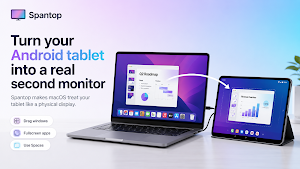
Spantop turns your Android tablet into an extended monitor, where macOS treats it like a physical display. Drag windows onto it, run fullscreen apps, use Spaces, and do anything you would do with a real second screen.
HOW IT WORKS
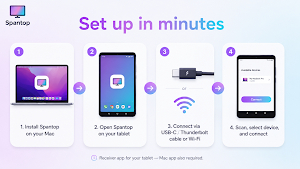
1. Install Spantop on your Mac from the App Store.
Mac App Store: https://apps.apple.com/in/app/spantop/id6767212376?mt=12
2. Open Spantop on your tablet.
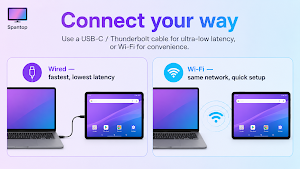
3. Connect via USB-C data cable, recommended, or WiFi.
4. On your Mac, tap Scan for Devices, select your tablet, then tap Connect — done.
⚠️ Use a USB-C data cable, not a charge-only cable. Many cables bundled with chargers and power banks only carry power, not data — Spantop needs data to stream your screen, so a charge-only cable will connect but show no picture.
FEATURES
• Real second monitor — macOS recognizes your tablet as a physical display in System Settings.
• USB-C or WiFi connection.
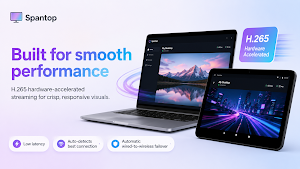
• H.265 hardware-accelerated streaming for smooth video.
• Auto-detects the best connection: USB for speed, WiFi for convenience.
• Automatic failover between wired and wireless if the cable is unplugged.
• A USB-C data cable for wired use (charge-only cables won't stream).
REQUIREMENTS
• Android 8.0 Oreo or newer.
• Tablet form factor, smallest width 600dp or more.
• H.265 hardware decoder, standard on all modern tablets.
• macOS 14 Sonoma or newer on the host Mac.
CONNECTION
USB-C: Enable USB Debugging on your tablet once. Plug it in with a USB-C data cable, and Spantop connects over the cable using ADB tunneling on the Mac side. This gives you the lowest latency and does not require WiFi.
WiFi: Keep both devices on the same network. Your tablet will be discovered automatically.
PRIVACY
We collect no personal data. Screen frames are streamed only to the locally connected tablet over USB or LAN. Nothing leaves your local network.
Full privacy policy: adewaskar.com/apps/spantop/privacy-policy
Note: This is the receiver app for your tablet. You also need to install Spantop on your Mac.
HOW IT WORKS
1. Install Spantop on your Mac from the App Store.
Mac App Store: https://apps.apple.com/in/app/spantop/id6767212376?mt=12
2. Open Spantop on your tablet.
3. Connect via USB-C data cable, recommended, or WiFi.
4. On your Mac, tap Scan for Devices, select your tablet, then tap Connect — done.
⚠️ Use a USB-C data cable, not a charge-only cable. Many cables bundled with chargers and power banks only carry power, not data — Spantop needs data to stream your screen, so a charge-only cable will connect but show no picture.
FEATURES
• Real second monitor — macOS recognizes your tablet as a physical display in System Settings.
• USB-C or WiFi connection.
• H.265 hardware-accelerated streaming for smooth video.
• Auto-detects the best connection: USB for speed, WiFi for convenience.
• Automatic failover between wired and wireless if the cable is unplugged.
• A USB-C data cable for wired use (charge-only cables won't stream).
REQUIREMENTS
• Android 8.0 Oreo or newer.
• Tablet form factor, smallest width 600dp or more.
• H.265 hardware decoder, standard on all modern tablets.
• macOS 14 Sonoma or newer on the host Mac.
CONNECTION
USB-C: Enable USB Debugging on your tablet once. Plug it in with a USB-C data cable, and Spantop connects over the cable using ADB tunneling on the Mac side. This gives you the lowest latency and does not require WiFi.
WiFi: Keep both devices on the same network. Your tablet will be discovered automatically.
PRIVACY
We collect no personal data. Screen frames are streamed only to the locally connected tablet over USB or LAN. Nothing leaves your local network.
Full privacy policy: adewaskar.com/apps/spantop/privacy-policy
Note: This is the receiver app for your tablet. You also need to install Spantop on your Mac.
What’s new
Version 1.2.8 · Updated August 14, 2026
Streaming now works on many more tablets — Spantop automatically switches to a video mode your device supports, and recovers on its own if the first try fails. Clearer setup guide, plus easier-to-read text throughout.
Alternatives to Spantop: Mac Display Extender
Looking for apps like Spantop: Mac Display Extender? Here are 6 similar Android apps on Google Play. The highest rated is DREO (4.8/5), and all 6 are free to download.
-
DREO 4.8
-
FlexiRoam: eSIM & Data Plans 3.6
-
FAX Desk: Send Fax from Phone 4.6
-
Mobile Link for Generators 4.6
-
Blue Sky Vitamin 4.8
-
Coolina 4.8
| App | Rating | Price | Installs | Last updated | Compare |
|---|---|---|---|---|---|
| Spantop: Mac Display Extender | – | Free | 100+ | Aug 14, 2026 | |
| DREO | 4.8 / 5 | Free | 500,000+ | Sep 23, 2026 | Compare |
| FlexiRoam: eSIM & Data Plans | 3.6 / 5 | Free | 1,000,000+ | Oct 22, 2026 | Compare |
| FAX Desk: Send Fax from Phone | 4.6 / 5 | Free | 10,000+ | Dec 19, 2025 | Compare |
| Mobile Link for Generators | 4.6 / 5 | Free | 500,000+ | Sep 22, 2026 | Compare |
| Blue Sky Vitamin | 4.8 / 5 | Free | 1,000+ | Oct 8, 2026 | Compare |
| Coolina | 4.8 / 5 | Free | 1,000+ | Oct 13, 2026 | Compare |