

Quality Image Compressor
ACE Labs Tools Contains ads
Compress images to the required size easily without losing quality.
- Downloads
- 23.6K+
- on Google Play
- Price
- Free
- No in-app purchases
- Updated
- Aug 27
- 2026 · v2.5
Screenshots

About Quality Image Compressor
Quality Image Compressor is a beautifully designed app to easily compress your images to required size.
Quality Image Compressor compresses the images without losing quality. The easy-to-use UI of the app allows you to perform different functions like compression, rotation, cropping or saving the compressed image in a smooth and seamless manner.
FEATURES
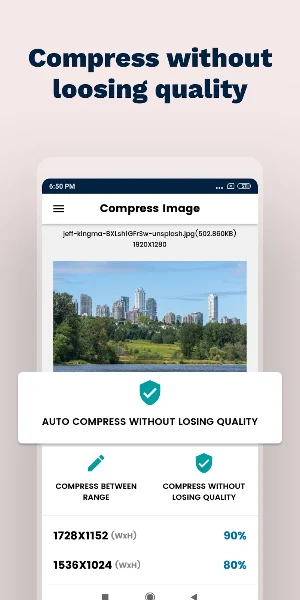
1. Compress without losing quality
One of the most important and useful feature that allows you to compress an image to a much smaller size without affecting the quality of the image.
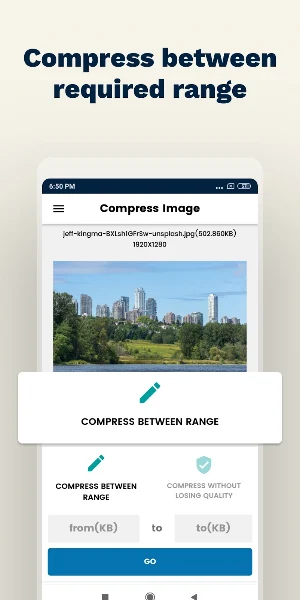
2. Compress between range(e.g. 20kb to 100kb)
Many forms require you to upload an image with size between a given range. With this option, generate a compressed image of size within that
required range automatically.
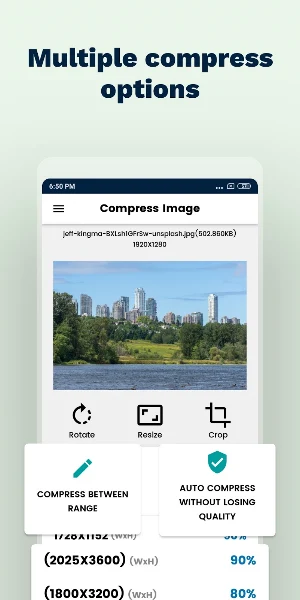
3. Multiple compress options
Compress the images from multiple compress options as per your requirement.
4. Crop Images
Crop away the unwanted portions from the image as per your requirement.
5. Rotate Image
Set the rotation for the image as per your requirement.
HOW TO USE
1. Select an image to compress.
2. Select RESIZE option to show all the different image compress options.
- If image has to be compressed within a specific range, select COMPRESS BETWEEN RANGE and enter the required range and compress.
- COMPRESS WITHOUT LOSING QUALITY option will automatically compress the image to a smaller size without losing quality.
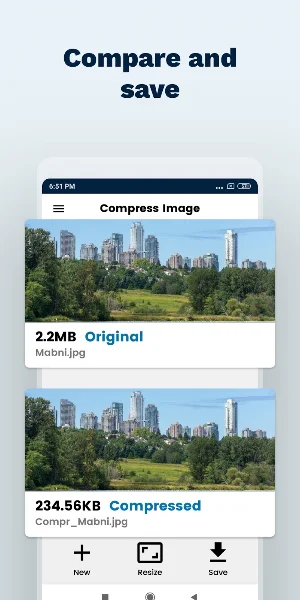
3. After the image is compressed, the original image and the compressed image will be available. If the compressed image is of required size, save the image by pressing SAVE option.
Quality Image Compressor compresses the images without losing quality. The easy-to-use UI of the app allows you to perform different functions like compression, rotation, cropping or saving the compressed image in a smooth and seamless manner.
FEATURES
1. Compress without losing quality
One of the most important and useful feature that allows you to compress an image to a much smaller size without affecting the quality of the image.
2. Compress between range(e.g. 20kb to 100kb)
Many forms require you to upload an image with size between a given range. With this option, generate a compressed image of size within that
required range automatically.
3. Multiple compress options
Compress the images from multiple compress options as per your requirement.
4. Crop Images
Crop away the unwanted portions from the image as per your requirement.
5. Rotate Image
Set the rotation for the image as per your requirement.
HOW TO USE
1. Select an image to compress.
2. Select RESIZE option to show all the different image compress options.
- If image has to be compressed within a specific range, select COMPRESS BETWEEN RANGE and enter the required range and compress.
- COMPRESS WITHOUT LOSING QUALITY option will automatically compress the image to a smaller size without losing quality.
3. After the image is compressed, the original image and the compressed image will be available. If the compressed image is of required size, save the image by pressing SAVE option.
User reviews

Thanks to this app because of it i m able to upload images in a short time and that too without loosing the picture quality 👍

Amazing app!!

Superb app

very good app to make your phone mb light
Frequently asked questions
What is Quality Image Compressor?
Quality Image Compressor is an app that allows you to easily compress images to a smaller size without losing quality.
What are the features of Quality Image Compressor?
The features of Quality Image Compressor include:
How do I use Quality Image Compressor?
To use Quality Image Compressor, follow these steps:
Alternatives to Quality Image Compressor
Looking for apps like Quality Image Compressor? Here are 6 similar Android apps on Google Play. The highest rated is Magic Builders (5.0/5), and all 6 are free to download.
-
Rock identifier
-
Lifeline 24/7
-
Draw Sketch : Trace to Sketch
-
Mushroom Live Wallpaper 3D
-
Magic Builders 5.0
-
AnyScan App - Doc Scanner, QR
| App | Rating | Price | Installs | Last updated | Compare |
|---|---|---|---|---|---|
| Quality Image Compressor | – | Free | 10,000+ | Aug 27, 2026 | |
| Rock identifier | – | Free | 50+ | Oct 3, 2023 | Compare |
| Lifeline 24/7 | – | Free | 1+ | Apr 13, 2023 | Compare |
| Draw Sketch : Trace to Sketch | – | Free | 50+ | Oct 7, 2023 | Compare |
| Mushroom Live Wallpaper 3D | – | Free | 5+ | Sep 3, 2023 | Compare |
| Magic Builders | 5.0 / 5 | Free | 1,000+ | Jun 16, 2023 | Compare |
| AnyScan App - Doc Scanner, QR | – | Free | 1,000+ | Jul 27, 2020 | Compare |
Similar apps on Google Play
- Rock identifier
- Lifeline 24/7
- Draw Sketch : Trace to Sketch
- Mushroom Live Wallpaper 3D
- Magic Builders
- AnyScan App - Doc Scanner, QR
- StoreHub Manager
- All Video Downloader 2023
- Mi band 7 Pro Guide
- Magnifying glass: Handy camera
- JLab Earbuds Guide
- Coleman Dehumidifier
- deleted contacts
- Deleted photo-video recovery
- tuluu
- AC Remote Control Universal
- Electrical Motor Calculator
- إدارة حلقات القُرْآن - للمُحفّ
- تحديد كلمة سر الواي فاي
- India VPN - Get Fast Indian IP
- Team Generator
- Huawei FreeBuds 4i Guide
- CNH Digital Guia
- Legit Fam
- Vipal Connection