

Video Player & Download Video
Share File Technologies by 090 Bravo Tools In-app purchases Contains ads
Fast video downloads, HD playback, and easy video management in one app
- Rating
- 4.4
- 58 ratings
- Downloads
- 50K+
- on Google Play
- Price
- Free
- In-app purchases
- Updated
- Jun 17
- 2026 · v9.0
Screenshots


About Video Player & Download Video
Enjoy a smoother way to watch and save your favorite videos with Video Player. Download videos from supported social media platforms and browsers for offline viewing, experience crisp HD playback, keep all your saved content organized in one place.
KEY FEATURES:
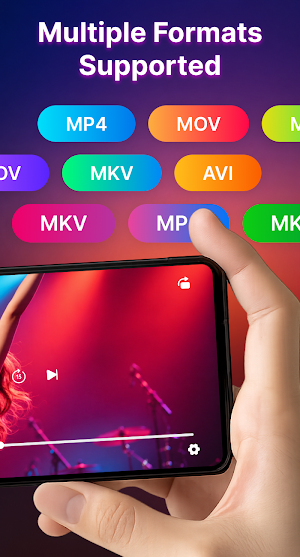
🎬 Support Multiple Video Formats
Play your favorite videos without worrying about compatibility. Enjoy smooth playback for popular video formats including MP4, MOV, MKV, AVI.
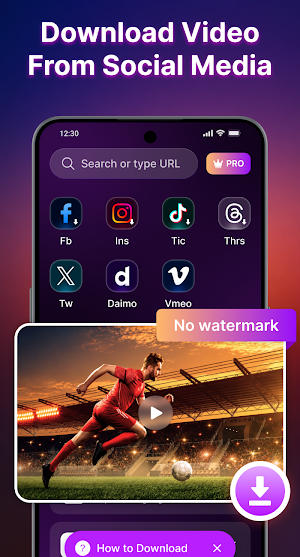
🔗 Effortless URL-Based Downloads
Simply paste a video link and start downloading in just a few taps. Fast, simple, and convenient.
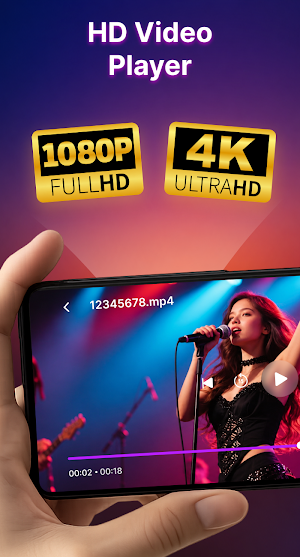
📺 HD Video Player
Watch videos in high quality with smooth playback performance. Experience clear visuals and an optimized player designed for everyday entertainment.
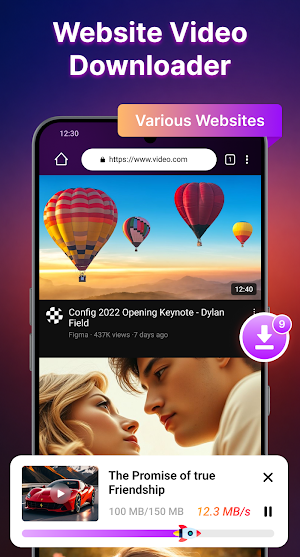
🌐 Smart Video Browser Downloader
Browse favorite video platforms inside the app and enjoy a more seamless downloading experience without switching between apps.
🔄 Flexible Multi-Platform Support
Save videos from various supported social media platforms and enjoy a more convenient downloading experience in one place.
▶️ Seamless Offline Playback
Enjoy downloaded videos anytime without requiring an internet connection.
🔒 Private & Secure Downloader
Manage your downloads with privacy-focused features and keep your media organized within the app.
📁 Downloaded Video Management
View, organize, rename, and manage your downloaded content quickly and easily.
✨ Easy-to-Use Interface
Clean design and simple controls make browsing, downloading, and playing videos effortless for everyone.
HOW TO USE
Download via URL
1. Select or paste a video URL.
2. Preview the content.
3. Tap Download to save the video.
Download from Other Apps
1. Open another app and find the video.
2. Tap Share and select “Video Player”.
3. The download will start automatically.
WHY CHOOSE VIDEO PLAYER?
✅ Watch and save videos in one place
✅ Enjoy offline playback anytime
✅ Fast and simple download experience
✅ Organize your saved videos easily
✅ Smooth HD video playback
DISCLAIMER
This application is NOT associated with, endorsed by, or affiliated with any major social media platform or specific video streaming service. Designed for personal use only. Users are responsible for ensuring they have the right to access, download, or manage content . Please respect copyright laws, intellectual property rights, and the terms of service of third-party platforms.
KEY FEATURES:
🎬 Support Multiple Video Formats
Play your favorite videos without worrying about compatibility. Enjoy smooth playback for popular video formats including MP4, MOV, MKV, AVI.
🔗 Effortless URL-Based Downloads
Simply paste a video link and start downloading in just a few taps. Fast, simple, and convenient.
📺 HD Video Player
Watch videos in high quality with smooth playback performance. Experience clear visuals and an optimized player designed for everyday entertainment.
🌐 Smart Video Browser Downloader
Browse favorite video platforms inside the app and enjoy a more seamless downloading experience without switching between apps.
🔄 Flexible Multi-Platform Support
Save videos from various supported social media platforms and enjoy a more convenient downloading experience in one place.
▶️ Seamless Offline Playback
Enjoy downloaded videos anytime without requiring an internet connection.
🔒 Private & Secure Downloader
Manage your downloads with privacy-focused features and keep your media organized within the app.
📁 Downloaded Video Management
View, organize, rename, and manage your downloaded content quickly and easily.
✨ Easy-to-Use Interface
Clean design and simple controls make browsing, downloading, and playing videos effortless for everyone.
HOW TO USE
Download via URL
1. Select or paste a video URL.
2. Preview the content.
3. Tap Download to save the video.
Download from Other Apps
1. Open another app and find the video.
2. Tap Share and select “Video Player”.
3. The download will start automatically.
WHY CHOOSE VIDEO PLAYER?
✅ Watch and save videos in one place
✅ Enjoy offline playback anytime
✅ Fast and simple download experience
✅ Organize your saved videos easily
✅ Smooth HD video playback
DISCLAIMER
This application is NOT associated with, endorsed by, or affiliated with any major social media platform or specific video streaming service. Designed for personal use only. Users are responsible for ensuring they have the right to access, download, or manage content . Please respect copyright laws, intellectual property rights, and the terms of service of third-party platforms.
What’s new
Version 9.0 · Updated June 17, 2026
- New design - New features
Alternatives to Video Player & Download Video
Looking for apps like Video Player & Download Video? Here are 6 similar Android apps on Google Play. The highest rated is Constant Contact Marketing App (4.7/5), and 4 of the 6 are free to download.
-
eBMS DRM
-
Download Twitter Videos - GIF 4.6
-
Video Downloader - Story Saver 3.6
-
Constant Contact Marketing App 4.7
-
Ooma Office Business Phone App 4.6
-
Nexa PDF Reader

| App | Rating | Price | Installs | Last updated | Compare |
|---|---|---|---|---|---|
| Video Player & Download Video | 4.4 / 5 | Free | 50,000+ | Jun 17, 2026 | |
| eBMS DRM | – | – | – | Apr 17, 2026 | Compare |
| Download Twitter Videos - GIF | 4.6 / 5 | Free | 10,000,000+ | Jul 31, 2026 | Compare |
| Video Downloader - Story Saver | 3.6 / 5 | Free | 1,000,000+ | – | Compare |
| Constant Contact Marketing App | 4.7 / 5 | Free | 100,000+ | Sep 14, 2026 | Compare |
| Ooma Office Business Phone App | 4.6 / 5 | Free | 100,000+ | – | Compare |
| Nexa PDF Reader | – | – | 10,000+ | Aug 7, 2026 | Compare |

