

Floor Plan AR | Room Measurement
Sebastian Kemper House & Home In-app purchases Contains ads
With Floor Plan AR you can draw rooms in a short time.
- Rating
- 4.2
- 33 ratings
- Downloads
- 1K+
- on Google Play
- Price
- Free
- In-app purchases
- Updated
- Sep 23
- 2020 · v9.7
Screenshots



About Floor Plan AR | Room Measurement
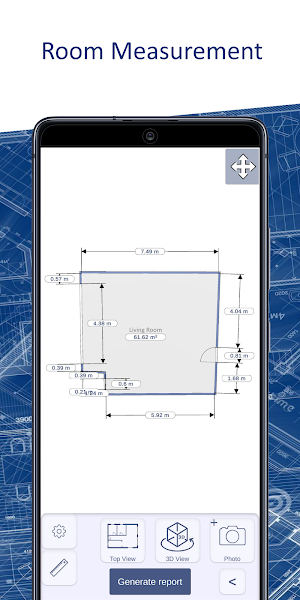
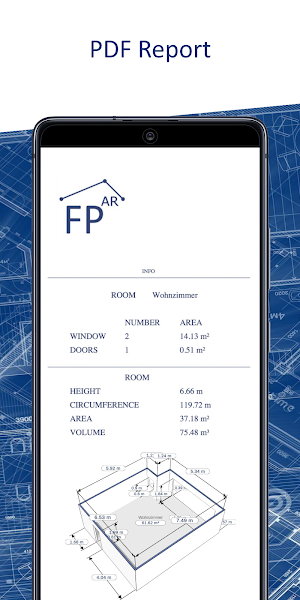
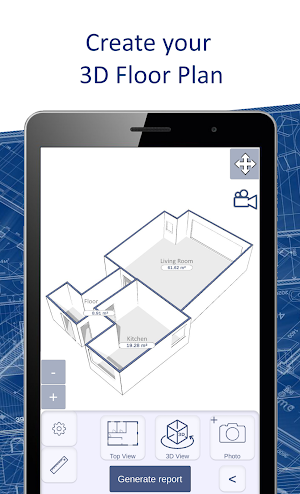
With Floor Plan AR you can draw, calculate and report room geometries.
Drawing Rooms
With the innovative technology augmented reality you can quickly and easily record room geometries.
Calculate
Floor Plan AR automatically calculates the lengths, areas and volumes of your room geometry.
Report
A complete report is automatically created for you, which you can export as a pdf file to use for your documents or customers.
What can be used for free?
The creation of projects or rooms is unlimited and free of charge.
There is no limit to the number of pictures you can take free of charge.
Creation of a plan view or a 3D view including the dimensions is free of charge.
When do I need the paid pro version?
The pro version is required to create PDF documents.
The pro version is required to reopen saved projects.
The pro version is offered through two subscriptions. A monthly and an annual subscription. A test phase is also offered. This runs for 7 days. If the test phase is not canceled within 7 days, it is assumed that the customer would like to continue to use the pro version and a monthly subscription will automatically be continued.
ARCore from google is used to implement automated geometry creation with the aid of the gyroscope and depth information from the camera. This measuring method is already very precise and is constantly being further developed. However, this is also heavily dependent on the performance of the end device, the lighting conditions and the experience of the user. Measured values obtained from this procedure should also be checked with conventional measuring devices. Floor Plan AR is designed to help you quickly create 2D and 3D sketches. By using Floor Plan AR, the user agrees that no claims can be made against the developer due to measurement errors, inaccuracies or operating errors.
Is your device compatible?
If your device contains a gyroscope and is compatible with ARCore, then yes!
If you have any questions or need help, please send an email to the email address provided.
Drawing Rooms
With the innovative technology augmented reality you can quickly and easily record room geometries.
Calculate
Floor Plan AR automatically calculates the lengths, areas and volumes of your room geometry.
Report
A complete report is automatically created for you, which you can export as a pdf file to use for your documents or customers.
What can be used for free?
The creation of projects or rooms is unlimited and free of charge.
There is no limit to the number of pictures you can take free of charge.
Creation of a plan view or a 3D view including the dimensions is free of charge.
When do I need the paid pro version?
The pro version is required to create PDF documents.
The pro version is required to reopen saved projects.
The pro version is offered through two subscriptions. A monthly and an annual subscription. A test phase is also offered. This runs for 7 days. If the test phase is not canceled within 7 days, it is assumed that the customer would like to continue to use the pro version and a monthly subscription will automatically be continued.
ARCore from google is used to implement automated geometry creation with the aid of the gyroscope and depth information from the camera. This measuring method is already very precise and is constantly being further developed. However, this is also heavily dependent on the performance of the end device, the lighting conditions and the experience of the user. Measured values obtained from this procedure should also be checked with conventional measuring devices. Floor Plan AR is designed to help you quickly create 2D and 3D sketches. By using Floor Plan AR, the user agrees that no claims can be made against the developer due to measurement errors, inaccuracies or operating errors.
Is your device compatible?
If your device contains a gyroscope and is compatible with ARCore, then yes!
If you have any questions or need help, please send an email to the email address provided.
What’s new
Version 9.7 · Updated September 23, 2020
general improvement
User reviews

Amaing

Don't listen to this wom*n, this is a good app. It just need to improve object recognition and need an exit button while I'm on the floor search screen.

Great app👍
Alternatives to Floor Plan AR | Room Measurement
Looking for apps like Floor Plan AR | Room Measurement? Here are 5 similar Android apps on Google Play. The highest rated is Home Designer - Architecture (4.7/5), and 4 of the 5 are free to download.
-
Smart Home Design | Floor Plan 4.4
-
HOUSE SKETCHER | 3D FLOOR PLAN 4.2
-
Home Designer - Architecture 4.7
-
3D Floor Plan | smart3Dplanner 4.4
-
Floor Plan AR | Architecture
| App | Rating | Price | Installs | Last updated | Compare |
|---|---|---|---|---|---|
| Floor Plan AR | Room Measurement | 4.2 / 5 | Free | 1,000+ | Sep 23, 2020 | |
| Smart Home Design | Floor Plan | 4.4 / 5 | Free | 1,000,000+ | Jul 24, 2026 | Compare |
| HOUSE SKETCHER | 3D FLOOR PLAN | 4.2 / 5 | Free | 500,000+ | Jul 24, 2026 | Compare |
| Home Designer - Architecture | 4.7 / 5 | Free | 100,000+ | Jul 24, 2026 | Compare |
| 3D Floor Plan | smart3Dplanner | 4.4 / 5 | Free | 1,000,000+ | Jul 24, 2026 | Compare |
| Floor Plan AR | Architecture | – | 5.49 USD | 10+ | Jan 24, 2022 | Compare |