
Starlink Assistant
Herbert Richard Lawson III Productivity Contains ads
Starlink Assistant - an app to assist notice to expert with the Starlink system
- Downloads
- 83.7K+
- on Google Play
- Price
- Free
- No in-app purchases
- Updated
- Jul 6
- 2024 · v2.0.8
Screenshots


About Starlink Assistant
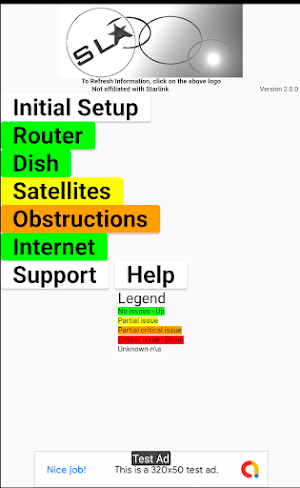
I wrote the Starlink Assistant App(SLA) because integrating the Starlink System into my home Internet system was a bit difficult. Another reason is that seeing how the Starlink system works is great fun. I want this app to help everyone identify and fix issues, use, and enjoy Starlink. The app uses color images and help pages to assist you navigate through most issues. The main page displays general information about how it is performing.
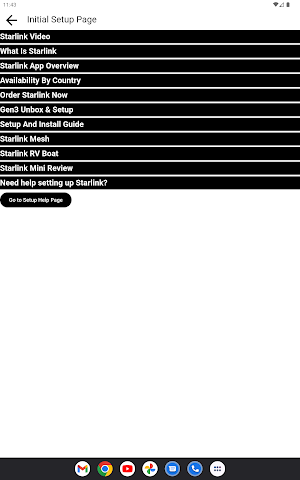
The Initial Setup page describes how to unbox & connect all equipment and wiring, install dishy (the Starlink Antenna), and configure the WiFi router. It also has YouTube links to explain how to unbox, install Dishy, configure your wifi router, and how to run a network cable.
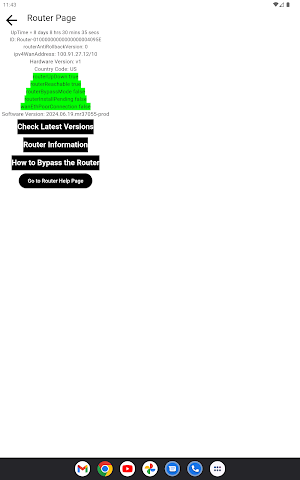
The Router/Wi-Fi page includes a test of the connection between the app and the router, display status of Uptime, and Wi-Fi software & firmware versions. Detailed instructions on how to use your own router are also included.
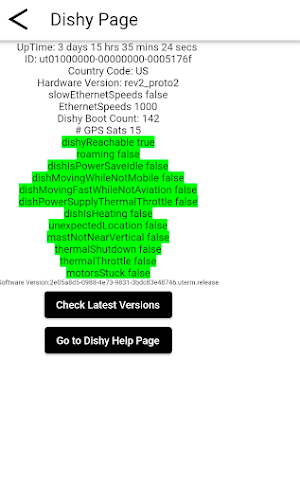
The Dishy page displays your antenna/Dishy uptime, physical issues (if the motors are stuck, an issue with temperature, mast not level, or unexpected location), and hardware & software versions.
The Satellite page will display “No Satellites” time, view all Satellites in real time(View map), show how & when you can see the satellites in the night sky, and a satellite help section. The Satellite help section describes how to use the View Satellite Map and give you a better understanding when satellite positions will be optimal.
The Internet page will display whether the Internet is up or down, average latency times, Internet Speed time for Dishy(Direct Internet times), 4 different speed test checkers and Youtube links for instruction.
The Obstructions page will display if there is a current Obstruction between Dishy and a satellite, Uptime, Obstruction recommendations and status. In case the obstruction is a tree, the app has information on local tree trimming companies.
The Support page how to get Starlink Support, getting the debug information and links to popular Starlink support.
The Help page describes in detail how to use each page (Setup, Router, Dishy, Satellite, Internet, Obstructions, & Support).
The Initial Setup page describes how to unbox & connect all equipment and wiring, install dishy (the Starlink Antenna), and configure the WiFi router. It also has YouTube links to explain how to unbox, install Dishy, configure your wifi router, and how to run a network cable.
The Router/Wi-Fi page includes a test of the connection between the app and the router, display status of Uptime, and Wi-Fi software & firmware versions. Detailed instructions on how to use your own router are also included.
The Dishy page displays your antenna/Dishy uptime, physical issues (if the motors are stuck, an issue with temperature, mast not level, or unexpected location), and hardware & software versions.
The Satellite page will display “No Satellites” time, view all Satellites in real time(View map), show how & when you can see the satellites in the night sky, and a satellite help section. The Satellite help section describes how to use the View Satellite Map and give you a better understanding when satellite positions will be optimal.
The Internet page will display whether the Internet is up or down, average latency times, Internet Speed time for Dishy(Direct Internet times), 4 different speed test checkers and Youtube links for instruction.
The Obstructions page will display if there is a current Obstruction between Dishy and a satellite, Uptime, Obstruction recommendations and status. In case the obstruction is a tree, the app has information on local tree trimming companies.
The Support page how to get Starlink Support, getting the debug information and links to popular Starlink support.
The Help page describes in detail how to use each page (Setup, Router, Dishy, Satellite, Internet, Obstructions, & Support).
What’s new
Version 2.0.8 · Updated July 6, 2024
Fixed bugs in Initial Setup, added wan ethernet speed issue flag, added Debug Copy help, and added Starlink Mini review.
Alternatives to Starlink Assistant
Looking for apps like Starlink Assistant? Here are 6 similar Android apps on Google Play. The highest rated is GTX열차 이용 알리미- 노선도 (4.9/5), and all 6 are free to download.
-
ChatX AI - ChatBot Assistant
-
GTX열차 이용 알리미- 노선도 4.9
-
Zwettler intern 2.0
-
HP Live Production
-
LIFE Connect
-
SURI 4.3
| App | Rating | Price | Installs | Last updated | Compare |
|---|---|---|---|---|---|
| Starlink Assistant | – | Free | 50,000+ | Jul 6, 2024 | |
| ChatX AI - ChatBot Assistant | – | Free | 1,000+ | Jul 9, 2024 | Compare |
| GTX열차 이용 알리미- 노선도 | 4.9 / 5 | Free | 10,000+ | Aug 27, 2026 | Compare |
| Zwettler intern 2.0 | – | Free | 100+ | Sep 14, 2026 | Compare |
| HP Live Production | – | Free | 5,000+ | – | Compare |
| LIFE Connect | – | Free | 5,000+ | Aug 21, 2026 | Compare |
| SURI | 4.3 / 5 | Free | 10,000+ | Sep 26, 2026 | Compare |
Compare Starlink Assistant with the top alternatives: ratings, updates, ASO score and keyword gaps →
Similar apps on Google Play
- ChatX AI - ChatBot Assistant
- GTX열차 이용 알리미- 노선도
- Zwettler intern 2.0
- HP Live Production
- LIFE Connect
- SURI
- Rutist Mobile
- Aura Secure
- PEO Central
- Şehit Gazi Dijital Kart
- To-Do List - Schedule And Note
- 工时表 - 跟踪工作时间和薪资考勤卡
- Life-Coaching AI
- Mental Health Mississippi
- NAGI partners
- نظام فيتورا - Vitura system
- BE BETTER APP
- WorkHub24 Beta
- AI Chatbot - AI Chat Assistant
- Daily AI Writer: Email, Letter
- Merge PDF - Split PDF Files
- Vi my workspace
- Tamil Nadu e-Nursery
- Dasara 2024
- Email Writer: AI Generator