

ARおそうじ
%E6%97%A5%E7%AB%8B%E3%82%B0%E3%83%AD%E3%83%BC%E3%83%90%E3%83%AB%E3%83%A9%E3%82%A4%E3%83%95%E3%82%BD%E3%83%AA%E3%83%A5%E3%83%BC%E3%82%B7%E3%83%A7%E3%83%B3%E3%82%BA%E6%A0%AA%E5%BC%8F%E4%BC%9A%E7%A4%BE Lifestyle
Hitachi Cleaner exclusive app lets you see the trajectory on your smartphone and get better at cleaning
- Downloads
- 2.4K+
- on Google Play
- Price
- Free
- No in-app purchases
- Updated
- Jun 18
- 2026 · v1.1.2
Screenshots


About ARおそうじ
[Key Features]
View the cleaning trail on your smartphone for a better cleaning experience.
● Cleaning Better
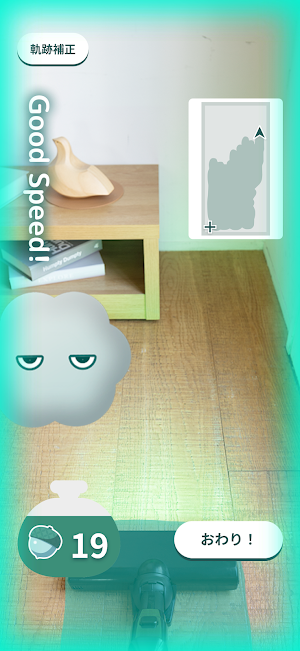
When you attach your smartphone and start cleaning, the cleaning trail will be displayed on the app screen, so you can see where you've cleaned. The screen frame will also light up along with the message "Good Speed!", letting you know the recommended speed for moving the vacuum cleaner.
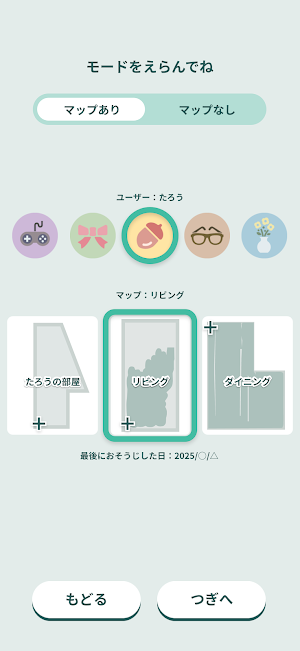
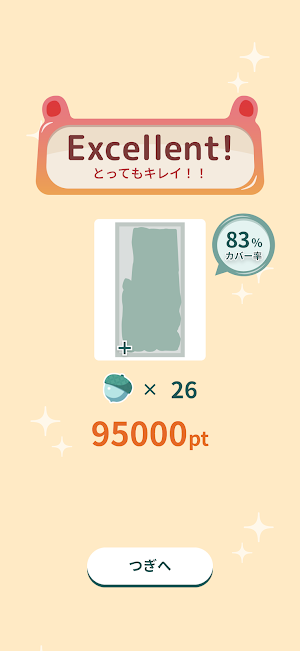
In "Map Included" mode, you can see the area you cleaned last time when selecting a map, making it easy to identify areas you need to clean more thoroughly this time. After cleaning, the coverage rate is displayed numerically, so you can see how much of the map you created has been cleaned.
● Cleaning More Fun
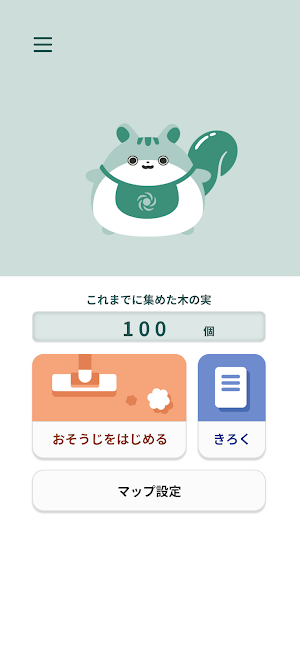
Selecting "Map Included" mode will display a pre-created map to make cleaning more fun. While cleaning, you'll earn nuts based on the area you cleaned and can suck up randomly appearing dust characters. The cleaning trail will also be displayed on the mini-map, so you can see where you've cleaned. After cleaning, a score will be displayed based on the coverage rate of the map and the number of dust characters you've vacuumed. The cleaning area and calorie burn (approximate) are also displayed, allowing you to enjoy cleaning while clearing milestones (goals). Achieved milestones can be viewed under "Achievements."
When cleaning in "Map Enabled" mode, the results are saved to the app's "Records." In "No Map" mode, you can clean by viewing the cleaning path even if you haven't created a map, but the various effects that make cleaning more enjoyable will be removed.
[Usage Precautions]
- It does not display an exact path.
- It does not display the exact cleaning area or calories burned.
- The speed at which you move the vacuum cleaner does not affect the displayed calorie burn value.
- Do not stare at the smartphone screen while using AR Cleaning. Also, be sure to check the safety of your surroundings before using AR Cleaning.
- Use AR Cleaning on flat floors with the main unit, extension pipe, head, smartphone holder, and handheld brush attached.
- When using, follow the instructions on your smartphone screen to make sure your smartphone is properly attached to the smartphone holder and that the smartphone holder is properly attached to the handheld brush.
*The app is free to use, but communication costs will be incurred when downloading and using the app.
*Please agree to the Terms of Use and Privacy Policy before using the app.
*The service content, screen design, and functions of the app may change without notice. In addition, the service may be terminated without notice.
*Operation is not guaranteed on all smartphones. Even with the recommended environment, operation and display may not be correct depending on your device.
*Please note that we are not responsible for any damage, loss, or malfunctions that may arise from installing the application.
For more information, please visit our support page.
https://kadenfan.hitachi.co.jp/app/clean/series02/
View the cleaning trail on your smartphone for a better cleaning experience.
● Cleaning Better
When you attach your smartphone and start cleaning, the cleaning trail will be displayed on the app screen, so you can see where you've cleaned. The screen frame will also light up along with the message "Good Speed!", letting you know the recommended speed for moving the vacuum cleaner.
In "Map Included" mode, you can see the area you cleaned last time when selecting a map, making it easy to identify areas you need to clean more thoroughly this time. After cleaning, the coverage rate is displayed numerically, so you can see how much of the map you created has been cleaned.
● Cleaning More Fun
Selecting "Map Included" mode will display a pre-created map to make cleaning more fun. While cleaning, you'll earn nuts based on the area you cleaned and can suck up randomly appearing dust characters. The cleaning trail will also be displayed on the mini-map, so you can see where you've cleaned. After cleaning, a score will be displayed based on the coverage rate of the map and the number of dust characters you've vacuumed. The cleaning area and calorie burn (approximate) are also displayed, allowing you to enjoy cleaning while clearing milestones (goals). Achieved milestones can be viewed under "Achievements."
When cleaning in "Map Enabled" mode, the results are saved to the app's "Records." In "No Map" mode, you can clean by viewing the cleaning path even if you haven't created a map, but the various effects that make cleaning more enjoyable will be removed.
[Usage Precautions]
- It does not display an exact path.
- It does not display the exact cleaning area or calories burned.
- The speed at which you move the vacuum cleaner does not affect the displayed calorie burn value.
- Do not stare at the smartphone screen while using AR Cleaning. Also, be sure to check the safety of your surroundings before using AR Cleaning.
- Use AR Cleaning on flat floors with the main unit, extension pipe, head, smartphone holder, and handheld brush attached.
- When using, follow the instructions on your smartphone screen to make sure your smartphone is properly attached to the smartphone holder and that the smartphone holder is properly attached to the handheld brush.
*The app is free to use, but communication costs will be incurred when downloading and using the app.
*Please agree to the Terms of Use and Privacy Policy before using the app.
*The service content, screen design, and functions of the app may change without notice. In addition, the service may be terminated without notice.
*Operation is not guaranteed on all smartphones. Even with the recommended environment, operation and display may not be correct depending on your device.
*Please note that we are not responsible for any damage, loss, or malfunctions that may arise from installing the application.
For more information, please visit our support page.
https://kadenfan.hitachi.co.jp/app/clean/series02/
What’s new
Version 1.1.2 · Updated June 18, 2026
・新機種に対応しました。
Alternatives to ARおそうじ
Looking for apps like ARおそうじ? Here are 6 similar Android apps on Google Play. All of them are free to download.
-
Zaluti Bluetooth
-
Cigar Diary & AI Sommelier
-
uni.pilates studio ユニピラティススタジオ
-
Greaterhc Fresno
-
Buing
-
Môi giới sàn Ra Khơi.VN
| App | Rating | Price | Installs | Last updated | Compare |
|---|---|---|---|---|---|
| ARおそうじ | – | Free | 1,000+ | Jun 18, 2026 | |
| Zaluti Bluetooth | – | Free | 500+ | Dec 10, 2025 | Compare |
| Cigar Diary & AI Sommelier | – | Free | 100+ | – | Compare |
| uni.pilates studio ユニピラティススタジオ | – | Free | 1+ | May 13, 2026 | Compare |
| Greaterhc Fresno | – | Free | 10+ | Sep 16, 2026 | Compare |
| Buing | – | Free | 10+ | Jul 17, 2026 | Compare |
| Môi giới sàn Ra Khơi.VN | – | Free | 100+ | Jul 25, 2025 | Compare |
Compare ARおそうじ with the top alternatives: ratings, updates, ASO score and keyword gaps →
Similar apps on Google Play
- Zaluti Bluetooth
- Cigar Diary & AI Sommelier
- uni.pilates studio ユニピラティススタジオ
- Greaterhc Fresno
- Buing
- Môi giới sàn Ra Khơi.VN
- SUNBA Camera Guide
- ENJFEOCY Camera Guide
- ZFC - Anil Kant
- BASTILLE
- ScreenovaX
- Fair Opinions
- GoSharpSharp
- Caply: AI Captions & Quotes
- Sri Sharada Peetham, Sringeri
- DeclareAll: Digital Will
- IMPACTE GYM
- Elevate Dialy
- Ludo
- Cadence Connect
- Memorial Memo
- HappyWoman
- OrnaMarket
- Vitalite Esthetics Loyalty
- Lucy Clinica & Spa