

AngioAID 3D
Cardiology Apps Education
Diagnostic angiography educational simulation to teach key concepts.
- Downloads
- 5K+
- on Google Play
- Price
- Free
- No in-app purchases
- Updated
- Apr 28
- 2026 · v0.54
Screenshots


About AngioAID 3D
AngioAID 3D is educational tool designed to teach key concepts of diagnostic angiography of coronary arteries. Developed at the Mount Sinai Hospital in New York City, New York State's highest volume cardiac cath lab, we aim to provide an interactive learning experience on this important topic.
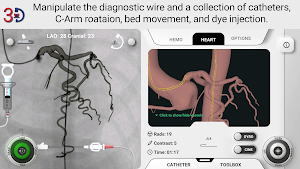
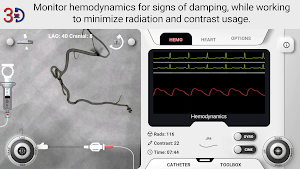
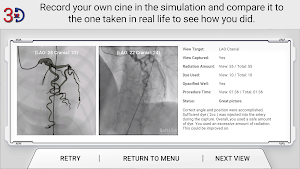
Within a 3D live simulation, you begin by advancing a diagnostic guidewire into the aortic root. Then, advance one of many diagnostic catheter options to either the right of left coronary ostium. Through pushing and pulling, as well as rotation of the catheter, try to achieve a truly co-axial engagement of the coronary ostium with the catheter. Meanwhile monitor the hemodynamic tab which simulated damping from over-engagement or roofing of the catheter tip. Line up the view with the target view, zoom to fill the screen with he coronaries, and rotate the C-Arm LAO/RAO and Cranial/Caudal until you're where you think you need to be. Finally, inject dye and take a cine to compare with the one we actually did in the cath lab for this set of coronaries.
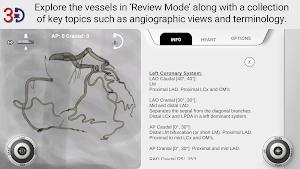
In addition to the diagnostic simulation, "Review Mode" allows you to play with angles and panning while always being able to see the vessels with no dye injection needed. Also a collection of key topics have been included within the review mode such as key angiographic angles depending on what you're aiming to see clearly, vessel segmentation conventions, and more coronary anatomy and angiography pearls.
We highly recommend you view the tutorial video that is available when you first open the application or from the settings page to understand all of the available functions.
The first launch has a normal set of coronary arteries but please stay tuned while we create more sets of coronaries such as anomalous coronaries and bypass grafts.
Within a 3D live simulation, you begin by advancing a diagnostic guidewire into the aortic root. Then, advance one of many diagnostic catheter options to either the right of left coronary ostium. Through pushing and pulling, as well as rotation of the catheter, try to achieve a truly co-axial engagement of the coronary ostium with the catheter. Meanwhile monitor the hemodynamic tab which simulated damping from over-engagement or roofing of the catheter tip. Line up the view with the target view, zoom to fill the screen with he coronaries, and rotate the C-Arm LAO/RAO and Cranial/Caudal until you're where you think you need to be. Finally, inject dye and take a cine to compare with the one we actually did in the cath lab for this set of coronaries.
In addition to the diagnostic simulation, "Review Mode" allows you to play with angles and panning while always being able to see the vessels with no dye injection needed. Also a collection of key topics have been included within the review mode such as key angiographic angles depending on what you're aiming to see clearly, vessel segmentation conventions, and more coronary anatomy and angiography pearls.
We highly recommend you view the tutorial video that is available when you first open the application or from the settings page to understand all of the available functions.
The first launch has a normal set of coronary arteries but please stay tuned while we create more sets of coronaries such as anomalous coronaries and bypass grafts.
Alternatives to AngioAID 3D
Looking for apps like AngioAID 3D? Here are 3 similar Android apps on Google Play. All of them are free to download.

| App | Rating | Price | Installs | Last updated | Compare |
|---|---|---|---|---|---|
| AngioAID 3D | – | Free | 5,000+ | Apr 28, 2026 | |
| IVUSAID | – | Free | 10,000+ | – | Compare |
| DeviceAID | – | Free | 1,000+ | Jul 30, 2025 | Compare |
| MCSAID | – | Free | 1,000+ | May 15, 2026 | Compare |
Compare AngioAID 3D with the top alternatives: ratings, updates, ASO score and keyword gaps →