

Maverick Lite
BZ Owl Ltd. Video Players & Editors In-app purchases
Edit videos x10 faster
- Downloads
- 100+
- on Google Play
- Price
- Free
- In-app purchases
- Updated
- Jan 10
- 2025 · v1.00.026
Screenshots


About Maverick Lite
Boost your video production with Maverick - a system that makes editing quicker and more precise.
Maverick is a stand alone system that uses real time marking (while shooting) in order to (almost) eliminate the need for browsing through all the recorded video footage.
Those of us who create a lot of footage know that most of it doesn’t make the final cut. Material screening is probably the most consuming phase of editing (Cost, Burnout, Production time...).
Editing should be a stress-free and creative process.
This is where Maverick comes in...
Using Maverick with Adobe Premiere Pro*
How to use Maverick in 3 simple steps:
1. Record and mark
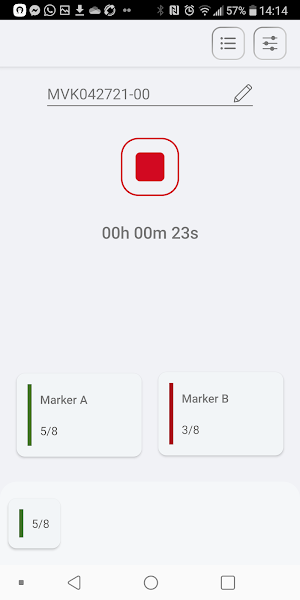
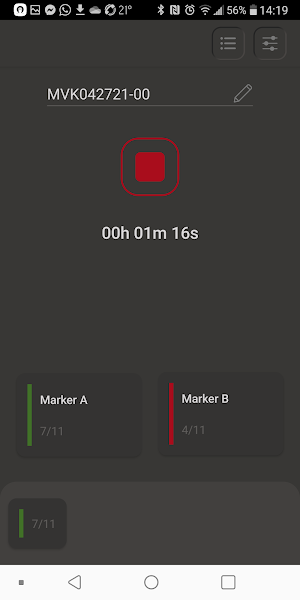
While you shoot a video, mark the interesting moment using the Maverick app.
Simply record audio with Maverick and press the buttons (on the app screen or on a bluetooth remote) whenever there is an important moment.
Once you're done, share the Maverick recordings with the post production team.
2. Import and align your tracks
Sync your raw footage and Maverick's recordings (.mp3) as you usually do (using Adobe Premiere Pro, Red Giant's PluralEyes, etc').
The markers appear on the Maverick’s audio track.
3. (Optional) Copy the markers to your sequence using the Maverick Plugin
Markers in Premiere are used best when they are on the sequence rather than on the tracks.
You may use the Maverick plug-in to copy the markers from the mp3 tracks to the sequence. Simply download and install the Maverick Premiere plugin and choose the sequence you want to apply it to.
For more details go to http://www.bz-owl.com/ .
*These steps are for Adobe Premiere Pro only.
If you’re using a different editing platform, please contact us for details on available solutions.
Properties
• Standalone (not connected to the camera).
• One-click operation.
• Universal (works with all cameras).
• Supports common Bluetooth camera remote control.
Who can benefit from Maverick?
• Video production (movies, TV, etc.)
• Content creators: YouTube videos.
• Family and personal video (School shows and sports tournaments, family events, etc.).
• Professional videographers.
• Sports events.
F.A.Q.
Q: How does it connect to the camera?
A: It doesn’t. It’s a stand alone tool.
Q: How does it impact the material I shoot?
A: There is no impact on the material. Maverick records its own sound track and registers markers.
Q: Which cameras are supported?
A: It works with any camera that records sound.
Q: Where do I see the markers?
A: The markers appear in Adobe’s Premiere Pro’s sequence
When you import maverick’s mp3 files into a track, the markers will be visible on that track. By using the Maverick plugin, the markers will be copied to the sequence itself. See https://www.bz-owl.com/
Q: Which editing platforms are supported?
A: Maverick currently works with Adobe Premiere Pro™. If you use other editing platforms, please contact us and we will update you when we roll out a version for the platforms you use.
Q: What type of files does Maverick generate?
A: Maverick generates audio files (mp3, mono, 44.1kHz, 16but, 96kbps) that are used for aligning with the footage (using Premiere Pro, PluralEyes etc.) The files carry the additional data (e.g. markers) inside them.
Q: Can I mark multiple cameras?
A: Of course, but we recommend using separate apps (on separate phones).
Q: Can I change each buttons’ function?
A: In the Lite version no but you can in the Pro version. Contact us for more details at [email protected] .
Q: Can I mark retrospectively? Can I undo a mark?
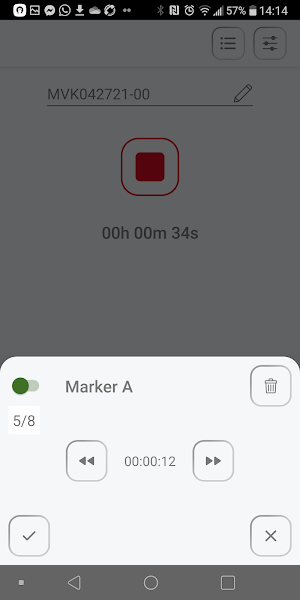
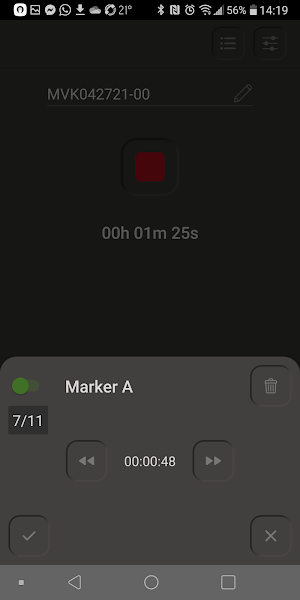
A: The last marker can be easily modified. You can modify time, marker type (green/red) or delete it. Just pull up the bottom tab to modify the last marker.
Maverick is a stand alone system that uses real time marking (while shooting) in order to (almost) eliminate the need for browsing through all the recorded video footage.
Those of us who create a lot of footage know that most of it doesn’t make the final cut. Material screening is probably the most consuming phase of editing (Cost, Burnout, Production time...).
Editing should be a stress-free and creative process.
This is where Maverick comes in...
Using Maverick with Adobe Premiere Pro*
How to use Maverick in 3 simple steps:
1. Record and mark
While you shoot a video, mark the interesting moment using the Maverick app.
Simply record audio with Maverick and press the buttons (on the app screen or on a bluetooth remote) whenever there is an important moment.
Once you're done, share the Maverick recordings with the post production team.
2. Import and align your tracks
Sync your raw footage and Maverick's recordings (.mp3) as you usually do (using Adobe Premiere Pro, Red Giant's PluralEyes, etc').
The markers appear on the Maverick’s audio track.
3. (Optional) Copy the markers to your sequence using the Maverick Plugin
Markers in Premiere are used best when they are on the sequence rather than on the tracks.
You may use the Maverick plug-in to copy the markers from the mp3 tracks to the sequence. Simply download and install the Maverick Premiere plugin and choose the sequence you want to apply it to.
For more details go to http://www.bz-owl.com/ .
*These steps are for Adobe Premiere Pro only.
If you’re using a different editing platform, please contact us for details on available solutions.
Properties
• Standalone (not connected to the camera).
• One-click operation.
• Universal (works with all cameras).
• Supports common Bluetooth camera remote control.
Who can benefit from Maverick?
• Video production (movies, TV, etc.)
• Content creators: YouTube videos.
• Family and personal video (School shows and sports tournaments, family events, etc.).
• Professional videographers.
• Sports events.
F.A.Q.
Q: How does it connect to the camera?
A: It doesn’t. It’s a stand alone tool.
Q: How does it impact the material I shoot?
A: There is no impact on the material. Maverick records its own sound track and registers markers.
Q: Which cameras are supported?
A: It works with any camera that records sound.
Q: Where do I see the markers?
A: The markers appear in Adobe’s Premiere Pro’s sequence
When you import maverick’s mp3 files into a track, the markers will be visible on that track. By using the Maverick plugin, the markers will be copied to the sequence itself. See https://www.bz-owl.com/
Q: Which editing platforms are supported?
A: Maverick currently works with Adobe Premiere Pro™. If you use other editing platforms, please contact us and we will update you when we roll out a version for the platforms you use.
Q: What type of files does Maverick generate?
A: Maverick generates audio files (mp3, mono, 44.1kHz, 16but, 96kbps) that are used for aligning with the footage (using Premiere Pro, PluralEyes etc.) The files carry the additional data (e.g. markers) inside them.
Q: Can I mark multiple cameras?
A: Of course, but we recommend using separate apps (on separate phones).
Q: Can I change each buttons’ function?
A: In the Lite version no but you can in the Pro version. Contact us for more details at [email protected] .
Q: Can I mark retrospectively? Can I undo a mark?
A: The last marker can be easily modified. You can modify time, marker type (green/red) or delete it. Just pull up the bottom tab to modify the last marker.
What’s new
Version 1.00.026 · Updated January 10, 2025
Version 1.00.026 - unlimited count of track recording is allowed during trial and in subscription - unlimited count of exports is allowed
Alternatives to Maverick Lite
Looking for apps like Maverick Lite? Here are 6 similar Android apps on Google Play. All of them are free to download.
-
YSL Sales Buddy
-
MhPro
-
VIYOUU - Easy video creation
-
Elephant Video Compress
-
All Video Player - HD Video
-
Ib Player - Smarter Live TV
| App | Rating | Price | Installs | Last updated | Compare |
|---|---|---|---|---|---|
| Maverick Lite | – | Free | 100+ | Jan 10, 2025 | |
| YSL Sales Buddy | – | Free | 1+ | Aug 12, 2025 | Compare |
| MhPro | – | Free | 10,000+ | Aug 3, 2025 | Compare |
| VIYOUU - Easy video creation | – | Free | 1,000+ | Sep 7, 2026 | Compare |
| Elephant Video Compress | – | Free | 10+ | Oct 31, 2025 | Compare |
| All Video Player - HD Video | – | Free | 1,000+ | – | Compare |
| Ib Player - Smarter Live TV | – | Free | 100,000+ | – | Compare |
Compare Maverick Lite with the top alternatives: ratings, updates, ASO score and keyword gaps →
Similar apps on Google Play
- YSL Sales Buddy
- MhPro
- VIYOUU - Easy video creation
- Elephant Video Compress
- All Video Player - HD Video
- Ib Player - Smarter Live TV
- HD Video Downloader and Player
- King 1
- Video to Mp3 Converter
- Photo Video Maker with Music
- Video Player - OX Player
- Chimege Sub
- Strong 4K Tv
- IPTV Nio Smart Player
- IBO Player IBOV
- IPTV Smart Live Player
- All Video Player & Downloader
- UniTv Pro
- GIF Studio - Easy GIFs Maker
- SnapDrama-Short Movies & Reels
- مراد عینکی دوبله بدون نت 1
- Descargador de videos HD
- GoCine - Guia de Cinema
- Reel Video Maker: Video Editor
- The Daily Show Audiobook