

Home Showroom
Battery Low Games House & Home Contains ads
An augmented reality app enabling users to try out furniture before buying.
- Downloads
- 100+
- on Google Play
- Price
- Free
- No in-app purchases
- Updated
- Apr 1
- 2018 · v1.0
Screenshots



About Home Showroom
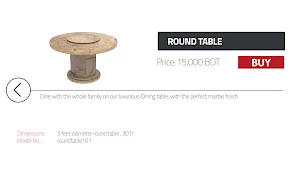
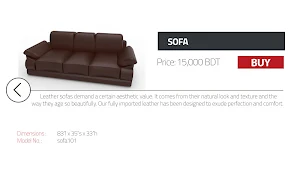
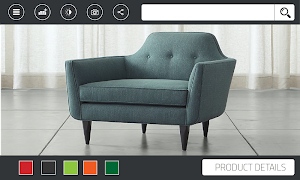
“Home Showroom” app allows users to visualize their selection of furniture(s) inside their own room and to make a better evaluation of how it will fit in their living room. The customers will be able to explore and try the furniture directly inside their interior.
The basic features include:
1. 3D visualization of furniture models in interior
2. Changing model colors to see which color suits best in the environment
3. Trying out different available sizes of furniture
4. Exploring, rotating and moving the furniture at ease
5. Showroom details and location
User guide:
First kindly print the marker in a A4 sized page. Next, launch the app on your phone. After the app has loaded, click the button that says, “Let’s get started”. You will be directed onto a menu with a list of furniture to choose from. After selecting a furniture, the app launches its in-built camera, which in terms of visuals, looks closely like a regular camera app. The printed marker page has to be taken now, and it has to be placed in the ground with a minimum amount of space around it on four sides. If the “Home Showroom” camera is held over the marker, the furniture will show up in the mobile screen as an Augmented Reality image and the furniture can be visualized easily as a natural part of the surroundings. Several pieces of furniture can be chosen, and the marker can be placed in any corner of the room where there is enough space to place a regular furniture, in order to check the visualized image.
Click this link to get the soft copy of the marker: https://goo.gl/tJxWpE
The basic features include:
1. 3D visualization of furniture models in interior
2. Changing model colors to see which color suits best in the environment
3. Trying out different available sizes of furniture
4. Exploring, rotating and moving the furniture at ease
5. Showroom details and location
User guide:
First kindly print the marker in a A4 sized page. Next, launch the app on your phone. After the app has loaded, click the button that says, “Let’s get started”. You will be directed onto a menu with a list of furniture to choose from. After selecting a furniture, the app launches its in-built camera, which in terms of visuals, looks closely like a regular camera app. The printed marker page has to be taken now, and it has to be placed in the ground with a minimum amount of space around it on four sides. If the “Home Showroom” camera is held over the marker, the furniture will show up in the mobile screen as an Augmented Reality image and the furniture can be visualized easily as a natural part of the surroundings. Several pieces of furniture can be chosen, and the marker can be placed in any corner of the room where there is enough space to place a regular furniture, in order to check the visualized image.
Click this link to get the soft copy of the marker: https://goo.gl/tJxWpE
Alternatives to Home Showroom
Looking for apps like Home Showroom? Here are 6 similar Android apps on Google Play. All of them are free to download.
-
AR Mujib Corner
-
Circulet
-
Save Earth - Galaxy
-
Paper Plane Earth - Plane Jump
-
Love pursuit by Walton TV
-
AR Brochure
| App | Rating | Price | Installs | Last updated | Compare |
|---|---|---|---|---|---|
| Home Showroom | – | Free | 100+ | Apr 1, 2018 | |
| AR Mujib Corner | – | Free | 10+ | Jan 25, 2023 | Compare |
| Circulet | – | Free | 10+ | Aug 11, 2022 | Compare |
| Save Earth - Galaxy | – | Free | 10+ | Apr 27, 2022 | Compare |
| Paper Plane Earth - Plane Jump | – | Free | 10+ | Apr 21, 2022 | Compare |
| Love pursuit by Walton TV | – | Free | 100+ | Feb 11, 2022 | Compare |
| AR Brochure | – | Free | 100+ | May 31, 2019 | Compare |
Compare Home Showroom with the top alternatives: ratings, updates, ASO score and keyword gaps →