
Click Speed Test: CPS Tester
MurGoo Tools In-app purchases
Measure clicks per second (CPS) Tap Speed and check screen for Dead Pixels
- Downloads
- 225+
- on Google Play
- Price
- Free
- In-app purchases
- Updated
- Jul 13
- 2026 · v1.2
Screenshots


About Click Speed Test: CPS Tester
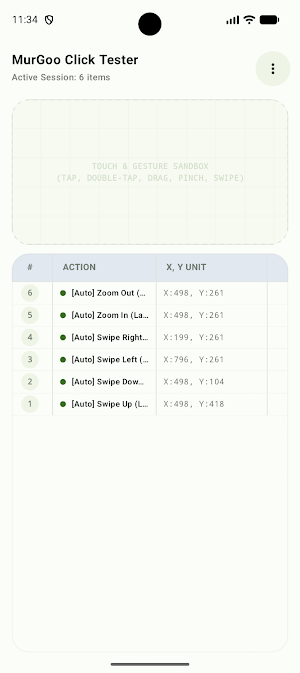
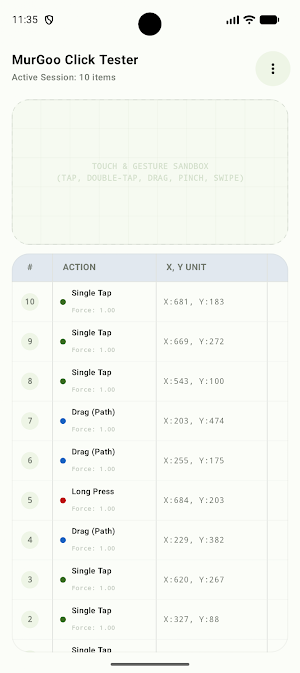
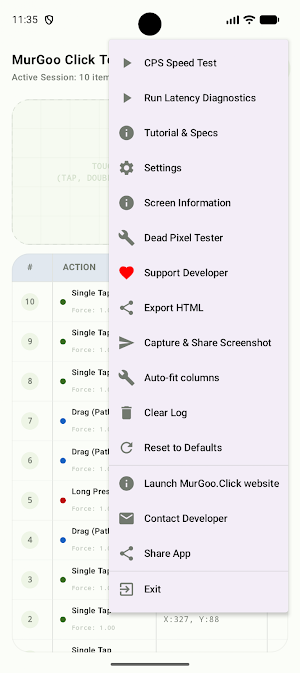
Benchmark your manual clicking speed, test your device touchscreen precision, and diagnose display health with MurGoo Click Tester—the ultimate all-in-one diagnostic and benchmarking companion for mobile gamers and hardware enthusiasts.
Whether you are looking to measure your Clicks Per Second (CPS), verify multi-touch response accuracy, or scan your screen for stuck or dead pixels, MurGoo Click Tester provides a fast, precise, and completely offline solution with zero hidden fees.
KEY FEATURES:
🚀 High-Precision CPS (Clicks Per Second) Test
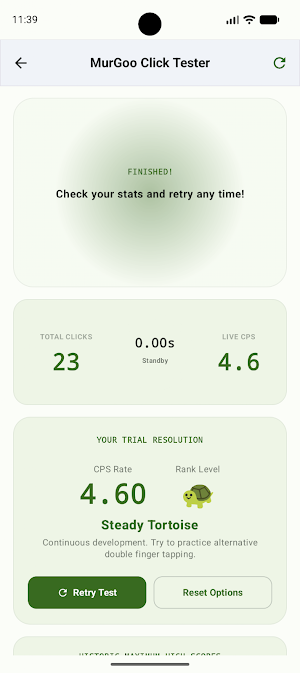
Challenge your finger tapping speed and training reflexes with our responsive tap benchmarking engine. Select from multiple duration intervals to test your endurance and peak agility:
• Ultra-fast 1-Second burst test
• Quick 3-Second and 5-Second speed tests
• Classic 10-Second and 15-Second stamina benchmarks
• Real-time performance metrics tracking your high scores locally.
📺 Advanced Dead Pixel Tester
Diagnose your screen's display quality and color reproduction. The Dead Pixel Tester cycles through full-screen solid primary colors to help you instantly spot defective, stuck, or dead pixels:
• Pure Red, Green, Blue, White, and Black display backdrops.
• Full-screen immersive mode for unobstructed viewing.
• Simple tap-to-cycle interface that automatically returns you to the dashboard.
🛡️ 100% Offline & Fully Secure
Your privacy is our priority. MurGoo Click Tester operates completely locally on your device:
• NO internet access required.
• NO data tracking, analytics, or background telemetry.
• NO intrusive permissions requested.
• All custom settings, theme preferences, and high scores are saved strictly on your local device.
🎨 Customization & Seamless Controls
Tailor the utility to match your style and needs:
• Sleek dark-mode aesthetic.
• Easily reset all high scores, settings, and local cache instantly through standard storage tools.
• Intuitive navigation and Material Design 3 user interface.
⚠️ IMPORTANT SAFETY & HEALTH WARNING:
The Dead Pixel Tester feature utilizes full-screen solid, high-contrast color shifts to diagnose display issues.
• Users with photosensitive epilepsy or conditions triggered by flashing lights or sudden visual shifts should avoid using this specific feature.
• A confirmation screen is included with an option to abort or proceed, allowing you to make safe and informed decisions before launching the display diagnostic.
Download MurGoo Click Tester today to test, benchmark, and optimize your mobile touch and screen performance!
Whether you are looking to measure your Clicks Per Second (CPS), verify multi-touch response accuracy, or scan your screen for stuck or dead pixels, MurGoo Click Tester provides a fast, precise, and completely offline solution with zero hidden fees.
KEY FEATURES:
🚀 High-Precision CPS (Clicks Per Second) Test
Challenge your finger tapping speed and training reflexes with our responsive tap benchmarking engine. Select from multiple duration intervals to test your endurance and peak agility:
• Ultra-fast 1-Second burst test
• Quick 3-Second and 5-Second speed tests
• Classic 10-Second and 15-Second stamina benchmarks
• Real-time performance metrics tracking your high scores locally.
📺 Advanced Dead Pixel Tester
Diagnose your screen's display quality and color reproduction. The Dead Pixel Tester cycles through full-screen solid primary colors to help you instantly spot defective, stuck, or dead pixels:
• Pure Red, Green, Blue, White, and Black display backdrops.
• Full-screen immersive mode for unobstructed viewing.
• Simple tap-to-cycle interface that automatically returns you to the dashboard.
🛡️ 100% Offline & Fully Secure
Your privacy is our priority. MurGoo Click Tester operates completely locally on your device:
• NO internet access required.
• NO data tracking, analytics, or background telemetry.
• NO intrusive permissions requested.
• All custom settings, theme preferences, and high scores are saved strictly on your local device.
🎨 Customization & Seamless Controls
Tailor the utility to match your style and needs:
• Sleek dark-mode aesthetic.
• Easily reset all high scores, settings, and local cache instantly through standard storage tools.
• Intuitive navigation and Material Design 3 user interface.
⚠️ IMPORTANT SAFETY & HEALTH WARNING:
The Dead Pixel Tester feature utilizes full-screen solid, high-contrast color shifts to diagnose display issues.
• Users with photosensitive epilepsy or conditions triggered by flashing lights or sudden visual shifts should avoid using this specific feature.
• A confirmation screen is included with an option to abort or proceed, allowing you to make safe and informed decisions before launching the display diagnostic.
Download MurGoo Click Tester today to test, benchmark, and optimize your mobile touch and screen performance!
Alternatives to Click Speed Test: CPS Tester
Looking for apps like Click Speed Test: CPS Tester? Here are 6 similar Android apps on Google Play. All of them are free to download.
-
MurGoo Image Search
-
MurGoo Image Converter
-
MurGoo Screen Watermark
-
MurGoo Click or Tap Counter
-
Auto Screenshot Capture OCR
-
LED Banner: Scroller Marquee
| App | Rating | Price | Installs | Last updated | Compare |
|---|---|---|---|---|---|
| Click Speed Test: CPS Tester | – | Free | 100+ | Jul 13, 2026 | |
| MurGoo Image Search | – | Free | 10+ | Jul 13, 2026 | Compare |
| MurGoo Image Converter | – | Free | 1+ | Jul 14, 2026 | Compare |
| MurGoo Screen Watermark | – | Free | 10+ | Jul 22, 2026 | Compare |
| MurGoo Click or Tap Counter | – | Free | 5+ | Sep 25, 2026 | Compare |
| Auto Screenshot Capture OCR | – | Free | 100+ | – | Compare |
| LED Banner: Scroller Marquee | – | Free | 10+ | Jul 13, 2026 | Compare |