
3D Tools
Oval Software Solutions Art & Design
3D Tools: 2D to STL Creator
- Downloads
- 57+
- on Google Play
- Price
- Free
- No in-app purchases
- Updated
- Mar 23
- 2026
Screenshots
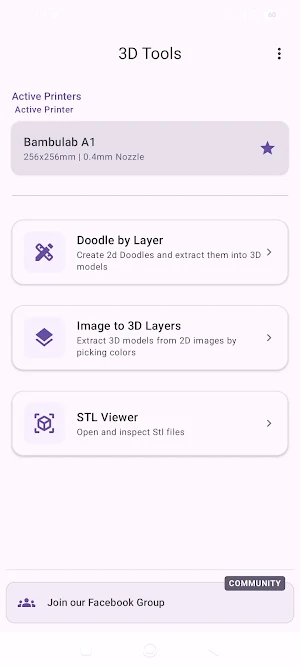
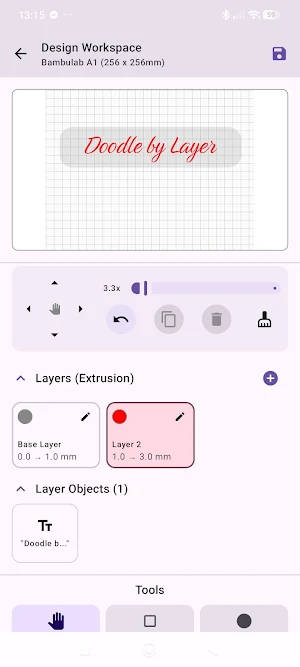
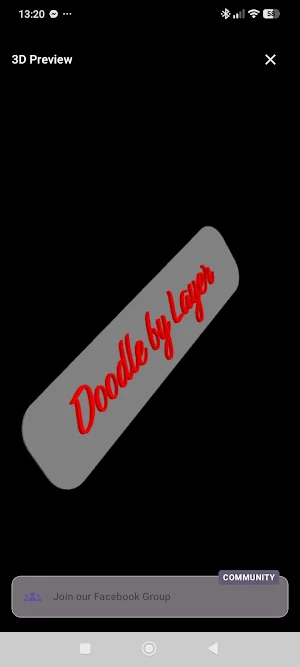


About 3D Tools
Unlock your creativity and bring your 2D ideas into the physical world!
Whether you are a 3D printing hobbyist, a maker, or a designer, [Insert App Name] provides a streamlined set of tools to create, view, and export 3D models directly from your mobile device. Forget complex CAD software—our intuitive toolkit is designed specifically to turn your 2D images and sketches into 3D printable STL files in minutes.
🛠️ CURRENT TOOLS INCLUDED:
1. 3D Doodle Creator
Build 3D models layer by layer with your own hands!
Set your desired layer height.
Draw directly on the screen using freehand, line, square, and circle tools.
Use the eraser to fine-tune your design.
Stack and combine multiple layers to build up a full 3D object.
Instantly generate and view your 3D model.
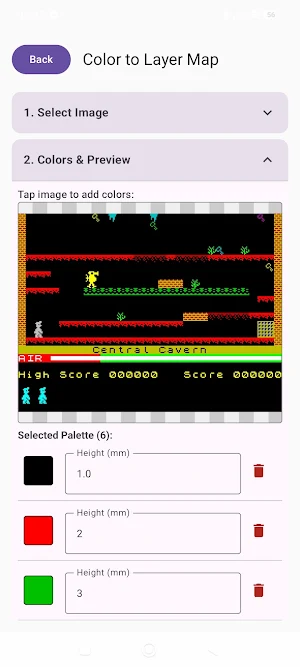
2. 2D Image to 3D Model Converter
Turn your photos, logos, and digital art into 3D printable objects.
Import any 2D image.
Extract specific colors and handle transparency.
Assign specific 3D layer heights to different colors.
Watch your flat image extrude into a multi-dimensional 3D model perfect for 3D printing.
3. STL Viewer & Inspector
Already have an STL file? Inspect it before you slice it.
Open and view STL files directly on your device.
Rotate, pan, and zoom to inspect model geometry and ensure your files are ready for the printer.
💾 EXPORT & PRINT
All models created within the app can be instantly exported as standard STL files, ready to use. Plus, if you have the Anycubic app installed you can slice online and send directly to your printer.
🚀 MORE TOOLS COMING SOON
We are constantly expanding our toolkit! Download now to master the current features, and stay tuned for upcoming updates that will introduce even more ways to design and manipulate 3D models.
Whether you are a 3D printing hobbyist, a maker, or a designer, [Insert App Name] provides a streamlined set of tools to create, view, and export 3D models directly from your mobile device. Forget complex CAD software—our intuitive toolkit is designed specifically to turn your 2D images and sketches into 3D printable STL files in minutes.
🛠️ CURRENT TOOLS INCLUDED:
1. 3D Doodle Creator
Build 3D models layer by layer with your own hands!
Set your desired layer height.
Draw directly on the screen using freehand, line, square, and circle tools.
Use the eraser to fine-tune your design.
Stack and combine multiple layers to build up a full 3D object.
Instantly generate and view your 3D model.
2. 2D Image to 3D Model Converter
Turn your photos, logos, and digital art into 3D printable objects.
Import any 2D image.
Extract specific colors and handle transparency.
Assign specific 3D layer heights to different colors.
Watch your flat image extrude into a multi-dimensional 3D model perfect for 3D printing.
3. STL Viewer & Inspector
Already have an STL file? Inspect it before you slice it.
Open and view STL files directly on your device.
Rotate, pan, and zoom to inspect model geometry and ensure your files are ready for the printer.
💾 EXPORT & PRINT
All models created within the app can be instantly exported as standard STL files, ready to use. Plus, if you have the Anycubic app installed you can slice online and send directly to your printer.
🚀 MORE TOOLS COMING SOON
We are constantly expanding our toolkit! Download now to master the current features, and stay tuned for upcoming updates that will introduce even more ways to design and manipulate 3D models.
What’s new
Updated March 23, 2026
First beta test Doodle by Layer, Image to 3D Layers and STL Viewer Tools added
Alternatives to 3D Tools
Looking for apps like 3D Tools? Here are 6 similar Android apps on Google Play. The highest rated is Pixilart - Make Pixel Art (4.1/5), and all 6 are free to download.
-
Design Space: DIY with Cricut 3.9
-
Pixilart - Make Pixel Art 4.1
-
Polycam: 3D Scanner & Editor 3.5
-
ZWCAD Mobile - DWG Viewer 3.6
-
GOGH: Animated Drawings 2.7
-
Likcut 3.8
| App | Rating | Price | Installs | Last updated | Compare |
|---|---|---|---|---|---|
| 3D Tools | – | Free | 50+ | Mar 23, 2026 | |
| Design Space: DIY with Cricut | 3.9 / 5 | Free | 5,000,000+ | Oct 19, 2026 | Compare |
| Pixilart - Make Pixel Art | 4.1 / 5 | Free | 1,000,000+ | Mar 31, 2026 | Compare |
| Polycam: 3D Scanner & Editor | 3.5 / 5 | Free | 1,000,000+ | Oct 27, 2026 | Compare |
| ZWCAD Mobile - DWG Viewer | 3.6 / 5 | Free | 1,000,000+ | Aug 12, 2026 | Compare |
| GOGH: Animated Drawings | 2.7 / 5 | Free | 10,000+ | Oct 23, 2025 | Compare |
| Likcut | 3.8 / 5 | Free | 10,000+ | – | Compare |
Compare 3D Tools with the top alternatives: ratings, updates, ASO score and keyword gaps →
Similar apps on Google Play
- Design Space: DIY with Cricut
- Pixilart - Make Pixel Art
- Polycam: 3D Scanner & Editor
- ZWCAD Mobile - DWG Viewer
- GOGH: Animated Drawings
- Likcut
- Formacar: Buy, Sell, Customize
- AI Logo Maker, AI Design: Hexa
- Moblo - 3D Furniture Design
- Growlink
- Prisma3D - Animation, Modeling
- Bambu Handy
- Thingiverse MakerWorld | 3Drop
- 3D Modeling App: Sculpt & Draw
- MakerFlo
- Blend: AI Videos Logos Try On
- Handy Art Reference Tool
- Nomad Sculpt
- HiPaint: Sketch, Draw & Paint
- Stop Motion Studio Pro
- ArcSite: CAD & Floor Plans
- KIRI Engine: 3D Scanner App
- Brother Artspira