
CraftOS-PC
Tools
The advanced ComputerCraft emulator for Android
- Rating
- 2.9
- 154 ratings
- Downloads
- 10.9K+
- on Google Play
- Price
- Free
- No in-app purchases
- Updated
- Aug 17
- 2024 · v2.8.3
Screenshots


About CraftOS-PC
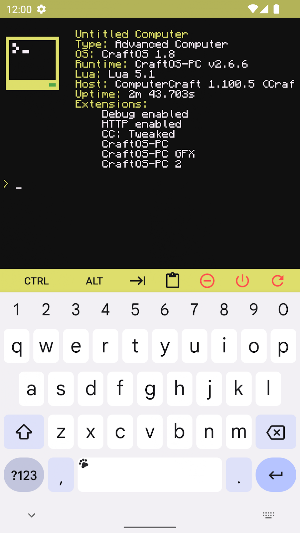
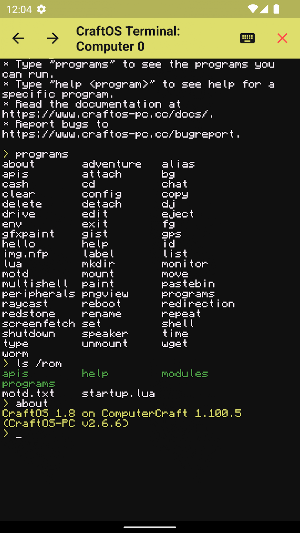
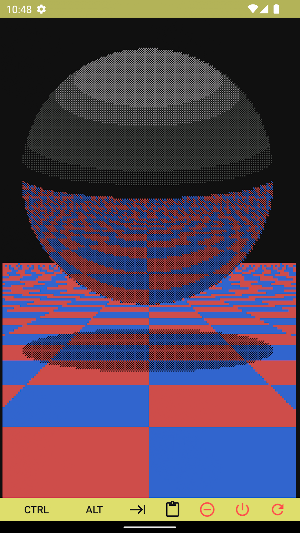
CraftOS-PC is a fantasy terminal that allows you to write and run programs inside an ‘80s-style text console.
CraftOS-PC emulates the popular mod "ComputerCraft" for an award-winning block building video game, which adds programmable computers to the game using the Lua programming language. CraftOS-PC takes this experience outside the game to allow you to run the same programs anywhere you go.
CraftOS-PC provides a set of functions (called APIs) that make it super easy to do simple tasks such as write text to the screen, read files, and more. The simplicity of these functions makes CraftOS-PC great for new programmers, but their power makes it possible to write all sorts of complex programs with less code.
If you aren’t ready to write programs yet, there’s already a large number of programs for ComputerCraft that will work in CraftOS-PC, ranging from simple games to whole graphical operating systems. These can be downloaded through the built-in Pastebin and GitHub Gist clients.
• Full Lua 5.1+ scripting environment and command-line REPL
• 16-color text-based terminal display
• Expansive virtual filesystem for program and data storage
• Built-in shell with syntax similar to most desktop shells
• APIs to easily access terminal, filesystem, Internet, event queue, and more
• Built-in programs make it easy to navigate & edit files without a single line of code
• Plenty of help documents to assist programmers
• Compatibility with thousands of existing ComputerCraft programs
• Over 3x faster than original mod and comparable emulators
• Emulation of all peripherals available in ComputerCraft
• Easily access configuration from inside CraftOS
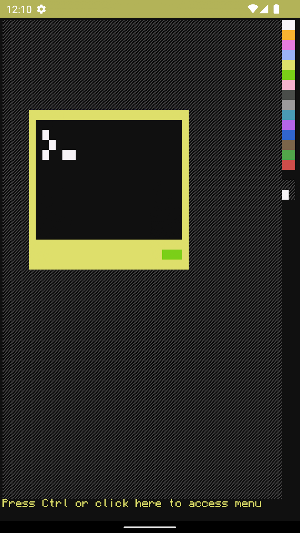
• Exclusive graphics mode providing up to 256-color, pixel-based screen manipulation
• Edit Lua scripts from CraftOS or other code editing apps
• Open-source app makes it easy to suggest and contribute changes
Documentation on all of the APIs that ComputerCraft provides are available at https://tweaked.cc, and CraftOS-PC’s unique APIs are described at https://www.craftos-pc.cc/docs/.
Join the CraftOS-PC community at https://www.craftos-pc.cc/discord!
CraftOS-PC emulates the popular mod "ComputerCraft" for an award-winning block building video game, which adds programmable computers to the game using the Lua programming language. CraftOS-PC takes this experience outside the game to allow you to run the same programs anywhere you go.
CraftOS-PC provides a set of functions (called APIs) that make it super easy to do simple tasks such as write text to the screen, read files, and more. The simplicity of these functions makes CraftOS-PC great for new programmers, but their power makes it possible to write all sorts of complex programs with less code.
If you aren’t ready to write programs yet, there’s already a large number of programs for ComputerCraft that will work in CraftOS-PC, ranging from simple games to whole graphical operating systems. These can be downloaded through the built-in Pastebin and GitHub Gist clients.
• Full Lua 5.1+ scripting environment and command-line REPL
• 16-color text-based terminal display
• Expansive virtual filesystem for program and data storage
• Built-in shell with syntax similar to most desktop shells
• APIs to easily access terminal, filesystem, Internet, event queue, and more
• Built-in programs make it easy to navigate & edit files without a single line of code
• Plenty of help documents to assist programmers
• Compatibility with thousands of existing ComputerCraft programs
• Over 3x faster than original mod and comparable emulators
• Emulation of all peripherals available in ComputerCraft
• Easily access configuration from inside CraftOS
• Exclusive graphics mode providing up to 256-color, pixel-based screen manipulation
• Edit Lua scripts from CraftOS or other code editing apps
• Open-source app makes it easy to suggest and contribute changes
Documentation on all of the APIs that ComputerCraft provides are available at https://tweaked.cc, and CraftOS-PC’s unique APIs are described at https://www.craftos-pc.cc/docs/.
Join the CraftOS-PC community at https://www.craftos-pc.cc/discord!
What’s new
Version 2.8.3 · Updated August 17, 2024
CraftOS-PC v2.8.3 includes a large number of bug fixes, including some security updates.
User reviews

wowwwwwwwwwww

The programs are good to know but not sure how to write your own I'm new to this app I will get there eventually thanks

Easy, Great, and one of my first introductions to programming. I've enjoyed this before it was on the playstore, nearing version 2.5.1, before downloading it here. It works better, functions greater, and is an overall treat!

Perfect emulator for Computercraft fans! Good for working on your computercraft lua files on the fly Even if you arent familiar with computercraft, its still a great app for bored Lua developers!

I couldn't get it to work on my pixel 7 pro, it just crashes immediately on startup, the PC version is cool though:)

Sad doesn't seem to work anymore :(
Alternatives to CraftOS-PC
Looking for apps like CraftOS-PC? Here are 5 similar Android apps on Google Play. 1 of the 5 are free to download.




| App | Rating | Price | Installs | Last updated | Compare |
|---|---|---|---|---|---|
| CraftOS-PC | 2.9 / 5 | Free | 10,000+ | Aug 17, 2024 | |
| FloorGen AI: House Designs | – | – | – | – | Compare |
| Murror AI | – | Free | 500+ | Nov 18, 2025 | Compare |
| Quick Image Changer | – | – | – | Oct 4, 2025 | Compare |
| Sora by OpenAI | – | – | 1,000,000+ | Dec 13, 2025 | Compare |
| Omega Locksync | – | – | 10+ | Jul 16, 2026 | Compare |
Compare CraftOS-PC with the top alternatives: ratings, updates, ASO score and keyword gaps →