
Move To SD Card
Bluelight Apps Tools Contains ads
Speed up your device by move files to SD card
- Downloads
- 1K+
- on Google Play
- Price
- Free
- No in-app purchases
- Updated
- Jun 14
- 2023 · v1.1
Screenshots


About Move To SD Card
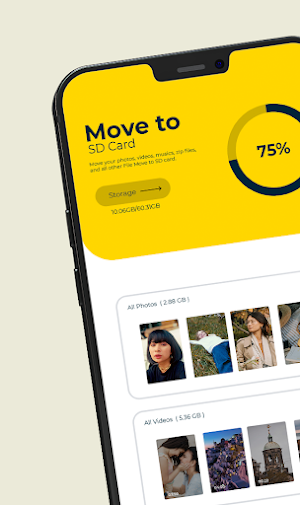
Move your photos, videos, musics, zip files, and all other downloads from your phone memory to SD card.
Move files to SD Card is fast solution to move your files from internal memory to SD card with one click.
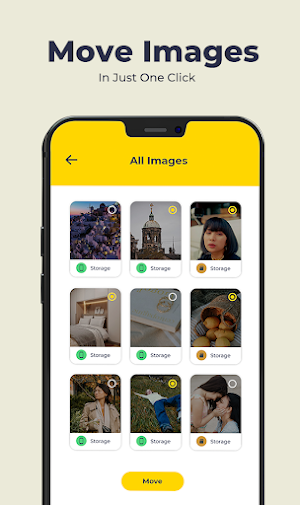
Move to sdcard works as move videos to sd card and move photos to sd card to move your images and photos easily.
Feature
• Move apps to SD card
• Simple UI
• files are grouped by file type
• Speed up your device by move files to SD card
• One click will do all the things
• Move apps to phone internal storage
• Sort app by movable, name, size and time
• User can custom [Install time] [Package name] [Apk path] to show in list
• Show app details: size, install time, package, apk path.
• Search in website by apk name, package name, app name
*Free up phone space by moving pictures, videos, documents and other files to SD card.
FAST AND EFFICIENT PERFORMANCE
Regularly using "Files to SD Card" ensures a seamless experience as it quickly frees up internal memory space with just one click. Move or backup your photos, videos, downloads, and other files from your device's internal memory to your SD card or USB OTG drive.
The same result can be achieved with other file managers, but with more work, more thinking and more clicks.
"Files to SD Card" is particularly useful for devices with limited internal memory, enabling the direct storage of captured content on the SD card. It also caters to users seeking a quick and seamless way to back up their files to the SD card or USB OTG drive. The app is compatible with Android Go devices.
In contrast, in our application you simply select files or directories and click on the big button and that's it. Everything quickly and easily.
If we granted root permission, we can move multi-app in one click, and can move almost all apps installed.
Get the most advanced Move To SD Card or Auto Move To SD Card app for FREE!!
All large files list available for remove unnecessary files and make extra space.
User Friendly User Interface.
Required Permission:
READ_EXTERNAL_STORAGE : get data from your storage and display in app
WRITE_EXTERNAL_STORAGE: to write data in SD card storage(move or transfer files)
MANAGE_EXTERNAL_STORAGE : For android 11 this permission is needed for data transfer and storage access.
Move files to SD Card is fast solution to move your files from internal memory to SD card with one click.
Move to sdcard works as move videos to sd card and move photos to sd card to move your images and photos easily.
Feature
• Move apps to SD card
• Simple UI
• files are grouped by file type
• Speed up your device by move files to SD card
• One click will do all the things
• Move apps to phone internal storage
• Sort app by movable, name, size and time
• User can custom [Install time] [Package name] [Apk path] to show in list
• Show app details: size, install time, package, apk path.
• Search in website by apk name, package name, app name
*Free up phone space by moving pictures, videos, documents and other files to SD card.
FAST AND EFFICIENT PERFORMANCE
Regularly using "Files to SD Card" ensures a seamless experience as it quickly frees up internal memory space with just one click. Move or backup your photos, videos, downloads, and other files from your device's internal memory to your SD card or USB OTG drive.
The same result can be achieved with other file managers, but with more work, more thinking and more clicks.
"Files to SD Card" is particularly useful for devices with limited internal memory, enabling the direct storage of captured content on the SD card. It also caters to users seeking a quick and seamless way to back up their files to the SD card or USB OTG drive. The app is compatible with Android Go devices.
In contrast, in our application you simply select files or directories and click on the big button and that's it. Everything quickly and easily.
If we granted root permission, we can move multi-app in one click, and can move almost all apps installed.
Get the most advanced Move To SD Card or Auto Move To SD Card app for FREE!!
All large files list available for remove unnecessary files and make extra space.
User Friendly User Interface.
Required Permission:
READ_EXTERNAL_STORAGE : get data from your storage and display in app
WRITE_EXTERNAL_STORAGE: to write data in SD card storage(move or transfer files)
MANAGE_EXTERNAL_STORAGE : For android 11 this permission is needed for data transfer and storage access.
User reviews

5starters

5starters

Good space when playing games save space to sd card very happy 5 star ratings keep up
Alternatives to Move To SD Card
Looking for apps like Move To SD Card? Here are 6 similar Android apps on Google Play. All of them are free to download.
-
Merge Multiple PDF Files
-
Photo Background Change Editor
-
Hanuman Jayanti Photo Editor
-
Contacts Backup & Restore
-
Sky Observation
-
2FA Authentication
| App | Rating | Price | Installs | Last updated | Compare |
|---|---|---|---|---|---|
| Move To SD Card | – | Free | 1,000+ | Jun 14, 2023 | |
| Merge Multiple PDF Files | – | Free | 500+ | Aug 11, 2023 | Compare |
| Photo Background Change Editor | – | Free | 500+ | Jul 19, 2023 | Compare |
| Hanuman Jayanti Photo Editor | – | Free | 1,000+ | Mar 29, 2023 | Compare |
| Contacts Backup & Restore | – | Free | 100+ | Dec 20, 2022 | Compare |
| Sky Observation | – | Free | 5+ | Dec 2, 2022 | Compare |
| 2FA Authentication | – | Free | 100+ | Oct 3, 2022 | Compare |
Compare Move To SD Card with the top alternatives: ratings, updates, ASO score and keyword gaps →