

Volume Audio Assistant - SoundAssistant
B Wind Tools Contains ads
Volume Audio Assistant is usefull for control of your device’s volume.
- Rating
- 2.0
- 391 ratings
- Downloads
- 50K+
- on Google Play
- Price
- Free
- No in-app purchases
- Updated
- Dec 7
- 2019 · v1.0
Screenshots

About Volume Audio Assistant - SoundAssistant
Volume Audio Assistant is a stunning application that gives you a chance to assume responsibility for your gadget's volume – rather than being constrained by it!
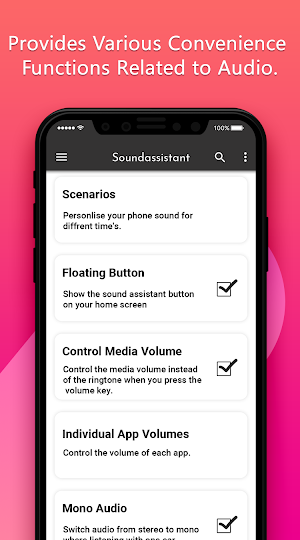
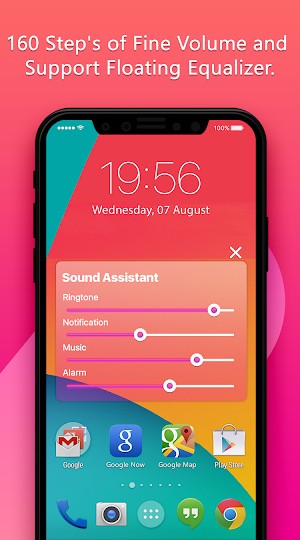
With Volume Audio Assistant you won't have to stress over that: you can control the volume of the ring, music, alert as you need, without setting it into quiet mode. You can likewise alter it. You can pick the volumes to change and you can deactivate them. It bunches together the entire volume's controls in a board, which show up when key volume is squeezed.
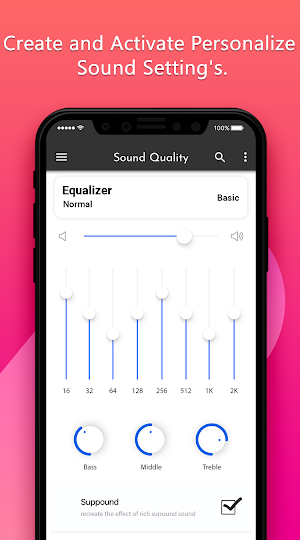
Volume Audio Assistant is incredibly simple to utilize. Essentially change existing or make new pre-characterized volume profiles, and switch between them with only a solitary touch. Individual profiles are included: Alarm, Media, Ringer, Notification, Voice (in-call), Bluetooth and in general framework volume.
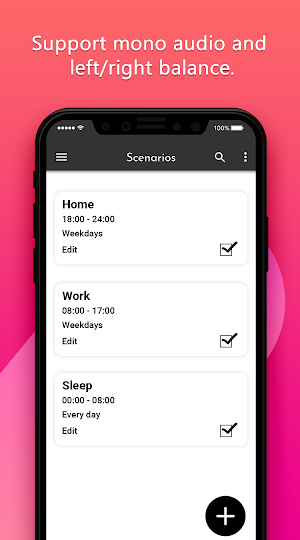
Volume Audio Assistant - Sound Assistant additionally recognizes when you embed earphones or initiate Bluetooth, and naturally switches to your favored volume profile. You can even make programmed booked presets dependent on time of day, physical area, or a schedule occasion.
In case you're physical volume catch is broken or you are awkward to modify volume by utilizing physical volume catch, Volume Control - Bottom Screen is an application you would love! This application will demonstrate movable volume smaller than usual bar at the base of the screen. You can swipe to show or conceal this bar anyplace.
Highlights Available from Samsung Experience variant 9.0
- Ability to swap left and right sounds on earphones
- Ability to hear ringtone, warning, and alert sounds just through earphones when earphone is associated.
This is a basic application that permits dealing with the diverse volume channels of your gadget. You can put symbols on your home screen to rapidly switch profiles. The application highlights lovely Material Design, offering both dull and light subjects.
Control every one of your volumes from one simple open area. Alter Ringer Volume, Media, Alarm, Notification, In-Call, System Volume. Also, Set your gadget on vibe, quiet, typical, or even endeavor to help your volume. Synchronized with gadget volume catches.
Much obliged to You...
With Volume Audio Assistant you won't have to stress over that: you can control the volume of the ring, music, alert as you need, without setting it into quiet mode. You can likewise alter it. You can pick the volumes to change and you can deactivate them. It bunches together the entire volume's controls in a board, which show up when key volume is squeezed.
Volume Audio Assistant is incredibly simple to utilize. Essentially change existing or make new pre-characterized volume profiles, and switch between them with only a solitary touch. Individual profiles are included: Alarm, Media, Ringer, Notification, Voice (in-call), Bluetooth and in general framework volume.
Volume Audio Assistant - Sound Assistant additionally recognizes when you embed earphones or initiate Bluetooth, and naturally switches to your favored volume profile. You can even make programmed booked presets dependent on time of day, physical area, or a schedule occasion.
In case you're physical volume catch is broken or you are awkward to modify volume by utilizing physical volume catch, Volume Control - Bottom Screen is an application you would love! This application will demonstrate movable volume smaller than usual bar at the base of the screen. You can swipe to show or conceal this bar anyplace.
Highlights Available from Samsung Experience variant 9.0
- Ability to swap left and right sounds on earphones
- Ability to hear ringtone, warning, and alert sounds just through earphones when earphone is associated.
This is a basic application that permits dealing with the diverse volume channels of your gadget. You can put symbols on your home screen to rapidly switch profiles. The application highlights lovely Material Design, offering both dull and light subjects.
Control every one of your volumes from one simple open area. Alter Ringer Volume, Media, Alarm, Notification, In-Call, System Volume. Also, Set your gadget on vibe, quiet, typical, or even endeavor to help your volume. Synchronized with gadget volume catches.
Much obliged to You...
User reviews

Surf

Good

It's fake!!
Alternatives to Volume Audio Assistant - SoundAssistant
Looking for apps like Volume Audio Assistant - SoundAssistant? Here are 6 similar Android apps on Google Play. All of them are free to download.
-
OTG USB - USB OTG Connector, U
-
Volume Slider :Volume Control
-
Sing Karaoke Online : Karaoke
-
Video call Recorder - Automati
-
Unit Converter - Unit Conversi
-
Hindi to English Translator :
| App | Rating | Price | Installs | Last updated | Compare |
|---|---|---|---|---|---|
| Volume Audio Assistant - SoundAssistant | 2.0 / 5 | Free | 50,000+ | Dec 7, 2019 | |
| OTG USB - USB OTG Connector, U | – | Free | 5,000+ | Oct 28, 2020 | Compare |
| Volume Slider :Volume Control | – | Free | 1,000+ | Oct 28, 2020 | Compare |
| Sing Karaoke Online : Karaoke | – | Free | 500+ | Dec 7, 2019 | Compare |
| Video call Recorder - Automati | – | Free | 1,000+ | Oct 28, 2020 | Compare |
| Unit Converter - Unit Conversi | – | Free | 100+ | Oct 28, 2020 | Compare |
| Hindi to English Translator : | – | Free | 100+ | Oct 28, 2020 | Compare |
Similar apps on Google Play
- OTG USB - USB OTG Connector, U
- Volume Slider :Volume Control
- Sing Karaoke Online : Karaoke
- Video call Recorder - Automati
- Unit Converter - Unit Conversi
- Hindi to English Translator :
- SIP Planner, Loan Pro, EMI Pro
- Loan Calculator : EMI Calculat
- IPTV : Online Iptv,Series, Mov
- MP3 Music Downloder - Mp3 Musi
- Crop Video Editor - Video cut
- Free VPN : Free Proxy Server &
- PF Balance, EPF Balance Check
- Fancy Style Keyboard - Cool Fo
- All Bank IFSC Code : Ifsc code