
Authenticator app - 2 factor
Quest Owl Tools Contains ads
Activate Two Factor Authenticator app (2FA, MFA, Multi OTP) & Password manager
- Rating
- 4.6
- 41 ratings
- Downloads
- 10K+
- on Google Play
- Price
- Free
- No in-app purchases
- Updated
- Sep 10
- 2024 · v1.11
Screenshots
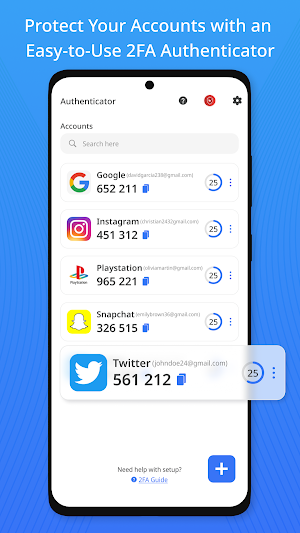
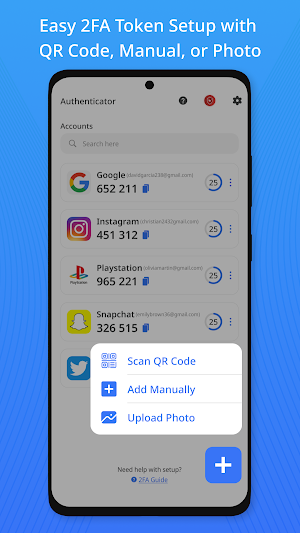
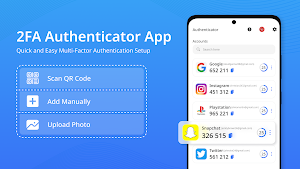
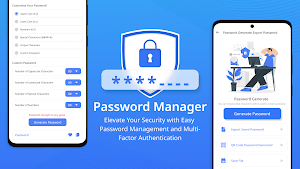


About Authenticator app - 2 factor
Key Features :
🔷 SIMPLE TO SETUP AND MANAGE
Scan QR codes or add accounts manually from your online accounts to on two factor authentication .
Upload screenshots of QR code from your gallery for ease in this authenticator.
Import/Export: Easily import and export your 2FA token or 2FA accounts.
Import from Google Authenticator: Using QR code to swiftly import your tokens from Google Authenticator.
🔷 2FA & BIOMETRIC SECURITY
Multi-Factor Authentication: Enhance security with auth's additional verification methods.
Biometric Lock: Ensure only you can access your 2FA codes with fingerprint, face recognition, PIN & pattern.
TOTP & OTP : Generate time-based, one-time passwords (TOTP) for extra account security.
🔷 PASSWORD MANAGEMENT
Password Manager: Protect, secure and manage your passwords with password manager.
Password Generator: Generate strong, unique passwords for accounts with password generator.
🔷 ADDITIONAL FEATURES
Multilingual Support: Available to users worldwide in a multiple languages.
Multi-Device Support: Access your codes across multiple devices seamlessly.
Unlimited Accounts & Codes: Store and manage unlimited accounts and codes.
Multi-Platform Support: Works on Android phones, Tablet and other platforms.
2FA Guide: Step-by-step detailed guide with screenshots to setting up 2FA on all your accounts.
🔷 SUPPORT ALL ACCOUNTS
With support for Google, Facebook, Discord, Microsoft Outlook, Instagram, PayPal, Amazon, Dropbox, LinkedIn, GitHub, OneDrive, LastPass, Robinhood, Binance, gaming platforms, PlayStation, Duo mobile and many more, you can secure all of your accounts, including social media, financial platforms and more. Authenticator is a great substitute for Microsoft Authenticator, Duo , Authy or Google Authenticator since it's the best 2 factor Authenticator app or OTP Authenticator app available. It support all the popular accounts and serves as outlook authenticator, discord authenticator, facebook authenticator app, binance authenticator, code generator app, ms authenticator and otp authenticator.
How it works:
Scan & Add: Scan QR codes from your online accounts to add them to Authenticator.
Authenticate: Use the Authenticator to generate time-based, one-time passwords (TOTP) for each login.
Stay Safe: Enjoy peace of mind knowing your accounts are protected with an 2 factor extra layer of security.
Why Authenticator - 2 Factor Stands Out:
2-Step Verification, also known as 2fa or multi factor authenticaton (MFA), strengthens the security of all of your accounts in the same way that an ordinary authentication app, such as Google Authenticator or Microsoft Authenticator would do.
PRIVACY-FIRST APPROACH
We prioritize your privacy with top-tier encryption and a strict no-data-collection policy.
OFFLINE ACCESS
You can access your authentication codes even when you are not connected to the internet, ensuring that you are never locked out of your accounts.
RELIABLE SUPPORT
Our dedicated support team is available around the clock; kindly mail your issue before writing a negative review.
Permissions:
Camera: For scanning QR codes.
Biometric: To enable biometric lock.
Contact Us:
For support or feedback, reach us at [email protected], we'll help you at the earliest.
What’s new
Version 1.11 · Updated September 10, 2024
Simple Setup: Easily add accounts by scanning QR codes or manually inputting details, with import options from Google Authenticator. Enhanced Security: Offers multi-factor authentication (MFA) with 2 factor authentication in US, Uk, etc. Secure Verification: 2 Factor authentication with authenticator app ensures secure account access. Bug Fixes and improvemnet.
User reviews

Goof

Goid

I highly recommend the Authenticator app - 2 factor. Its 2fa and two factor authentication features are robust and provide excellent security.

It's great and I use it alote

Exllent
Alternatives to Authenticator app - 2 factor
Looking for apps like Authenticator app - 2 factor? Here are 3 similar Android apps on Google Play. The highest rated is Live Flight Tracker - Radar 24 (3.1/5), and all 3 are free to download.

| App | Rating | Price | Installs | Last updated | Compare |
|---|---|---|---|---|---|
| Authenticator app - 2 factor | 4.6 / 5 | Free | 10,000+ | Sep 10, 2024 | |
| AI Drawing - Trace and Draw | – | Free | 500,000+ | Jun 19, 2026 | Compare |
| Live Flight Tracker - Radar 24 | 3.1 / 5 | Free | 100,000+ | Jun 13, 2026 | Compare |
| Portuguese English Translator | – | Free | 10,000+ | Oct 8, 2026 | Compare |