
CleanBoard Whiteboard Scanner
Stephan Martin Productivity
Clean up whiteboard & document photos instantly. Share crisp, readable results.
- Downloads
- 592+
- on Google Play
- Price
- Free
- No in-app purchases
- Updated
- May 3
- 2026 · v1.7
Screenshots


About CleanBoard Whiteboard Scanner
CleanBoard turns blurry, glare-ridden whiteboard and document photos into sharp, readable images - in seconds. No cloud, no account.
Photograph a whiteboard or document and end up with a washed-out, uneven mess?
CleanBoard fixes that in seconds — turning glare-ridden, low-contrast photos into
clean, readable images you can share straight from your phone.
**Three powerful cleanup algorithms**
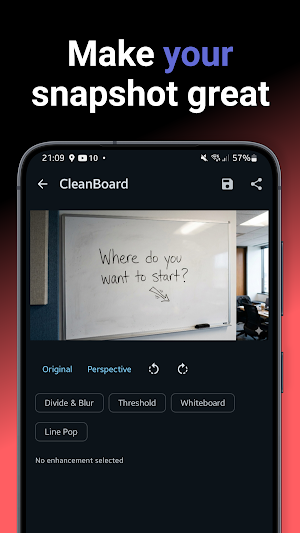
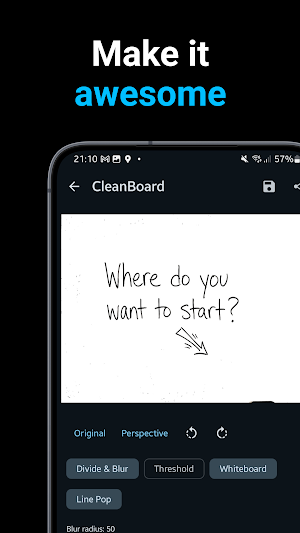
• Divide & Blur — the classic GIMP technique: evens lighting, removes background
colour, and makes text and diagrams pop against a white surface.
• Adaptive Threshold — Bradley's local thresholding handles uneven illumination
across large boards without blowing out fine detail.
• Whiteboard Enhance — boosts colour saturation and contrast so coloured markers
stay vivid rather than fading to grey.
Mix and match methods, or apply them in combination for best results.
**Perspective correction**
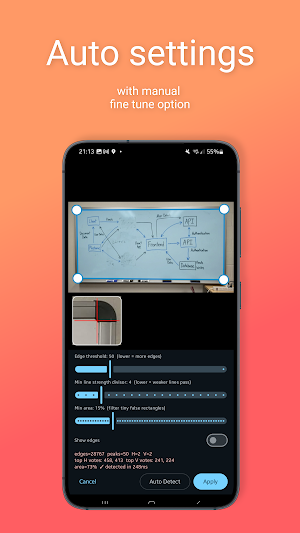
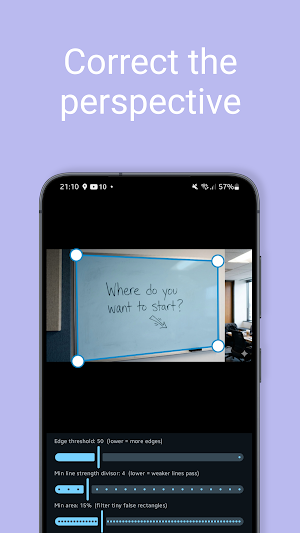
Drag the four corner handles to straighten a photo taken at an angle. Tap
Auto-Detect and CleanBoard analyses the image with a Hough line transform to find
the whiteboard edges automatically — then warp the result flat with a single tap.
**Fine-tune every result**
Adjustable sliders let you dial in blur radius, threshold window, and enhancement
strength per method. A live before/after toggle shows exactly what changed.
Rotate the image 90° left or right any time.
**Flexible input and output**
• Pick any photo from your gallery.
• Receive images via the Android share sheet from your camera app, file manager,
or any other app — CleanBoard appears as a share target automatically.
• Share the cleaned result to any app with one tap.
• Save directly to your gallery with a single button; a confirmation snackbar
lets you know the moment the file is written.
**100% on-device. No account. No cloud.**
Every pixel is processed locally on your device. CleanBoard never uploads your
images anywhere, requires no sign-in, and works fully offline.
Whether you're capturing meeting notes, lecture slides, hand-drawn diagrams, or
paper documents, CleanBoard gives you a fast, private way to clean them up and
share them — right from your pocket.
Photograph a whiteboard or document and end up with a washed-out, uneven mess?
CleanBoard fixes that in seconds — turning glare-ridden, low-contrast photos into
clean, readable images you can share straight from your phone.
**Three powerful cleanup algorithms**
• Divide & Blur — the classic GIMP technique: evens lighting, removes background
colour, and makes text and diagrams pop against a white surface.
• Adaptive Threshold — Bradley's local thresholding handles uneven illumination
across large boards without blowing out fine detail.
• Whiteboard Enhance — boosts colour saturation and contrast so coloured markers
stay vivid rather than fading to grey.
Mix and match methods, or apply them in combination for best results.
**Perspective correction**
Drag the four corner handles to straighten a photo taken at an angle. Tap
Auto-Detect and CleanBoard analyses the image with a Hough line transform to find
the whiteboard edges automatically — then warp the result flat with a single tap.
**Fine-tune every result**
Adjustable sliders let you dial in blur radius, threshold window, and enhancement
strength per method. A live before/after toggle shows exactly what changed.
Rotate the image 90° left or right any time.
**Flexible input and output**
• Pick any photo from your gallery.
• Receive images via the Android share sheet from your camera app, file manager,
or any other app — CleanBoard appears as a share target automatically.
• Share the cleaned result to any app with one tap.
• Save directly to your gallery with a single button; a confirmation snackbar
lets you know the moment the file is written.
**100% on-device. No account. No cloud.**
Every pixel is processed locally on your device. CleanBoard never uploads your
images anywhere, requires no sign-in, and works fully offline.
Whether you're capturing meeting notes, lecture slides, hand-drawn diagrams, or
paper documents, CleanBoard gives you a fast, private way to clean them up and
share them — right from your pocket.
What’s new
Version 1.7 · Updated May 3, 2026
Initial release of CleanBoard. Highlights: • 4 cleanup methods (Divide & Blur, Adaptive Threshold, Whiteboard Enhance, Line Pop) • Perspective correction with auto corner detection • Paint brush for manual touch-ups • Pinch to zoom and pan • Save to gallery and share • Smart share picker when a second image is shared while editing
Alternatives to CleanBoard Whiteboard Scanner
Looking for apps like CleanBoard Whiteboard Scanner? Here are 6 similar Android apps on Google Play. The highest rated is Calendar Week Number in status (3.9/5), and all 6 are free to download.
-
NearScan
-
RTK Position
-
MemoryPulse - Test Your Memory
-
Piston Pulse Live Wallpaper
-
Mental Math Master 3.4
-
Calendar Week Number in status 3.9
| App | Rating | Price | Installs | Last updated | Compare |
|---|---|---|---|---|---|
| CleanBoard Whiteboard Scanner | – | Free | 500+ | May 3, 2026 | |
| NearScan | – | Free | 5+ | – | Compare |
| RTK Position | – | Free | 500+ | Aug 17, 2026 | Compare |
| MemoryPulse - Test Your Memory | – | Free | 100+ | Mar 29, 2026 | Compare |
| Piston Pulse Live Wallpaper | – | Free | 500+ | – | Compare |
| Mental Math Master | 3.4 / 5 | Free | 50,000+ | – | Compare |
| Calendar Week Number in status | 3.9 / 5 | Free | 50,000+ | – | Compare |