
Device sensors
Tools Contains ads
Explore every sensor on your phone in real time — no account needed.
- Downloads
- 81+
- on Google Play
- Price
- Free
- No in-app purchases
- Updated
- Aug 6
- 2026 · v1.0.0
Screenshots


About Device sensors
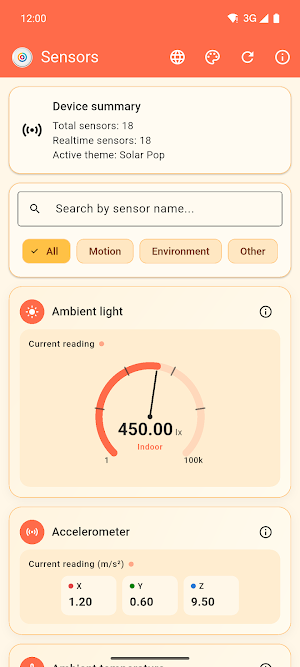
Sensors Device shows you, in real time, absolutely every sensor built into your phone or tablet: accelerometer, gyroscope, magnetometer, compass, ambient light, pressure, humidity, temperature, proximity, heart rate, step counter, and many more.
No account, no complicated setup — just open the app and see live data with clear gauges and charts.
WHAT YOU CAN DO
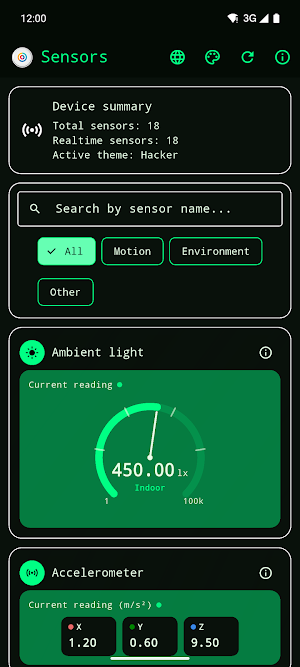
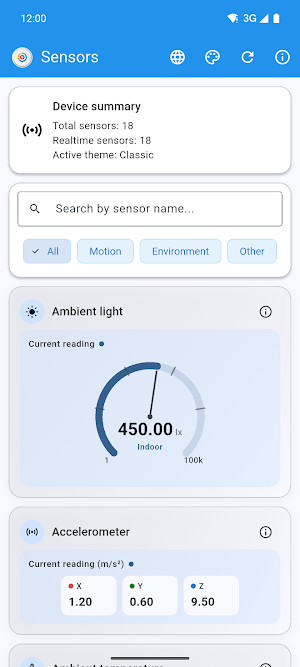
• View live readings with easy-to-read, speedometer-style gauges.
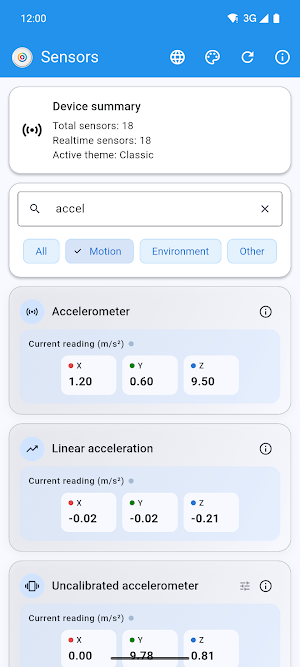
• Search for a sensor by name or filter by category: Motion, Environment, or Other.
• Tap the info icon on any sensor to see its full spec sheet: vendor, type, max range, resolution, and power draw.
• Check a device summary: total sensors available and how many stream live data.
• Spot duplicate sensors your manufacturer reports more than once, neatly grouped instead of cluttering the screen.
• Calibrate your compass with ease: the app flags low accuracy and guides you through the figure-eight gesture.
30+ SENSOR TYPES SUPPORTED
Accelerometer, uncalibrated accelerometer, gyroscope, uncalibrated gyroscope, magnetometer, uncalibrated magnetometer, orientation, gravity, linear acceleration, rotation vector, game rotation vector, geomagnetic rotation vector, ambient light, pressure, temperature, ambient temperature, relative humidity, proximity, heart rate, heart beat, step counter, step detector, significant motion, tilt detector, stationary detect, motion detect, wake and glance gestures, wrist tilt, hinge angle, device orientation, and more.
MAKE IT YOURS
Pick from 7 completely different visual themes: Classic, Solar Pop, Ocean Lab, Retro Arcade, Paper and Marker, Hacker, and Retro. Switch between Spanish and English with a single tap, right inside the app.
WHO IT'S FOR
Perfect for developers who want to check what sensors a device exposes before coding against them, technicians diagnosing hardware, and anyone curious about what their phone can actually "feel."
Sensors Device is free, supported by unobtrusive ads.
No account, no complicated setup — just open the app and see live data with clear gauges and charts.
WHAT YOU CAN DO
• View live readings with easy-to-read, speedometer-style gauges.
• Search for a sensor by name or filter by category: Motion, Environment, or Other.
• Tap the info icon on any sensor to see its full spec sheet: vendor, type, max range, resolution, and power draw.
• Check a device summary: total sensors available and how many stream live data.
• Spot duplicate sensors your manufacturer reports more than once, neatly grouped instead of cluttering the screen.
• Calibrate your compass with ease: the app flags low accuracy and guides you through the figure-eight gesture.
30+ SENSOR TYPES SUPPORTED
Accelerometer, uncalibrated accelerometer, gyroscope, uncalibrated gyroscope, magnetometer, uncalibrated magnetometer, orientation, gravity, linear acceleration, rotation vector, game rotation vector, geomagnetic rotation vector, ambient light, pressure, temperature, ambient temperature, relative humidity, proximity, heart rate, heart beat, step counter, step detector, significant motion, tilt detector, stationary detect, motion detect, wake and glance gestures, wrist tilt, hinge angle, device orientation, and more.
MAKE IT YOURS
Pick from 7 completely different visual themes: Classic, Solar Pop, Ocean Lab, Retro Arcade, Paper and Marker, Hacker, and Retro. Switch between Spanish and English with a single tap, right inside the app.
WHO IT'S FOR
Perfect for developers who want to check what sensors a device exposes before coding against them, technicians diagnosing hardware, and anyone curious about what their phone can actually "feel."
Sensors Device is free, supported by unobtrusive ads.
What’s new
Version 1.0.0 · Updated August 6, 2026
Improve UI UX
Alternatives to Device sensors
Looking for apps like Device sensors? Here are 4 similar Android apps on Google Play. The highest rated is My Hurricane Tracker Pro (4.8/5), and 3 of the 4 are free to download.
-
beurer HealthManager Pro 2.8
-
Daypad - Simple Time Tracker 4.2
-
myCadillac 4.6
-
My Hurricane Tracker Pro 4.8
| App | Rating | Price | Installs | Last updated | Compare |
|---|---|---|---|---|---|
| Device sensors | – | Free | 50+ | Aug 6, 2026 | |
| beurer HealthManager Pro | 2.8 / 5 | Free | 500,000+ | Oct 16, 2026 | Compare |
| Daypad - Simple Time Tracker | 4.2 / 5 | Free | 5,000+ | May 26, 2026 | Compare |
| myCadillac | 4.6 / 5 | Free | 500,000+ | Oct 14, 2026 | Compare |
| My Hurricane Tracker Pro | 4.8 / 5 | 3.99 USD | 10,000+ | Sep 16, 2026 | Compare |
Compare Device sensors with the top alternatives: ratings, updates, ASO score and keyword gaps →