
Sanctuary: Minimalist Launcher
Galadriel Labs Productivity In-app purchases
Reduce screen time with intention gates, app limits, and a minimalist launcher.
- Downloads
- 418+
- on Google Play
- Price
- Free
- In-app purchases
- Updated
- Aug 9
- 2026 · v1.0.16
Screenshots


About Sanctuary: Minimalist Launcher
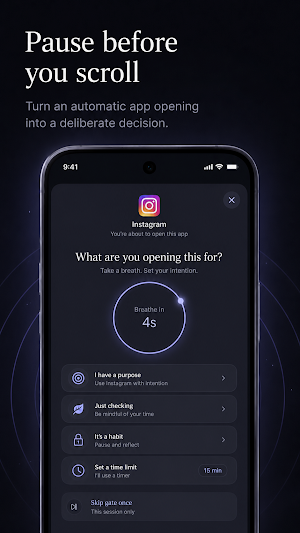
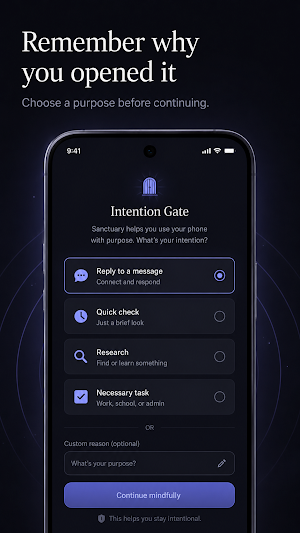
Instead of treating every distracting app like an enemy, Sanctuary places a deliberate pause between impulse and action. When you open a selected app, the Intention Gate asks one simple question:
“What are you opening this for?”
Choose a purpose, wait through a short breathing pause, and continue—or decide you never needed to open the app at all.
A Calm Minimalist Home Screen
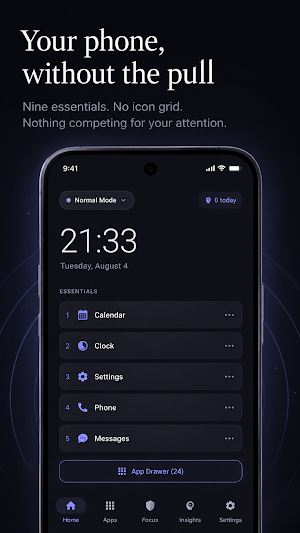
Replace a crowded icon grid with a quiet, text-first home screen built around the time, date, your active focus mode, and up to nine essential apps.
No social feed. No red notification badges. No visual clutter competing for your attention.
Intention Gates
Choose which apps should require a mindful pause.
Sanctuary can:
• Detect selected apps opened from the launcher, notifications, widgets, or deep links
• Ask you to state your intention before continuing
• Add a configurable breathing cooldown
• Let you return home instead of opening the app
• Record purposeful opens, cancellations, and overrides locally
• Grant a temporary session after you choose to continue
Daily App Limits
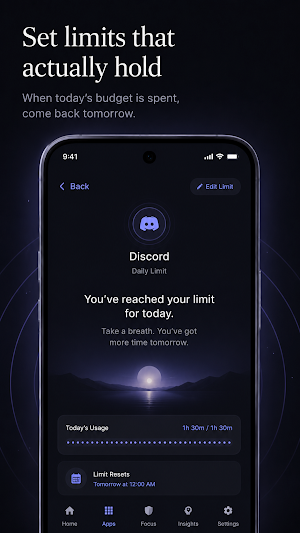
Set a daily usage budget for distracting apps. Once the budget is spent, Sanctuary shows a calm daily-limit screen and asks you to return tomorrow.
Focus Modes and Schedules
Shape your phone around different parts of your day.
Use modes such as:
• Deep Work
• Reading and Zen
• Sleep and Wind-down
• Weekend Unplug
Create time-based schedules so Sanctuary can change focus modes automatically during work hours, study time, evenings, or bedtime.
Text-First App Library
Find every installed app without returning to a stimulating icon grid.
• Search apps quickly
• Sort alphabetically, by category, or oldest-used first
• Rename apps with custom aliases
• Pin essentials to the home screen
• Hide apps from the launcher
• Choose which apps use Intention Gates
• Set daily time limits
Notification Digest
Choose specific apps whose non-urgent notifications can wait for a scheduled digest. Notification titles and previews are stored only on your device and remain available in Insights until you clear them.
Android delivers notifications before a notification listener can dismiss them, so some devices may briefly show an alert before Sanctuary removes it from the notification shade.
Reflection Without Judgment
Sanctuary helps you understand your behavior without streaks, trophies, or shame.
Review:
• Purposeful app openings
• Times you decided not to continue
• Overrides
• Per-app patterns
• Your local intention history
• Delivered notification summaries
Private by Design
Sanctuary is built around local processing.
• No Sanctuary account
• No advertising SDKs
• No behavioral analytics
• No cloud sync
• No sale of attention data
• User-initiated local export and import
• Purchases handled through Google Play
The optional Accessibility Service only detects when an app comes to the foreground so Sanctuary can display an Intention Gate or daily-limit screen. It cannot read screen content, passwords, messages, or keystrokes.
Notification access is optional and is used only for apps you explicitly select for digesting.
A Phone That Feels Like a Tool Again
Sanctuary does not ask you to abandon useful technology. It helps make distracting behavior less automatic.
Use your phone when you mean to. Leave when you are done.
Install Sanctuary and make distraction a decision.
What’s new
Version 1.0.16 · Updated August 9, 2026
Sanctuary transforms your phone into a distraction-free minimalist home screen designed for digital detox, intentional habits, and higher daily productivity. Unlike traditional app blockers that punish or restrict you with rigid walls, Sanctuary introduces Friction by Design and Intention Gates—making distracting apps harder to open while encouraging mindful awareness.
Alternatives to Sanctuary: Minimalist Launcher
Looking for apps like Sanctuary: Minimalist Launcher? Here are 4 similar Android apps on Google Play. The highest rated is Bartlett Arborist Supply (4.9/5), and 3 of the 4 are free to download.
-
PurpleLine Icon Pack : LineX 4.7
-
Bartlett Arborist Supply 4.9
-
Coast: Native Work Order CMMS 4.4
-
IFSTA Instructor 9 3.9
| App | Rating | Price | Installs | Last updated | Compare |
|---|---|---|---|---|---|
| Sanctuary: Minimalist Launcher | – | Free | 100+ | Aug 9, 2026 | |
| PurpleLine Icon Pack : LineX | 4.7 / 5 | 0.79 USD | 5,000+ | Aug 14, 2026 | Compare |
| Bartlett Arborist Supply | 4.9 / 5 | Free | 1,000+ | Jun 22, 2026 | Compare |
| Coast: Native Work Order CMMS | 4.4 / 5 | Free | 50,000+ | Oct 26, 2026 | Compare |
| IFSTA Instructor 9 | 3.9 / 5 | Free | 5,000+ | Oct 31, 2025 | Compare |