

Auto Paste - Quick Paste
A Logix Labs Productivity In-app purchases
Save text. Paste instantly from your Quick Paste keyboard. Type less.
- Downloads
- 1K+
- on Google Play
- Price
- Free
- In-app purchases
- Updated
- Aug 14
- 2026 · v1.5.0
Screenshots
About Auto Paste - Quick Paste
Stop typing the same things over and over! Meet Auto Paste - Quick Paste, the ultimate clipboard manager and paste keyboard designed to save you time.
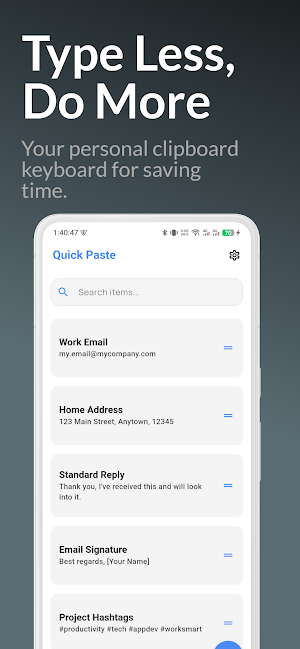
Our app lets you create and save a library of text templates, so you can paste frequent replies, emails, addresses, or any other text with a single tap. Forget the hassle of switching apps to copy and paste—Quick Paste makes it instant.
🌟 KEY FEATURES 🌟
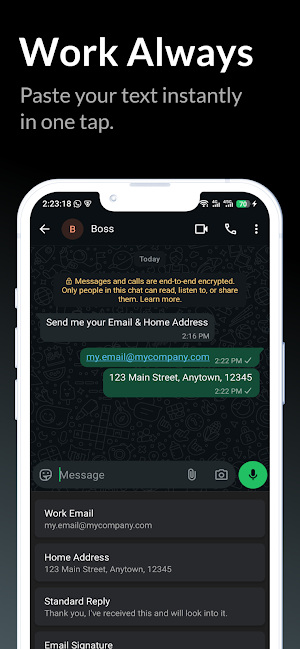
🚀 Instant Paste Keyboard: Access all your saved text templates directly from our custom keyboard. Works in any app!
📂 Unlimited Templates: Create and store as many templates as you need. Organize them with clear titles for easy access.
⚡ Fast & Easy: A clean, simple interface. Add new items in seconds and find them instantly with the built-in search.
📋 Powerful Clipboard Manager: A better way to manage your important text. Your most-used replies are always just one tap away.
🎨 MAKE IT TRULY YOURS 🎨
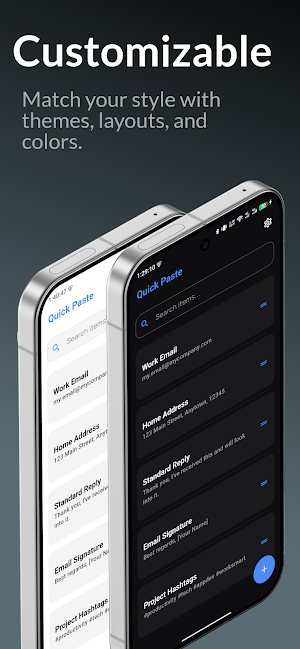
Your tools should match your style. We built our paste keyboard to be the most customizable on the Play Store.
Light & Dark Themes: Perfect for any time of day. Our stunning dark mode is easy on the eyes.
Custom Accent Colors: Personalize the entire app with your favorite color.
Grid & List Layouts: Choose the layout that works best for you, both in the app and on the keyboard.
🔒 100% PRIVATE AND SECURE 🔒
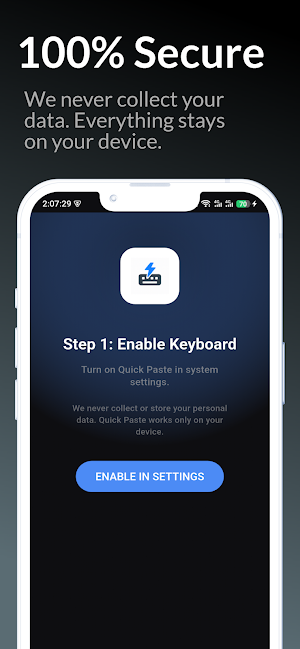
This is our most important feature. We NEVER collect your personal data.
Works 100% Offline: The app does not require an internet connection.
No Cloud Sync: Your data NEVER leaves your device.
No Spying: We cannot read what you type with your regular keyboard.
"Auto Paste - Quick Paste" is a secure clipboard you can trust with your emails, addresses, and other personal information.
HOW TO USE:
Enable: Open the app and follow the simple 2-step setup to enable the "Quick Paste" keyboard.
Create: Tap the "+" button to add your frequent replies, emails, or any other text.
Paste: In any app, switch your keyboard to "Quick Paste," tap your template, and watch it paste instantly!
Whether you're in customer support, sales, or just tired of typing your email 20 times a day, this text expander app is for you.
Download Auto Paste - Quick Paste today and start to "Type Less, Do More!"
Our app lets you create and save a library of text templates, so you can paste frequent replies, emails, addresses, or any other text with a single tap. Forget the hassle of switching apps to copy and paste—Quick Paste makes it instant.
🌟 KEY FEATURES 🌟
🚀 Instant Paste Keyboard: Access all your saved text templates directly from our custom keyboard. Works in any app!
📂 Unlimited Templates: Create and store as many templates as you need. Organize them with clear titles for easy access.
⚡ Fast & Easy: A clean, simple interface. Add new items in seconds and find them instantly with the built-in search.
📋 Powerful Clipboard Manager: A better way to manage your important text. Your most-used replies are always just one tap away.
🎨 MAKE IT TRULY YOURS 🎨
Your tools should match your style. We built our paste keyboard to be the most customizable on the Play Store.
Light & Dark Themes: Perfect for any time of day. Our stunning dark mode is easy on the eyes.
Custom Accent Colors: Personalize the entire app with your favorite color.
Grid & List Layouts: Choose the layout that works best for you, both in the app and on the keyboard.
🔒 100% PRIVATE AND SECURE 🔒
This is our most important feature. We NEVER collect your personal data.
Works 100% Offline: The app does not require an internet connection.
No Cloud Sync: Your data NEVER leaves your device.
No Spying: We cannot read what you type with your regular keyboard.
"Auto Paste - Quick Paste" is a secure clipboard you can trust with your emails, addresses, and other personal information.
HOW TO USE:
Enable: Open the app and follow the simple 2-step setup to enable the "Quick Paste" keyboard.
Create: Tap the "+" button to add your frequent replies, emails, or any other text.
Paste: In any app, switch your keyboard to "Quick Paste," tap your template, and watch it paste instantly!
Whether you're in customer support, sales, or just tired of typing your email 20 times a day, this text expander app is for you.
Download Auto Paste - Quick Paste today and start to "Type Less, Do More!"
What’s new
Version 1.5.0 · Updated August 14, 2026
☁️ Manual cloud sync with improved reliability. 💙 New privacy-friendly supporter leaderboard. ⚡ Smoother performance and polished UI. 🛡️ Bug fixes and stability improvements.
User reviews

A++

Very Helpful for Copy pasting work
Alternatives to Auto Paste - Quick Paste
Looking for apps like Auto Paste - Quick Paste? Here are 3 similar Android apps on Google Play. The highest rated is Breakroom Chat & Scheduling (4.7/5), and 2 of the 3 are free to download.



| App | Rating | Price | Installs | Last updated | Compare |
|---|---|---|---|---|---|
| Auto Paste - Quick Paste | – | Free | 1,000+ | Aug 14, 2026 | |
| Breakroom Chat & Scheduling | 4.7 / 5 | Free | 100,000+ | Oct 1, 2026 | Compare |
| Asthma Diary | – | – | – | Jan 28, 2026 | Compare |
| Business Texting with Salesmsg | 4.5 / 5 | Free | 10,000+ | Oct 27, 2026 | Compare |