
DockBar : Taskbar for Android
Tools
Taskbar to access favourite and recent apps instantly, docked in navigation bar
- Downloads
- 237+
- on Google Play
- Price
- $0.99
- No in-app purchases
- Updated
- Oct 20
- 2026 · vDockBar_2.0
Screenshots



About DockBar : Taskbar for Android
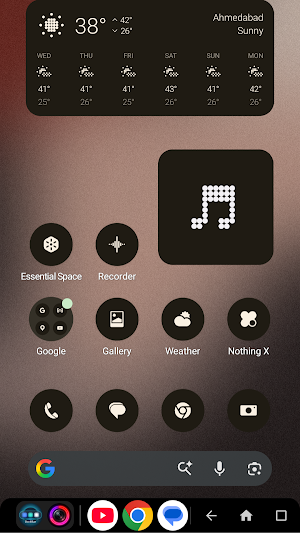
Add a persistent DockBar to the navigation bar and instantly access your favourite apps and recent apps from anywhere - without interrupting what you're doing.
⚡ FAST • MINIMAL • ALWAYS AVAILABLE
DockBar is designed to feel like a native system feature - smooth, responsive, and always ready when you need it.
────────────────────
🔒 100% PRIVATE & OFFLINE
────────────────────
DockBar is built with privacy as a core principle.
• Works completely offline - no internet required
• No data collection, no tracking, no analytics
• No personal data is stored or shared
• No background network activity
Your usage stays entirely on your device.
Unlike many apps, DockBar does NOT send any data to servers — everything runs locally for maximum security and performance.
────────────────────
⚡ CORE FEATURES
────────────────────
• Persistent Taskbar
Always-visible dock overlay across all apps for instant access
• Pin Your Favourite Apps
Pin up to 8 apps for one-tap launching anytime
• Recent Apps
Dock updates automatically as you switch apps - stay in flow
• Adjustable Recent Apps
Customize how many recent apps appear (2–8)
• Smooth Animations
Fluid scrolling and transitions - no lag, no jank
• Navigation Customization
Rearrange Back and Recents buttons your way
• Works Everywhere
Compatible with gesture navigation and button navigation
────────────────────
🎯 WHY DOCKBAR?
────────────────────
• Minimal design, no clutter
• Lightning-fast performance
• Built for productivity and multitasking
• Clean, modern UI experience
• No ads, no distractions
────────────────────
🔐 PERMISSIONS & TRANSPARENCY
────────────────────
DockBar uses only the permissions required for its core functionality:
• Accessibility Service
Used ONLY to show DockBar on Screen
It does NOT read screen content, capture input, or collect personal data
• Usage Access (Optional)
Used to improve recent apps list
We believe in full transparency - DockBar respects your privacy at every level.
────────────────────
Upgrade your Android experience with DockBar - the private, powerful, and modern taskbar your phone deserves.
What’s new
Version DockBar_2.0 · Updated October 20, 2026
What's new in DockBar_2.0 • Edge handle: a slim handle on the screen edge opens a vertical dock • Always on: keep your dock on screen, at the bottom or along an edge • Pop-up gets corner hints so you always know where to double-tap • Hide DockBar in chosen apps, auto-hide, keep-open • Quick Settings tile to show or hide the dock anywhere • Works on the Foldables • Six new colour palettes for DockBar's screens
User reviews

Hi, Been test driving your dock bar for a few days now, really like it, but wanted to recommend a few suggestions, 1.add apps menu icon like how Google or Samsung have it on their foldable 2. option to make the corners more rounded 3. icon pack support if you can add those I think you have a real winner, so keep eve...

Nice App..

exceptional. been looking for this type of app since the longest , the closest one I ever got close to his is taskbar but it does not override the system navigation bar. so the recent app is above the navigation bar, it gets in the way of the screen making it difficult to touch bottom parts of the screen. What I lik...

DockBar is one of those rare Android productivity apps that actually changes workflow instead of just adding visual customization. The biggest advantage is how intentional multitasking feels compared to permanently visible sidebars or OEM panels. Works especially well for users running custom launchers where native ...

minimal app permission...👍
Alternatives to DockBar : Taskbar for Android
Looking for apps like DockBar : Taskbar for Android? Here are 6 similar Android apps on Google Play. The highest rated is AIO Launcher (4.5/5), and all 6 are free to download.
-
Good Lock : Custom Lock Screen 3.1
-
ISO Today 4.3
-
Nuki Smart Lock 4.3
-
AIO Launcher 4.5
-
dynamicSpot - Dynamic Island 4.4
-
One Hand Operation + 4.2
| App | Rating | Price | Installs | Last updated | Compare |
|---|---|---|---|---|---|
| DockBar : Taskbar for Android | – | $0.99 | 100+ | Oct 20, 2026 | |
| Good Lock : Custom Lock Screen | 3.1 / 5 | Free | 1,000,000+ | Oct 26, 2026 | Compare |
| ISO Today | 4.3 / 5 | Free | 10,000+ | May 7, 2026 | Compare |
| Nuki Smart Lock | 4.3 / 5 | Free | 1,000,000+ | Oct 28, 2026 | Compare |
| AIO Launcher | 4.5 / 5 | Free | 1,000,000+ | Oct 19, 2026 | Compare |
| dynamicSpot - Dynamic Island | 4.4 / 5 | Free | 10,000,000+ | Aug 20, 2025 | Compare |
| One Hand Operation + | 4.2 / 5 | Free | 1,000,000+ | Sep 15, 2026 | Compare |