

Inkletter: E-Ink Newsletter
Productivity In-app purchases
Boox Gmail newsletters. Paginated E-Ink reader, offline.
- Downloads
- 7+
- on Google Play
- Price
- Free
- In-app purchases
- Updated
- Sep 5
- 2026 · v1.0.4
Screenshots


About Inkletter: E-Ink Newsletter
Gmail newsletter reader for Boox and E-Ink. Google sign-in is read-only — the app never sends mail. Paginated, offline, no ads. Your messages stay on the device.
Inkletter isolates Gmail newsletters into a calm black-on-white reader for Boox, Onyx, Hisense, and similar e-paper devices.
WHY INKLETTER?
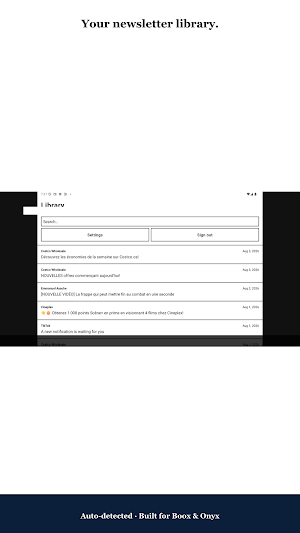
Newsletters get buried in Gmail between work mail, promotions, and alerts. Inkletter automatically detects newsletter messages (List-Unsubscribe header) and gathers them into a dedicated library. No infinite scroll, no noisy UI chrome: a reading flow designed for electronic paper and longer sessions.
HOW IT WORKS
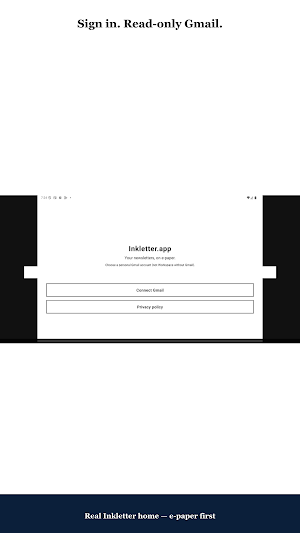
1. Sign in with Google (secure OAuth, read-only access).
2. Inkletter syncs your Gmail newsletters to the device.
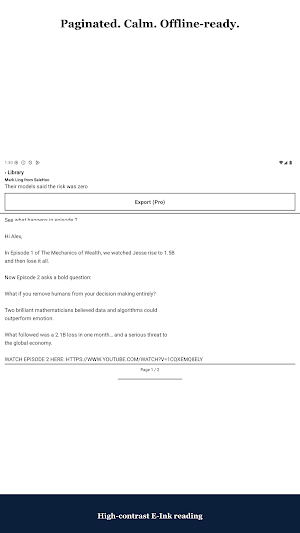
3. Open a newsletter and read page by page (tap left / right).
4. Keep reading offline from the local cache.
5. Sign out to clear tokens and cache, or revoke access in your Google Account permissions.
KEY FEATURES
• Secure Google Sign-In — gmail.readonly scope only
• Automatic newsletter detection
• Organized library built for reading, not inbox triage
• Paginated E-Ink reader (high contrast, reduced ghosting)
• Offline reading after sync
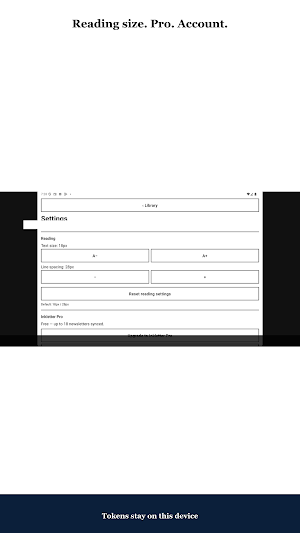
• Font size and margin controls
• French and English UI
• No ads in the reading experience
• Inkletter Pro (Google Play subscription): extended sync and export
SUPPORTED DEVICES
Inkletter targets Android E-Ink phones and tablets — especially Boox, Onyx, Hisense, and other e-paper readers. It can run on standard Android phones too, but it is purpose-built as an e-ink newsletter reader for e-paper displays.
PRIVACY AND DATA CONTROL
• Read-only Gmail — the app never sends, edits, or deletes email on your behalf
• OAuth tokens encrypted on device
• Local cache only — no Inkletter backend storing your newsletter content
• Privacy policy: https://www.inkletter.app/privacy-en
• Delete data / revoke access: https://www.inkletter.app/delete-data
• Contact: [email protected]
WHO IS IT FOR?
Busy professionals, students, and heavy digest readers (tech, finance, culture, productivity) who prefer quiet reading on an e-reader. If Gmail is where your newsletters arrive and E-Ink is where you want to read them, Inkletter connects the two without turning your reader into a noisy smartphone.
Inkletter Pro is optional: start free, then choose a monthly or yearly Play subscription (trial availability depends on Play offers) when you need higher sync and export limits.
Download Inkletter and turn your Android e-reader into a focused e-ink newsletter reader for Gmail.
Inkletter isolates Gmail newsletters into a calm black-on-white reader for Boox, Onyx, Hisense, and similar e-paper devices.
WHY INKLETTER?
Newsletters get buried in Gmail between work mail, promotions, and alerts. Inkletter automatically detects newsletter messages (List-Unsubscribe header) and gathers them into a dedicated library. No infinite scroll, no noisy UI chrome: a reading flow designed for electronic paper and longer sessions.
HOW IT WORKS
1. Sign in with Google (secure OAuth, read-only access).
2. Inkletter syncs your Gmail newsletters to the device.
3. Open a newsletter and read page by page (tap left / right).
4. Keep reading offline from the local cache.
5. Sign out to clear tokens and cache, or revoke access in your Google Account permissions.
KEY FEATURES
• Secure Google Sign-In — gmail.readonly scope only
• Automatic newsletter detection
• Organized library built for reading, not inbox triage
• Paginated E-Ink reader (high contrast, reduced ghosting)
• Offline reading after sync
• Font size and margin controls
• French and English UI
• No ads in the reading experience
• Inkletter Pro (Google Play subscription): extended sync and export
SUPPORTED DEVICES
Inkletter targets Android E-Ink phones and tablets — especially Boox, Onyx, Hisense, and other e-paper readers. It can run on standard Android phones too, but it is purpose-built as an e-ink newsletter reader for e-paper displays.
PRIVACY AND DATA CONTROL
• Read-only Gmail — the app never sends, edits, or deletes email on your behalf
• OAuth tokens encrypted on device
• Local cache only — no Inkletter backend storing your newsletter content
• Privacy policy: https://www.inkletter.app/privacy-en
• Delete data / revoke access: https://www.inkletter.app/delete-data
• Contact: [email protected]
WHO IS IT FOR?
Busy professionals, students, and heavy digest readers (tech, finance, culture, productivity) who prefer quiet reading on an e-reader. If Gmail is where your newsletters arrive and E-Ink is where you want to read them, Inkletter connects the two without turning your reader into a noisy smartphone.
Inkletter Pro is optional: start free, then choose a monthly or yearly Play subscription (trial availability depends on Play offers) when you need higher sync and export limits.
Download Inkletter and turn your Android e-reader into a focused e-ink newsletter reader for Gmail.
Alternatives to Inkletter: E-Ink Newsletter
Looking for apps like Inkletter: E-Ink Newsletter? Here are 6 similar Android apps on Google Play. All of them are free to download.
-
Aivorys - AI Video Meetings
-
Socratic AI
-
CanalPlay
-
遺品整理レポート - 作業写真PDF
-
PDF Station: Read & Edit PDF
-
Nepali Ukhan
| App | Rating | Price | Installs | Last updated | Compare |
|---|---|---|---|---|---|
| Inkletter: E-Ink Newsletter | – | Free | 5+ | Sep 5, 2026 | |
| Aivorys - AI Video Meetings | – | Free | 50+ | Oct 26, 2026 | Compare |
| Socratic AI | – | Free | 100+ | – | Compare |
| CanalPlay | – | Free | 500+ | Apr 17, 2026 | Compare |
| 遺品整理レポート - 作業写真PDF | – | Free | 0+ | – | Compare |
| PDF Station: Read & Edit PDF | – | Free | 10+ | Aug 20, 2026 | Compare |
| Nepali Ukhan | – | Free | 1,000+ | Sep 27, 2026 | Compare |
Similar apps on Google Play
- Aivorys - AI Video Meetings
- Socratic AI
- CanalPlay
- 遺品整理レポート - 作業写真PDF
- PDF Station: Read & Edit PDF
- Nepali Ukhan
- Doc Viewer X
- GigBird: Gig Planner & Payment
- Quillox: Smart Note Organizer
- Aqua AI
- Tariqy - طريقي
- Hacienda Staff
- OpenHabitTracker
- Neoguard Portaria
- Creators
- Ctrlavana
- Multiproducto La Positiva
- MiOffice Ai
- Streaks: Habit Tracker
- Intensivo
- GhostGuard Mobile
- Website Blocker
- NextAgency Agency Management
- DocHub
- Ryda Uganda Driver