
About Bizmic
Bizmic is the official companion app for Hearit.ai professional BLE audio devices. Seamlessly connect, record, and manage your voice recordings with advanced Bluetooth Low Energy technology.
🎙️ KEY FEATURES
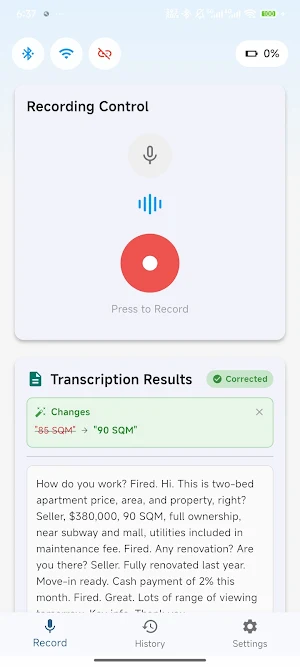
【Real-Time Audio Recording】
• One-tap recording with device hardware button
• Real-time audio streaming via BLE connection
• High-quality ADPCM audio codec (16kHz/8kHz)
• Automatic audio playback after recording
• Live waveform visualization
【Smart Device Connection】
• Auto-scan for nearby Hearit.ai devices
• Quick BLE pairing and stable connection
• Real-time signal strength (RSSI) display
• Battery level monitoring with charging status
• Device information reading (firmware, hardware version)
【Recording Management】
• Save and organize all your recordings
• Play, share, or delete recordings anytime
• Audio file management with timestamps
• Export recordings in standard audio format
【Voice-to-Text (ASR)】
• Real-time speech recognition
• Accurate transcription of your recordings
• Text correction and editing support
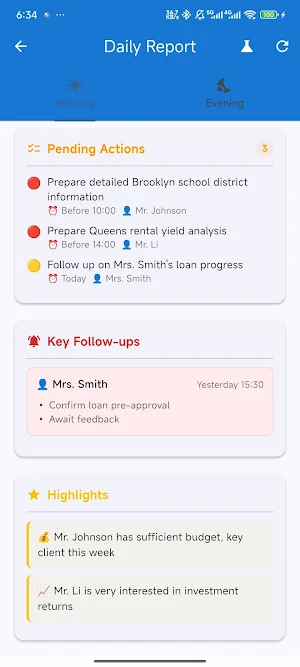
• Daily summary reports
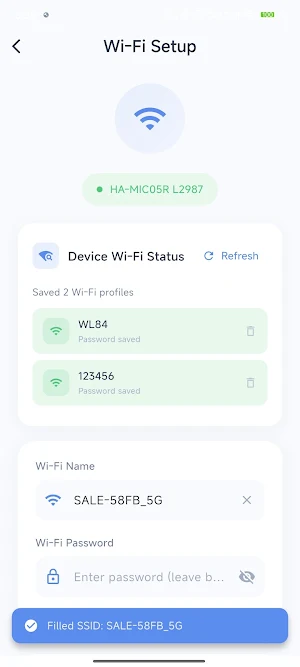
【WiFi Configuration】
• Easy WiFi setup for your Hearit.ai device
• Seamless network connectivity
• Real-time connection status
🔧 DEVICE COMPATIBILITY
This app works exclusively with Hearit.ai(HA-series) professional audio devices. A compatible Hearit.ai hardware device is required.
📋 PERMISSIONS EXPLAINED
• Bluetooth: Required for device scanning and connection
• Location: Required by Android for BLE scanning (no location data collected)
• Microphone: Required for voice recording features
• Storage: Required for saving audio recordings
🔒 PRIVACY & SECURITY
• No account registration required
• All recordings stored locally on your device
• No personal data collected or shared
• Audio data processed securely
📱 SYSTEM REQUIREMENTS
• Android 6.0 (API 23) or higher
• Bluetooth Low Energy (BLE) support
• Hearit.ai hardware device required
💡 HOW TO USE
1. Turn on your Hearit.ai device
2. Open the app and tap "Scan"
3. Select your device from the list
4. Once connected, press the device button to start recording
5. Release to stop - audio plays automatically!
Experience professional voice recording with Bizmic - Your reliable audio companion.
Similar Apps

QmetaRam AI: Quantum Assistant
Next-gen modular AI with advanced voice chat and independent thinking framework

Asthma Diary
Track asthma symptoms, triggers, and medication easily.

TimeRespect
Do you truly not have time for the person you want to be ?

Dashpivot
Site forms, photos and teams for construction and industrial project management.

sleepme: Path To Better Sleep
A multi-purpose platform that brings you closer to a great night’s sleep!
ZUMIMALL
ZUMIMALL works on Home Security System, providing a series of security products.
