

Let's Play Mahjong
Ryu Nakamura Games iPhoneiPadiPod touch
Let's Play Mahjong is a free Games app for iPhone and iPad by Ryu Nakamura. Requires iOS 26.0. Updated October 16, 2026.
- Price
- Free
- on the App Store
- Size
- 52 MB
- Age 4+
- Updated
- Oct 16
- 2026 · v1.3
Screenshots
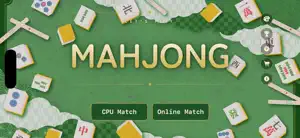
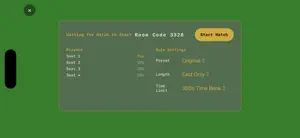
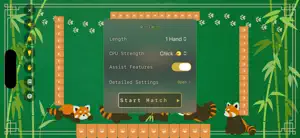
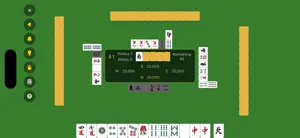
About Let's Play Mahjong
Start a match the moment you want to play, with rules and visuals you can customize down to the smallest detail. Whether you just learned the rules or you're an experienced player who cares about the fine print, play at your own pace. ■ Online Match (NEW) - Play real-time matches with friends or other players around the world - Just create a room and share the code to start playing right away - Empty seats are automatically filled by CPU, so you can play solo anytime - Choose rule presets (Original / Tenhou / M.League), match length, and time bank per room ■ CPU Matches - Easily choose the CPU difficulty - In detailed settings, set each seat's play style individually from 6 types, including aggressive caller, defensive closed-hand, and silent tenpai (damaten) - Choose unlimited thinking time, 10 seconds per discard, or a 300-second time bank — for both careful thinkers and fast players ■ Fully Customizable Rules - Rule presets based on Tenhou and the M.League, plus original rule sets - Fine-tune everything: open tanyao (kuitan), aka dora count, riichi/ippatsu/uradora/kandora, kuikae (swap-discard restriction), dealer repeat conditions, yakuman stacking, double yakuman, counted yakuman, pao (liability), round-up mangan, and more - Choose your match format: East-only, half game (hanchan), or single hand ■ Assist Features for Beginners - Discard assist and call assist help you decide without hesitation - Check the yaku quick-reference chart anytime - A how-to-play guide and on-screen assist display let you learn the rules while you play ■ Match History - Every match's results are recorded so you can review your own play style ■ Fully Customizable Appearance - Board backgrounds include original colors plus "animal" themes: red panda, cat, shiba inu, and fox - Tile designs now include a free illustrated Red Panda theme, for both tile faces and tile backs, alongside the classic color scheme - Adjust the size of your hand tiles and river tiles to your liking - Pick one BGM track for the whole match, or a different one for each hand from East 1 to South 4 - Additional content (in-app purchase) unlocks even more customization, including detailed color settings and a hand-drawn canvas theme Any opponent you like. Any rules you like. Any look you like. Make mahjong your own, with Let's Play Mahjong.
What’s new
Version 1.3 · Updated October 16, 2026
- Added Online Match! Play real-time matches with friends or other players. - Empty seats are automatically filled by CPU, so you can start a match solo anytime. - Added a new, free "Red Panda" tile design for both tile faces and backs. - You can now adjust the size of your own hand tiles and river tiles independently. - Reorganized the title screen menu for better clarity. - Other bug fixes and improvements.
App privacy
The developer, Ryu Nakamura, reported these privacy practices to Apple.
Data Not Linked to You
The following data, which may be collected but is not linked to your identity, may be used for the following purposes:
- Identifiers: Device ID
Used for: App Functionality
Alternatives to Let's Play Mahjong
Looking for apps like Let's Play Mahjong? Here are 6 similar apps on the App Store. The highest rated is Mahjong Walk: Riichi Trainer (5.0/5), and all 6 are free to download.
-
 鬼神AI麻雀
-
 Mahjong Score Drill
-
 Fire - 火起こしゲーム
-
 シンプル4人打ち麻雀
4.0
シンプル4人打ち麻雀
4.0
-
 SoloRiichi Mahjong
-
 Mahjong Walk: Riichi Trainer
5.0
Mahjong Walk: Riichi Trainer
5.0
| App | Rating | Price | Last updated | Compare |
|---|---|---|---|---|
| Let's Play Mahjong | – | Free | October 16, 2026 | |
| 鬼神AI麻雀 | – | Free | Oct 10, 2026 | Compare |
| Mahjong Score Drill | – | Free | Oct 5, 2026 | Compare |
| Fire - 火起こしゲーム | – | Free | Dec 12, 2023 | Compare |
| シンプル4人打ち麻雀 | 4.0 / 5 (1) | Free | Oct 10, 2026 | Compare |
| SoloRiichi Mahjong | – | Free | Oct 5, 2026 | Compare |
| Mahjong Walk: Riichi Trainer | 5.0 / 5 (1) | Free | Oct 5, 2026 | Compare |
Compare Let's Play Mahjong with the top alternatives: ratings, updates, ASO score and keyword gaps →