

DualPane
Wolfram Wacker Utilities iPhoneiPadiPod touch
DualPane is a free Utilities app for iPhone and iPad by Wolfram Wacker. Rated 5.0/5 from 2 ratings. Requires iOS 18.0. Updated September 26, 2026.
- Rating
- 5.0
- 2 ratings
- Price
- Free
- on the App Store
- Size
- 3 MB
- Age 9+
- Updated
- Sep 26
- 2026 · v5.3
Screenshots
About DualPane
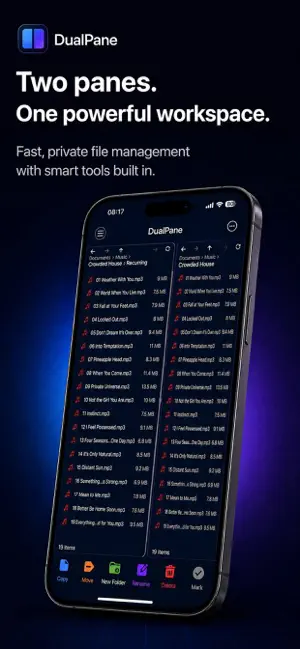
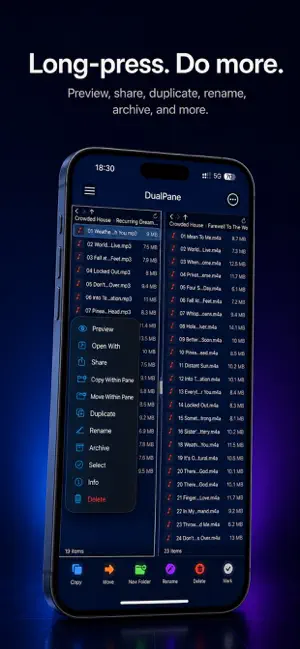
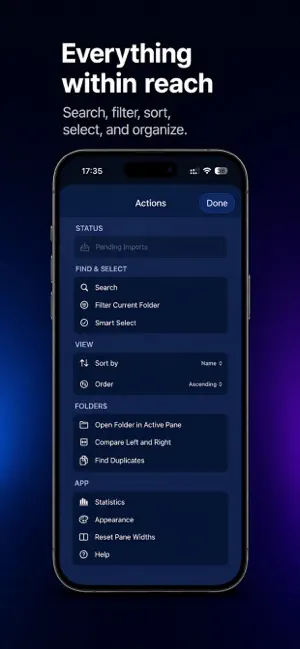
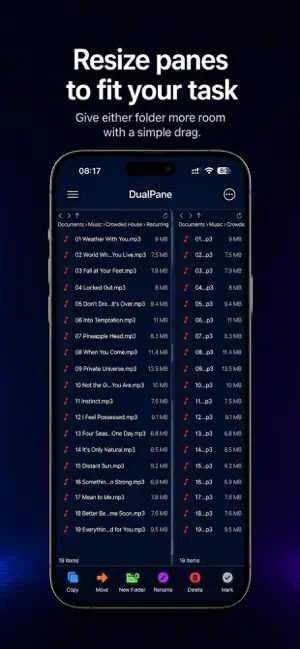
DualPane is a focused dual-pane file manager for iPhone, iPad and Apple Silicon Mac that makes everyday file work faster, clearer and more efficient. Browse two folders side by side, move and copy files between locations, organize documents, manage archives, preview text files and work with shared files from other apps. DualPane is designed for practical file workflows without clutter. Whether you are sorting downloads, organizing project folders, reviewing shared files or working with archives, DualPane gives you a faster way to manage files directly on your device. DualPane Pro unlocks advanced tools for power users, including batch rename, folder compare, duplicate finding, within-pane copy and move, archive browsing, text editing and more. Key Features: • Dual-Pane file management for faster file operations • Long-press any file or folder to access the context menu • Browse folders side by side, copy and move files between panes • Adjustable pane widths (drag the divider, reset in settings) • Open folders, navigate subfolders and manage files efficiently • Rename files and folders • Create new folders • Delete files and folders • Search within the active pane, including subfolders • Import files from other apps with the share extension • Review pending imports before saving them into a folder • Preview text-based files such as TXT and JSON • Share files to other apps, AirDrop, Print or Save to Files • Create and extract archives • Preview archive contents and handle unsupported files more clearly • Works on iPhone, iPad and Apple Silicon Mac DualPane Pro: • Batch rename multiple files • Advanced batch rename options • Compare left and right folders • Find duplicate files • Copy to another folder within the same pane • Move to another folder within the same pane • Browse archive contents before extraction • Extract only selected files from archive preview • Edit and save text-based files directly in the app • Share folders and selections as archive files • Customization for pane background colours • Customization for bottom toolbar icon styles • Saved Workspaces
What’s new
Version 5.3 · Updated September 26, 2026
We’ve streamlined file and folder context menus for quicker, clearer access to the actions you use most. Archive-related options are now neatly grouped and we’ve improved menu reliability on the latest versions of iOS.
App privacy
The developer, Wolfram Wacker, reported these privacy practices to Apple.
Data Not Collected
The developer does not collect any data from this app.
Alternatives to DualPane
Looking for apps like DualPane? Here are 6 similar apps on the App Store. The highest rated is Freestyle Calculator: Sci & FX (5.0/5), and 5 of the 6 are free to download.
-
 Photo to ZIP - Image to Zip
-
 LinkQR for Safari
-
 AudioWeaver: Audio Cleaner
4.3
AudioWeaver: Audio Cleaner
4.3
-
 Block Ads: Adblocker VPN
3.3
Block Ads: Adblocker VPN
3.3
-
 Convert Video to MP3: VidoTune
4.0
Convert Video to MP3: VidoTune
4.0
-
 Freestyle Calculator: Sci & FX
5.0
Freestyle Calculator: Sci & FX
5.0
| App | Rating | Price | Last updated | Compare |
|---|---|---|---|---|
| DualPane | 5.0 / 5 (2 ratings) | Free | September 26, 2026 | |
| Photo to ZIP - Image to Zip | – | Free | Aug 11, 2026 | Compare |
| LinkQR for Safari | – | 1.99 USD | May 5, 2026 | Compare |
| AudioWeaver: Audio Cleaner | 4.3 / 5 (6) | Free | Oct 12, 2026 | Compare |
| Block Ads: Adblocker VPN | 3.3 / 5 (3) | Free | Sep 30, 2026 | Compare |
| Convert Video to MP3: VidoTune | 4.0 / 5 (18) | Free | May 6, 2026 | Compare |
| Freestyle Calculator: Sci & FX | 5.0 / 5 (8) | Free | Oct 7, 2026 | Compare |
Compare DualPane with the top alternatives: ratings, updates, ASO score and keyword gaps →