

Store Commerce
Business
The Dynamics 365 Store Commerce application
- Rating
- 4.1
- 109 ratings
- Downloads
- 10K+
- on Google Play
- Price
- Free
- No in-app purchases
- Updated
- Aug 29
- 2026 · v9.58.26238.5
Screenshots


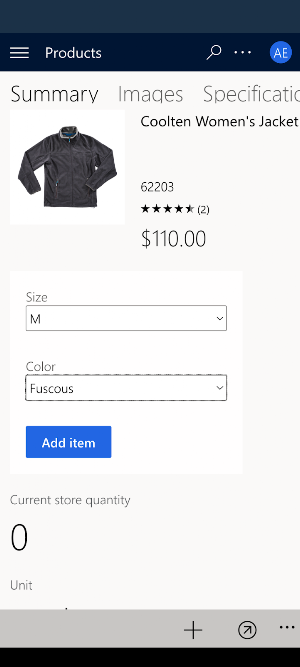
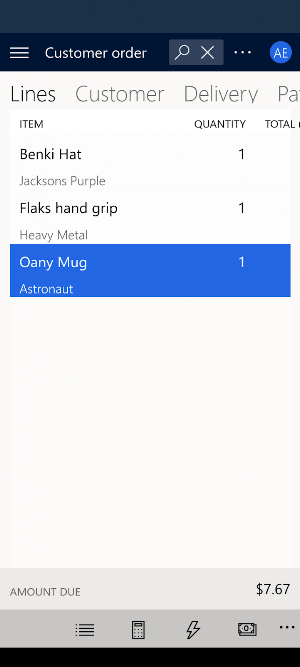
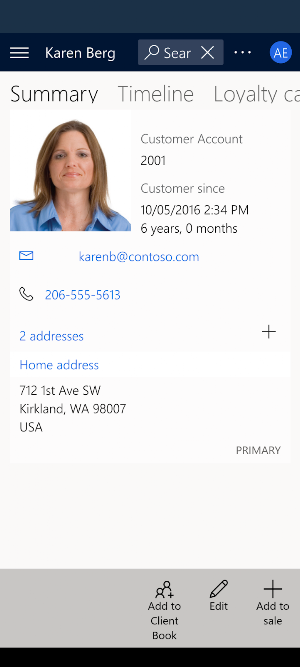
About Store Commerce
The Store Commerce app is the point of sale experience for Microsoft Dynamics 365 Commerce. It delivers feature-rich and comprehensive point of sale capabilities that helps retail sales associates, cashiers and managers to provide superior customer service. In addition to flexible and performant sales transaction workflows, the Store Commerce app supports important store operations such as assisted selling and clientelling, order processing and fulfillment, inventory management, shift and cash management, staff task management, omni-channel payment methods, role-based reports, and more. The Store Commerce app interfaces with peripheral devices such as payment terminals, receipt printers and cash drawers, and is highly customizable to meet the needs of a wide range of business requirements.
Dynamics 365 Commerce is a complete, yet composable, omnichannel solution that unifies back-office, in-store, call center and e-commerce experiences for consumers and business partners that personalize customer engagement, increase employee productivity and optimize commerce practices.
Prerequisites: Deploy a Commerce Scale Unit using the Dynamics Lifecycle Service portal before using the Store Commerce app. The app needs the CPOS URL to activate a register. Stores, workers and Devices need to be configured in Dynamics 365 Commerce back office. Detailed information and documentation can be found under the Dynamics 365 Commerce section of the Microsoft Learn site (https://learn.microsoft.com.)
By installing this app, you agree to the Terms at: https://go.microsoft.com/fwlink/?linkid=2207925
Dynamics 365 Commerce is a complete, yet composable, omnichannel solution that unifies back-office, in-store, call center and e-commerce experiences for consumers and business partners that personalize customer engagement, increase employee productivity and optimize commerce practices.
Prerequisites: Deploy a Commerce Scale Unit using the Dynamics Lifecycle Service portal before using the Store Commerce app. The app needs the CPOS URL to activate a register. Stores, workers and Devices need to be configured in Dynamics 365 Commerce back office. Detailed information and documentation can be found under the Dynamics 365 Commerce section of the Microsoft Learn site (https://learn.microsoft.com.)
By installing this app, you agree to the Terms at: https://go.microsoft.com/fwlink/?linkid=2207925
Frequently asked questions
What is the Store Commerce app?
The Store Commerce app is the point of sale experience for Microsoft Dynamics 365 Commerce. It provides comprehensive point of sale capabilities for retail sales associates, cashiers, and managers.
What features does the Store Commerce app offer?
The Store Commerce app offers flexible and performant sales transaction workflows, assisted selling and clientelling capabilities, order processing and fulfillment, inventory management, shift and cash management, staff task management, omni-channel payment methods, role-based reports, and more.
Does the Store Commerce app interface with peripheral devices?
Yes, the Store Commerce app interfaces with peripheral devices such as payment terminals, receipt printers, and cash drawers.
Can the Store Commerce app be customized?
Yes, the Store Commerce app is highly customizable to meet the needs of various business requirements.
What is Dynamics 365 Commerce?
Dynamics 365 Commerce is a complete omnichannel solution that unifies back-office, in-store, call center, and e-commerce experiences. It aims to personalize customer engagement, increase employee productivity, and optimize commerce practices.
What are the prerequisites for using the Store Commerce app?
Before using the Store Commerce app, you need to deploy a Commerce Scale Unit using the Dynamics Lifecycle Service portal. The app also requires the CPOS URL to activate a register. Additionally, stores, workers, and devices need to be configured in Dynamics 365 Commerce back office.
Where can I find more information and documentation about Dynamics 365 Commerce?
Detailed information and documentation can be found under the Dynamics 365 Commerce section of the Microsoft Learn site (https://learn.microsoft.com).
Are there any terms or agreements associated with installing the Store Commerce app?
Yes, by installing the app, you agree to the Terms specified at: https://go.microsoft.com/fwlink/?linkid=2207925.
Alternatives to Store Commerce
Looking for apps like Store Commerce? Here are 6 similar Android apps on Google Play. The highest rated is Microsoft Teams (4.7/5), and all 6 are free to download.
-
Microsoft Teams 4.7
-
Microsoft Authenticator 4.7
-
Office (Microsoft 365) 4.4
-
Xbox 4.5
-
Microsoft Outlook 4.5
-
Microsoft Edge: Web Browser 4.7
| App | Rating | Price | Installs | Last updated | Compare |
|---|---|---|---|---|---|
| Store Commerce | 4.1 / 5 | Free | 10,000+ | Aug 29, 2026 | |
| Microsoft Teams | 4.7 / 5 | Free | 500,000,000+ | Oct 22, 2026 | Compare |
| Microsoft Authenticator | 4.7 / 5 | Free | 100,000,000+ | – | Compare |
| Office (Microsoft 365) | 4.4 / 5 | Free | 1,000,000,000+ | Sep 18, 2026 | Compare |
| Xbox | 4.5 / 5 | Free | 100,000,000+ | Sep 14, 2026 | Compare |
| Microsoft Outlook | 4.5 / 5 | Free | 1,000,000,000+ | – | Compare |
| Microsoft Edge: Web Browser | 4.7 / 5 | Free | 100,000,000+ | Sep 28, 2026 | Compare |
Compare Store Commerce with the top alternatives: ratings, updates, ASO score and keyword gaps →
Similar apps on Google Play
- Microsoft Teams
- Microsoft Authenticator
- Office (Microsoft 365)
- Xbox
- Microsoft Outlook
- Microsoft Edge: Web Browser
- Microsoft Word: Edit Documents
- Intune Company Portal
- Microsoft Start: News & more
- Microsoft Excel: Spreadsheets
- Xbox Game Pass
- Link to Windows
- Microsoft OneDrive
- Microsoft PowerPoint
- Microsoft Bing - Search & earn
- Microsoft OneNote: Save Notes
- Microsoft To Do: Lists & Tasks
- Microsoft Defender
- Microsoft Math Solver
- Microsoft Translator
- Microsoft Outlook Lite
- Xbox Game Pass (Beta)
- Microsoft Family Safety
- Microsoft Solitaire Collection
- Microsoft Lens - PDF Scanner
- Remote Desktop
- Microsoft Launcher
- Microsoft SharePoint
- Xbox beta
- Xbox Family Settings
- Power Apps
- Microsoft Kaizala
- Microsoft Power BI
- Microsoft Planner
- Mahjong by Microsoft
- Microsoft 365 Admin
- Microsoft Whiteboard
- Skype for Business for Android
- Microsoft Sudoku
- Microsoft Azure
- Wordament® by Microsoft
- SMS Organizer
- Microsoft Lists
- Microsoft Intune
- Azure Information Protection
- MSN Weather - Forecast & Maps
- Halo Waypoint
- Bing Wallpapers
- As Dusk Falls Companion App
- Power Automate
- MSN Money- Stock Quotes & News
- Microsoft Surface
- Field Service (Dynamics 365)
- Microsoft Stream: Videos
- Microsoft Edge Beta
- Bing places for business
- Dynamics 365 for Phones
- Microsoft Bookings
- Microsoft Edge Dev
- Microsoft Edge Canary
- TakeLessons Live
- Microsoft Advertising
- Sketch 360
- Dynamics 365 Business Central
- Remote Desktop 8
- Dynamics 365 Sales
- IoT Plug and Play
- Work Folders
- Managed Home Screen
- Warehouse Management
- Microsoft Finance and Operatio
- TakeLessons for Teachers
- Dynamics NAV
- Conference Management Toolkit
- Field Service Mobile
- Dynamics 365 Remote Assist
- Dual Screen Experience Example
- Remote Help (Alpha)
- Engkoo
- Store Commerce
- Dynamics 365 for Tablets
- Lync 2010
- Path Guide
- Dynamics 365 Project Timesheet
- Alumni Relay - Engage & Grow
- Microsoft Surface OEMConfig