Autonion: Android Automation
Smart automation tool. Build visual flows, cross-device macros & system triggers
About Autonion: Android Automation
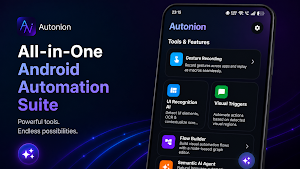
Autonion (Automation Companion) is a powerful, privacy-first automation tool. Built with an "Offline-First, Local-Enhanced" architecture, Autonion empowers you to automate repetitive tasks on your Android device and PC—without needing root access.
Create visual workflows, record custom gestures, connect system triggers, and interact through natural language assistance to build custom macros tailored to your routine.
✨ Core Features
🌐 Cross-Device Ecosystem & PC Control
Connect your digital workflow seamlessly across devices:
• Desktop Integration: Use your phone to trigger custom workflows that run directly on your PC or browser via the companion desktop app.
• Local Network Sync: Securely sync and trigger automations across your Android Phone, Tablet, and Desktop over your local Wi-Fi.
• Direct LAN Connection: All communication occurs locally on your network with no intermediate cloud servers, ensuring fast response times and privacy.
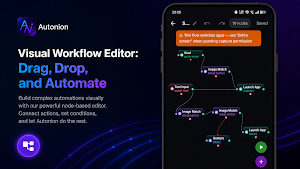
🔀 Visual Flow Builder
Create custom automations using an intuitive, drag-and-drop node editor. Connect triggers, conditions, and actions visually to build structured workflows that interact with your device.
💬 Omni-Chat Assistant
Interact with your automations using natural language. Query app documentation, trigger user-configured shortcuts, or connect your preferred local/cloud models for smart assistance.
🎮 Gesture Recording & Playback
No programming required. Easily record your screen taps, swipes, scrolls, and text inputs, then save them as repeatable macros that you can trigger anytime.
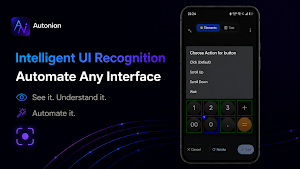
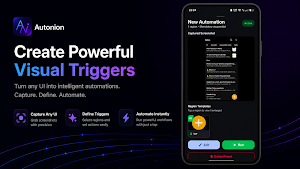
👁️ Screen Understanding & Visual Triggers
Use on-device image matching to detect specific visual elements on screen and trigger your configured macro flows automatically when a designated button or icon appears.
⚡ Smart System Triggers
Automate device actions based on real-world context:
• Location: Trigger actions when entering or exiting specific geofenced areas.
• Time & Schedules: Run scheduled routines at specified times.
• Battery: Respond to charging status or battery level changes.
• Wi-Fi: Run workflows when connecting to specific Wi-Fi networks.
• App Launch: Start configured macros when specific apps are opened.
🔒 Privacy-First & Offline By Default
Your data stays on your device. Core features like screen recognition, UI parsing, and gesture playback run entirely on-device. No data is shared with external servers unless you explicitly configure a third-party AI provider.
🛠️ Built-in Automation Debugger
Inspect and refine your workflows with a real-time log inspector that displays step-by-step execution details.
Why Choose Autonion?
• No Root Required
• Free and Open Source
• Modular action system (volume, brightness, connectivity, system toggles)
• No ads or tracking
Take control of your routines, save time, and build streamlined workflows with Autonion!
Note regarding permissions:
Autonion uses the Android AccessibilityService API strictly to execute user-recorded gestures and user-configured flow actions. It only interacts with the screen when you explicitly run a macro or automation flow. Autonion does not collect, store, or share any personal data through the Accessibility Service.
Similar Apps

Quikshort: Shortcut Creator
Create custom home screen shortcuts and quick setting tiles for anything.

Spatial Touch™ - Air Gestures
Control your phone without touching the screen!
Parental Control - Kroha
Sound around the child, Limit screen time, Kids mode with Parental control app.

Screen Recorder Unlimited
Simple & Lightweight Screen Recorder app, no watermark, no root, no limits
OneCalc: All-in-one Calculator
Calculator with basic & scientific functions + unit converter

Building Tools
Tools™ helps prevent costly mistakes and maximise efficiency
