About Ubu UCCW Theme
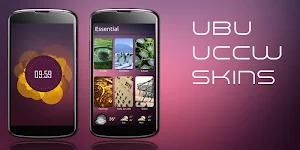
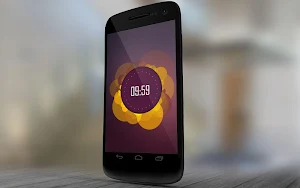
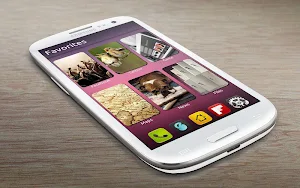
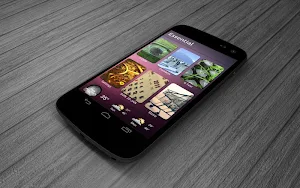
This is a UCCW skins pack with which you can theme your device to look like Ubuntu phone OS. There are several hi-quality app cards with shadow effect and there's a beautiful clock. Plus header skins to categorize each homescreen.
== FEATURES ==
* This Ubu theme pack contains 3 sets of skins + a mind blowing clock. The sets are
** Favorite. Contains a header skin + 6 app skins - Game, Maps, News, Files and 2 more.
** Essentials. Contains a header skin + 7 app skins - Calls, Contacts, Text, Settings, Calendar, Weather and one more.
** Media. Contains a header skin + 6 app skins - Music, Gallery, Browser, Camera, Mails and one more.
* Plus a superbly beautiful clock.
* Assign the apps you want to each of the hotspots. Total of 21 hotspots.
* You can change color of the text and hour format of the clock too.
* There is an alternate version to this theme available. Check in "More from developer" below.
== INSTRUCTIONS ==
To use this skin, you have to install, apply and optionally edit/assign hotspots to the skin.
Install -
* After downloading the skin app from play store, launch it.
* Tap "Install Skin" button in the app.
* Tap "Ok" when it asks you whether you want to replace app. This step is replacing the skin installer with the actual skin. OR
* If you are using a KitKat device, it'll ask whether you want to update the existing app.
* Tap "Install". When that finishes, tap "Done". Skin is now installed.
Apply -
* You must have latest version of Ultimate custom widget (UCCW) installed. http://goo.gl/eDQjG
* Recommendation - Use Apex or Nova launcher. Grid size 8x6. Horizontal and Vertical margin = None. Dock as overlay and hidden.
* Place a UCCW widget of 2x2 size on the homescreen. You can do so by dragging the widget from app drawer or by long pressing homescreen to pull up widget menu.
* This will open the skins list. Skins installed from play store will show up ONLY HERE.
* Tap on the skin you want to apply and it'll be applied to the widget.
* Repeat the steps to place any number of widgets.
* Long press on the widgets and resize them. Header skins need to be resized to 6x1 and the app skins need to be resized to 2x3.
Edit -
* After applying the skin as mentioned above, launch UCCW app itself. Tap Menu, tap "hotspot mode" and tap 'OFF'. UCCW will exit.
* Now tap anywhere on the uccw widget. It'll open in uccw edit window.
* Scroll through the components in the bottom half of the screen. Assign apps to hotspots in this window. This IS a MUST.
* You can change color, format etc too (optional) in this window.
* When done, no need to save. That won't work. Simply tap Menu, tap "hotspot mode" and tap 'ON'. UCCW will exit. Your changes will now be applied to the widget.
== TIPS / TROUBLESHOOT ==
* If the "Install" step fails; go to Android settings > Security and make sure "Unknown sources" is enabled. Reason explained here - http://wizardworkapps.blogspot.com/2013/12/ultimate-custom-widgets-uccw-tutorial.html
* To change temperature unit between Celsius and Fahrenheit -> Launch UCCW app itself. Tap Menu, tap settings. Here, if "Celsius" is marked, temperature will display in Celsius. If unmarked, Fahrenheit.
* If weather info is not displayed/updated, Launch UCCW app itself. Tap Menu, tap settings, tap location. Make sure "Auto location" is checked and that the third row is correctly showing your location.
* You can also tap Menu, tap settings, tap 'weather provider' and change the selected provider.
Mail me if you have ANY issues.
Similar Apps

Ubu2 UCCW Theme
This is alternate version (version 2) of a UCCW skins pack with...

Ubu UCCW Theme
This is a UCCW skins pack with which you can theme your...
Wow UCCW Skins
Rounded edges, subtle colors, sleek fonts - screen-full of 'em. Pack of...
Trays UCCW Skin
I'm fascinated with different shapes coming together, I guess. This is my...

Texty UCCW Skin
Love minimal text only clock designs? Who says they need to be...
Stack UCCW Skin
Minimal skin for UCCW widgets.== FEATURES ==* Pack of two skins.* First...