Dashboard UCCW Skin
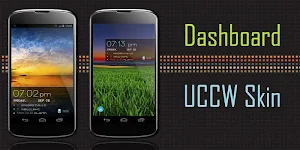
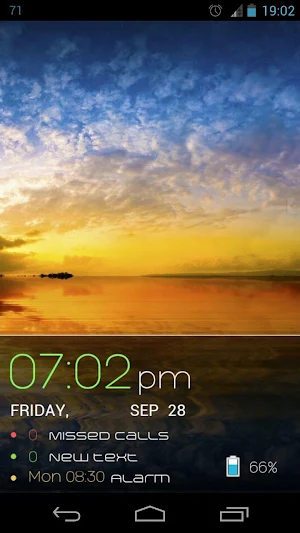
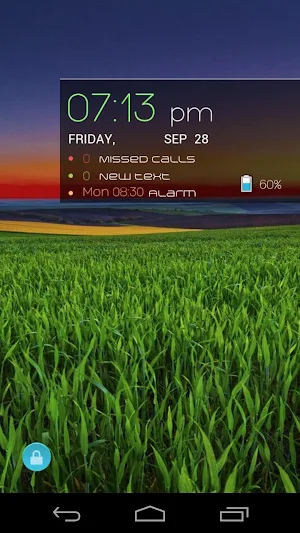
Time, date, battery, call/text count, alarm - everything in a docked dashboard.
About Dashboard UCCW Skin
If you are looking for a bunch of important information neatly organized on a board, then I'm sure you'd love this skin. Slap this UCCW widget skin at the bottom of your screen as a 5x3 widget or near top half of the screen as 4x2; it simply looks beautiful anyway you slice it.
== FEATURES ==
The skin shows / contains the following -
* Clock in big, beautifully thin font.
* Current date
* Missed calls count, new text count and the next alarm time.
* Remaining battery percentage.
* There are several hotspots in the skin. You can assign your favorite apps to them.
* You can also change the colors of the different text elements.
== INSTRUCTIONS ==
To use this skin, you have to install, apply and optionally edit/assign hotspots to the skin.
Install -
* After downloading the skin app from play store, launch it.
* Tap "Install Skin" button in the app.
* Tap "Ok" when it asks you whether you want to replace app. This step is replacing the skin installer with the actual skin. OR
* If you are using a KitKat device, it'll ask whether you want to update the existing app.
* Tap "Install". When that finishes, tap "Done". Skin is now installed.
Apply -
* You must have latest version of Ultimate custom widget (UCCW) installed. http://goo.gl/eDQjG
* Place a UCCW widget of 4x3 size on the homescreen. You can do so by dragging the widget from app drawer or by long pressing homescreen to pull up widget menu.
* This will open the skins list. Skins installed from play store will show up ONLY HERE.
* Tap on the skin you want to apply and it'll be applied to the widget.
Edit -
* After applying the skin as mentioned above, launch UCCW app itself. Tap Menu, tap "hotspot mode" and tap 'OFF'. UCCW will exit.
* Now tap anywhere on the uccw widget. It'll open in uccw edit window.
* Scroll through the components in the bottom half of the screen. Assign apps to hotspots in this window. This IS a MUST.
* You can change color, format etc too (optional) in this window.
* When done, no need to save. That won't work. Simply tap Menu, tap "hotspot mode" and tap 'ON'. UCCW will exit. Your changes will now be applied to the widget.
== TIPS / TROUBLESHOOT ==
* If the "Install" step fails; go to Android settings > Security and make sure "Unknown sources" is enabled. Reason explained here - http://wizardworkapps.blogspot.com/2013/12/ultimate-custom-widgets-uccw-tutorial.html
Mail me if you have ANY issues.
Similar Apps

Ubu2 UCCW Theme
This is alternate version (version 2) of a UCCW skins pack with...

Ubu UCCW Theme
This is a UCCW skins pack with which you can theme your...
Wow UCCW Skins
Rounded edges, subtle colors, sleek fonts - screen-full of 'em. Pack of...
Trays UCCW Skin
I'm fascinated with different shapes coming together, I guess. This is my...

Texty UCCW Skin
Love minimal text only clock designs? Who says they need to be...
Stack UCCW Skin
Minimal skin for UCCW widgets.== FEATURES ==* Pack of two skins.* First...