Loknot: Secure Notes & Writing
Private minimalist notepad: focus tools, Markdown, app lock. Works offline.
About Loknot: Secure Notes & Writing
Loknot is a private, minimalist notes app and notepad for Android, built for secure note taking and focused writing. Capture ideas, drafts, checklists, and knowledge offline with Markdown and powerful organization tools.
MINIMALIST DESIGN & FUNCTIONALITY
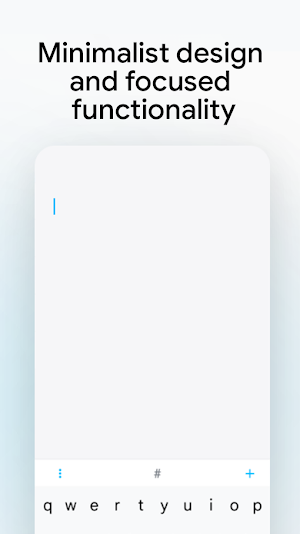
Loknot is designed as a clean, minimalist notepad that keeps your writing front and center. Switch between screens with just a couple of swipes. Mode icons are neatly tucked away in a smart panel, ensuring your workspace stays completely distraction-free. The moment you open Loknot, you're dropped right into the editor—ready to type. No extra taps are needed to save your work; everything is saved automatically.
DISTRACTION-FREE FOCUS MODE
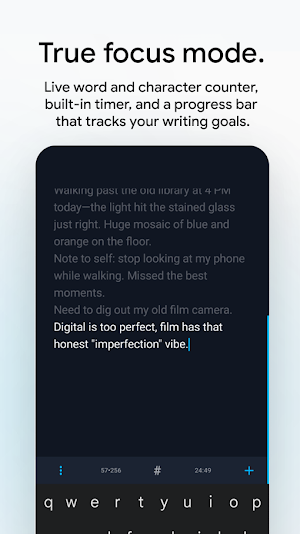
Get in the zone. Whenever you start typing, the top status bar smoothly fades away. You can also enable **Typewriter Mode**, which keeps your current line highlighted and perfectly centered on the screen so you never lose your place. Turn Loknot into a distraction-free writing app whenever you need to focus.
TOOLS FOR PRODUCTIVE WRITING
Use focused writing tools to track progress and build a consistent writing habit. Track your progress with a live word/character counter and a timer, both easily accessible on the smart panel. Need a push? Set custom typing goals. As you type, a subtle blue progress bar rises on the right side of the screen, turns a satisfying green the moment you hit your target.
PRIVATE & SECURE NOTES
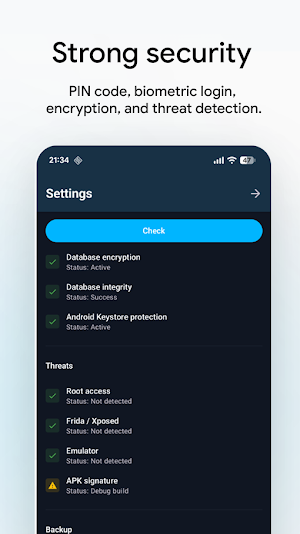
Loknot utilizes state-of-the-art encryption and protection methods to keep your data safe. Keep your private notes protected with encryption, PIN or biometric app lock. Encrypt your backups with a password, block screenshots, configure auto-lock, and even enable tamper-detection mode. For ultimate peace of mind, run built-in security and encryption diagnostics anytime directly from your Settings.
MARKDOWN, CHECKLISTS, WIKI & BUILT-IN CALCULATOR
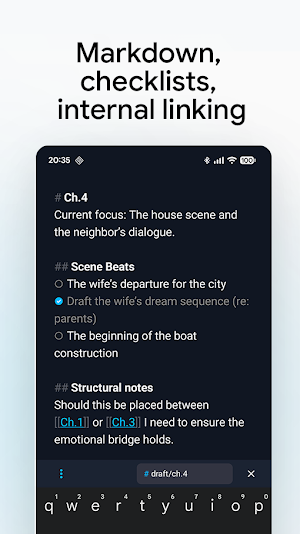
- Markdown Notes: Write, save, and preview Markdown notes in .md format.
- Checklists: Build interactive to-do lists. Checked items automatically get a checkmark and fade out to keep your focus on pending tasks.
- Wiki Links & Backlinks: Use a powerful system of internal links and backlinks. Link to existing notes or quickly jump to notes that reference the one you’re currently working on.
- Native Calculator: Doing quick math? Just type an equation directly into the editor (e.g., `2-5+6*7=`) and the answer will appear automatically.
SMART ORGANIZATION & AUTOMATION
Keep your digital workspace tidy with folders, nested (tree) tags, and the ability to pin your most important folders, tags, and notes. Tags are incredibly easy to add via the smart editor panel.
- Auto-Sorting: Set up rules to automatically route notes to specific folders based on keywords. For example, if you type the word "creative," the note instantly moves to your designated creative folder.
- Auto-Archive & Cleanup: Set customizable timers to automatically move older notes to the Auto-Archive folder, and configure schedules to automatically clear out your Archive and Trash.
SEAMLESS EXPORT & SHARING
Export any note directly from the editor as a .txt, .md, or .html file. Share notes and text through any compatible app. You can also bulk-select multiple saved notes and instantly merge them into a single `.txt` file.
CUSTOMIZATION
Make Loknot your own. Toggle note titles on or off, and customize the font style and size for both headings and body text. Choose between sleek Light and Dark themes. Loknot proudly supports over 30 languages.
BACKUP & SYNC
Loknot works offline, so your notes remain available without an internet connection. Never lose your work. Create password-encrypted local backups directly on your device. For cloud access, enable Google Drive sync—your notes will be securely stored in a hidden folder in your Drive, allowing you to seamlessly sync your workspace across all your devices.
Loknot: Secure Notes & Writing details
Loknot: Secure Notes & Writing is a free Productivity app for Android with 50+ installs on Google Play. It was released on August 21, 2026 and last updated on August 21, 2026. It's developed by Artovo. It requires Android 9 or later.
- Category
- Productivity
- Installs
- 50+
- Price
- Free
- In-app purchases
- No
- Ads
- No ads
- Current version
- 1.0.1-free
- Requires Android
- 9
- Content rating
- Everyone
- Released
- August 21, 2026
- Last updated
- August 21, 2026
- Developer
- Artovo
Alternatives to Loknot: Secure Notes & Writing
Looking for apps like Loknot: Secure Notes & Writing? Here are 6 similar Android apps on Google Play. The highest rated is Hedy: AI Meeting Coach & Notes (4.8/5), and all 6 are free to download.
Nested Folder Notes - Folino
Unlimited Subfolders and Hierarchy
LiveIt Journal, Planner, Notes
Life organizer & productivity: journal, planner, notes, to do, & bullet journal.

monday.com - AI Work Platform
Outpace Everyone With The Best AI Work App

DayDew - Daily Journal, Diary
Daily journal and diary app for notes, memories, mood tracking, habits, and more

Memento Database
Organize anything: Flexible database for personal and business data tracking

Hedy: AI Meeting Coach & Notes
AI note taker with live transcripts, meeting summaries & live coaching
| App | Rating | Price | Installs |
|---|---|---|---|
| Loknot: Secure Notes & Writing | – | Free | 50+ |
| Nested Folder Notes - Folino | 4.2 / 5 | Free | 50+ |
| LiveIt Journal, Planner, Notes | 4.4 / 5 | Free | 500,000+ |
| monday.com - AI Work Platform | 4.7 / 5 | Free | 500,000+ |
| DayDew - Daily Journal, Diary | 3.4 / 5 | Free | 500+ |
| Memento Database | 4.4 / 5 | Free | 1,000,000+ |
| Hedy: AI Meeting Coach & Notes | 4.8 / 5 | Free | 1,000+ |
