About TeamLogger
TeamLogger Mobile helps employees track project and task time using an existing TeamLogger organization account.
Transparent employee screenshot monitoring
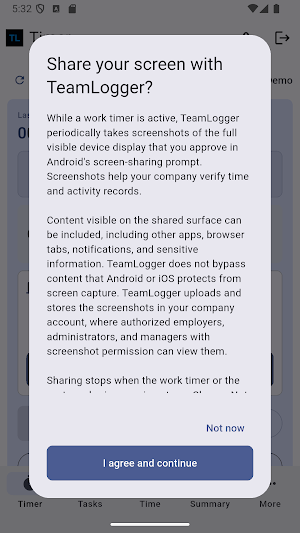
TeamLogger is an enterprise workforce time-tracking and employee-monitoring service for organizations and their employees. When an employee explicitly starts a monitored work session, accepts TeamLogger's disclosure, and approves Android screen capture, the app may periodically capture and upload screenshots of the full visible device display to the employee's TeamLogger organization. Screenshots can include content visible in other apps, browser tabs, and notifications during the monitored session. TeamLogger does not bypass content that Android protects from screen capture.
A persistent TeamLogger notification and identifiable icon remain visible while Android screen capture is active. The employee can stop sharing from TeamLogger or the notification. A stopped or interrupted capture requires a new user-approved screen-capture session.
Time tracking
- Choose assigned projects and tasks.
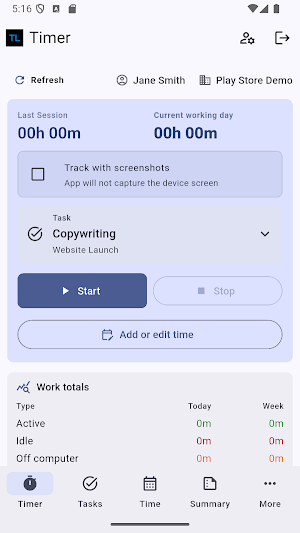
- Start, stop, switch tasks, punch out, and add required work notes.
- Keep eligible timer work queued during brief disconnections and sync when the network returns.
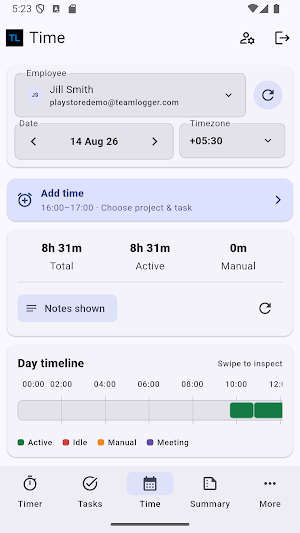
- Review current timer, daily totals, sync status, and screenshot-upload status.
- Eligible non-client accounts can administer projects and their tasks from the separate online-only More > Projects workspace. Task creation from the Timer flow remains available offline.
Authorized team workflows
- Permission-gated employer and manager accounts can review recent monitoring cards and employee screenshot history by date.
- Pending manual-time entries are grouped by employee and date.
- Authorized approvers can approve all pending entries, one employee's pending entries, one employee-day group, or an individual entry.
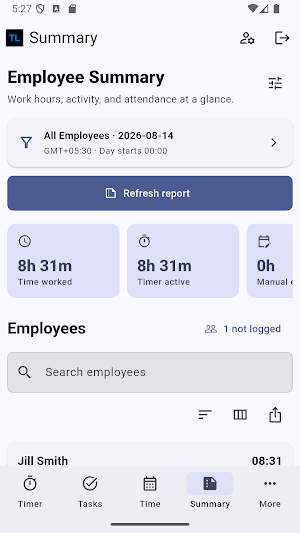
- Eligible accounts can view Employee Summary and supported leave workflows.
Privacy and support
TeamLogger Mobile does not silently monitor employees. Android screen capture requires a TeamLogger disclosure, an affirmative employee choice, Android's screen-capture consent, and a visible ongoing notification. The mobile app does not collect keyboard or pointer activity, active-window names, website history, webcam images, Contacts, SMS, call logs, or device location in this release, and it does not use the microphone or record audio.
Privacy Policy and Request a feature are available to every authenticated user from the More menu. Support appears when company settings and the signed-in role permit it, and is available at [email protected].
TeamLogger Mobile is intended for employees with an existing TeamLogger organization account. It does not create accounts or sell subscriptions in the app. Use the TeamLogger desktop tracker for desktop-only collection features and TrakLogger for field staff or location-based tracking.
TeamLogger details
TeamLogger is a free Business app for Android with 100+ installs on Google Play. It was released on August 15, 2026 and last updated on September 10, 2026. It's developed by Build80. It requires Android 7.0 or later.
- Category
- Business
- Installs
- 100+
- Price
- Free
- In-app purchases
- No
- Ads
- No ads
- Current version
- 1.0.1
- Requires Android
- 7.0
- Content rating
- Everyone
- Released
- August 15, 2026
- Last updated
- September 10, 2026
- Developer
- Build80
What’s new in TeamLogger
More responsive Start and Stop controls. Improved saving, recovery and synchronization of tracked work. Clearer mobile work-session indicators in screenshot history, with interaction activity shown as unavailable. Improved leave attachment selection.
Version 1.0.1 · Updated September 10, 2026
Alternatives to TeamLogger
Looking for apps like TeamLogger? Here are 6 similar Android apps on Google Play. The highest rated is Smartsheet: Projects & Teams (4.8/5), and all 6 are free to download.

myReach - AI Assistant
AI for Search and discovery

Pushbullet: SMS on PC and more
Send text messages and see your notifications while on your computer

Quo (formerly OpenPhone)
The phone system for better customer relationships

Smartsheet: Projects & Teams
Manage intelligent AI-powered projects to boost collaboration and productivity.

Onoff Numbers
Your Second Number With An App!

MoreApp Forms
MoreApp makes your life easier.
| App | Rating | Price | Installs | Last updated |
|---|---|---|---|---|
| TeamLogger | – | Free | 100+ | Sep 10, 2026 |
| myReach - AI Assistant | 4.0 / 5 | Free | 100+ | – |
| Pushbullet: SMS on PC and more | 4.2 / 5 | Free | 1,000,000+ | – |
| Quo (formerly OpenPhone) | 4.6 / 5 | Free | 50,000+ | – |
| Smartsheet: Projects & Teams | 4.8 / 5 | Free | 500,000+ | – |
| Onoff Numbers | 3.6 / 5 | Free | 1,000,000+ | – |
| MoreApp Forms | 4.3 / 5 | Free | 500,000+ | Sep 8, 2026 |
